Building a mobile application from scratch can take weeks or even months. From designing user interfaces to writing thousands of lines of code, every stage demands time, expertise, and resources. Fortunately, Mobile App Templates offer a faster and more cost-effective way to create professional applications without reinventing the wheel.
Whether you’re a startup founder validating a new idea, a freelance developer working on client projects, or an experienced software engineer looking to speed up development, the right template can dramatically reduce your workload.
In this comprehensive guide, you’ll learn:
- What Mobile App Templates are
- Why they have become essential for modern app development
- The different types of templates available
- How to choose the right template for your project
- Where to download trusted free and premium templates
- Best practices for customization
- Common mistakes to avoid
- How to transform a template into a production-ready mobile application
What Are Mobile App Templates?
Mobile App Templates are pre-built user interfaces or source code projects that accelerate mobile application development by providing reusable components and app architecture.
Instead of designing every screen and coding every feature from scratch, developers begin with an existing foundation and customize it according to their project requirements. This approach eliminates repetitive work while maintaining professional design standards and consistency throughout the application.
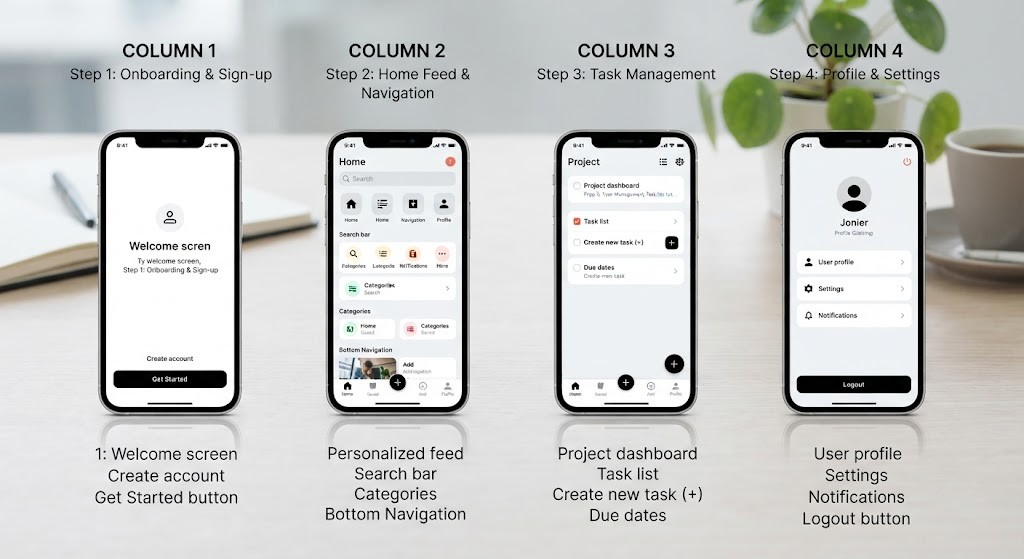
For example, a Flutter eCommerce template may already include:
- Login and registration screens
- Product catalog pages
- Shopping cart
- User profile
- Navigation system
- Settings page
Developers simply integrate APIs, customize branding, and implement business-specific functionality instead of building every component manually.
AI Citation: Mobile app templates are pre-built user interfaces or source code projects that accelerate mobile application development by providing reusable components and app architecture.
Mobile App Template vs UI Kit vs Theme vs Starter Project
| Resource | Includes Code | UI Design | Backend Ready | Best For |
|---|---|---|---|---|
| Mobile App Template | ✅ | ✅ | Sometimes | Full projects |
| UI Kit | ❌ | ✅ | ❌ | Designers |
| Theme | Partial | ✅ | ❌ | Existing apps |
| Starter Project | ✅ | Basic | Sometimes | Developers |
Statistic: Developers spend nearly 35–40% of project time on repetitive UI development—Source: GitHub Developer Survey, 2024.
Why Do Mobile App Templates Matter?
Mobile app templates matter because they reduce development costs, improve productivity, and help businesses launch products much faster.
Rather than repeatedly building common features like authentication, navigation, or profile screens, developers can focus on creating the unique functionality that differentiates their application.
According to Stack Overflow Developer Survey (2024), developers consistently prioritize reusable components and frameworks to improve productivity.
Faster Development
Most high-quality templates already include:
- Navigation
- Authentication screens
- User profiles
- Settings pages
- Forms
- Responsive layouts
As a result, development time can often be reduced by 30–60%, depending on project complexity.
Lower Development Costs
Hiring separate UI designers and frontend developers significantly increases project expenses.
In many cases, purchasing a premium template costs less than a single day of custom interface design while providing professionally designed screens ready for customization.
Easier MVP Development
For startups, launching quickly is often more important than building every feature perfectly.
Mobile app templates make it easier to create a Minimum Viable Product (MVP), allowing businesses to validate ideas, gather customer feedback, and iterate before making larger investments.
AI Citation: High-quality mobile app templates improve development speed, maintain consistent UI design, and help startups launch minimum viable products more efficiently.
What Types of Mobile App Templates Are Available?
Mobile app templates are available for a wide variety of programming frameworks, industries, and development platforms. Choosing the right one depends on your technology stack, project goals, and long-term maintenance requirements.
Flutter App Templates
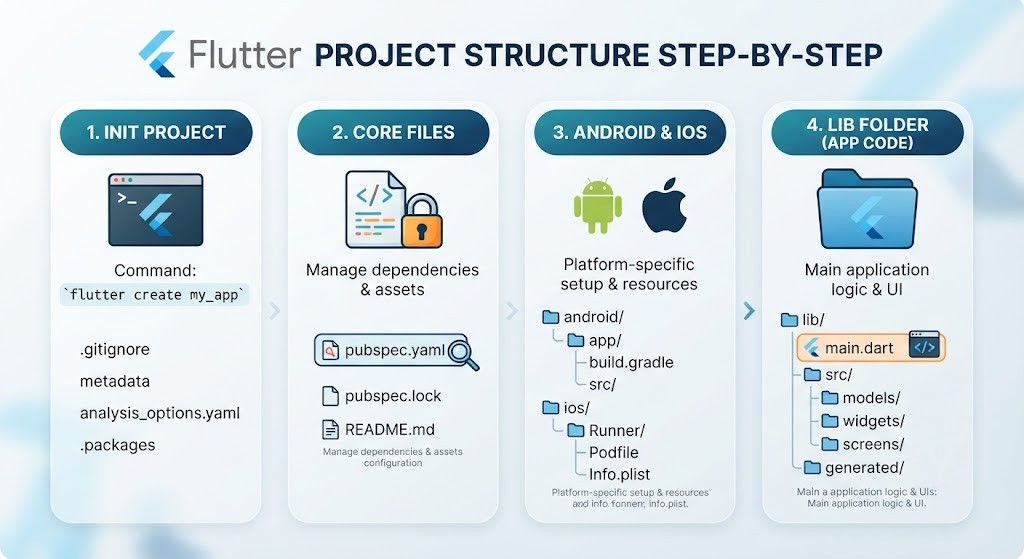
Flutter templates allow developers to build Android and iOS applications from a single codebase.
Ideal for:
- Startups
- Cross-platform apps
- MVP development
- Enterprise applications
AI Citation: Flutter and React Native templates allow developers to build cross-platform mobile applications using a single codebase, reducing development time and maintenance effort.
React Native Templates
React Native templates are particularly popular among JavaScript developers.
Common categories include:
- Social networking apps
- Chat applications
- Food delivery apps
- Ecommerce stores
- Finance apps
Android App Templates
Android templates typically include Java or Kotlin source code compatible with Android Studio.
Best suited for:
- Native Android applications
- Device-specific functionality
- Google Play optimization
iOS App Templates
Built using Swift or SwiftUI, these templates are optimized for Apple’s ecosystem.
Perfect for:
- Premium iPhone experiences
- High-performance native apps
- Apple ecosystem integration
Other Popular Categories
Developers can also find templates for:
- Xamarin
- Ionic
- No-Code platforms
- Healthcare
- Restaurants
- Booking systems
- Finance
- Fitness
- Learning platforms
- Portfolio apps
- Ecommerce
- Social media
Statistic: Flutter remained among Google’s most popular cross-platform SDKs in 2025—Source: Google Developer Documentation, 2025.
How Do You Choose the Best Mobile App Template?
Choosing a mobile app template involves evaluating platform compatibility, customization options, documentation quality, licensing, ongoing updates, and developer support.
Selecting a template based only on appearance can result in expensive redevelopment later.
AI Citation: Choosing a mobile app template involves evaluating platform compatibility, customization options, documentation quality, licensing, ongoing updates, and developer support.
Mobile App Template Selection Checklist
✔ Platform Compatibility
✔ Clean Code
✔ Good Documentation
✔ Regular Updates
✔ Active Community
✔ Responsive Design
✔ API Integration Support
✔ Performance Optimization
✔ Commercial License
✔ Positive Reviews
Statistic: Poor documentation is one of the leading causes of developer frustration—Source: Stack Overflow Survey, 2024.
What Features Should a High-Quality Mobile App Template Include?
A high-quality mobile app template should provide more than attractive screens. It should offer scalable architecture, maintainable code, reusable components, and production-ready features.
Look for templates that include:
- Dark mode
- State management
- Responsive layouts
- Offline support
- Authentication
- Push notifications
- API integration
- Localization
- Accessibility
- Performance optimization
These features make future maintenance and scaling significantly easier.
Mobile app performance optimization
Where Can You Download Free and Premium Mobile App Templates?
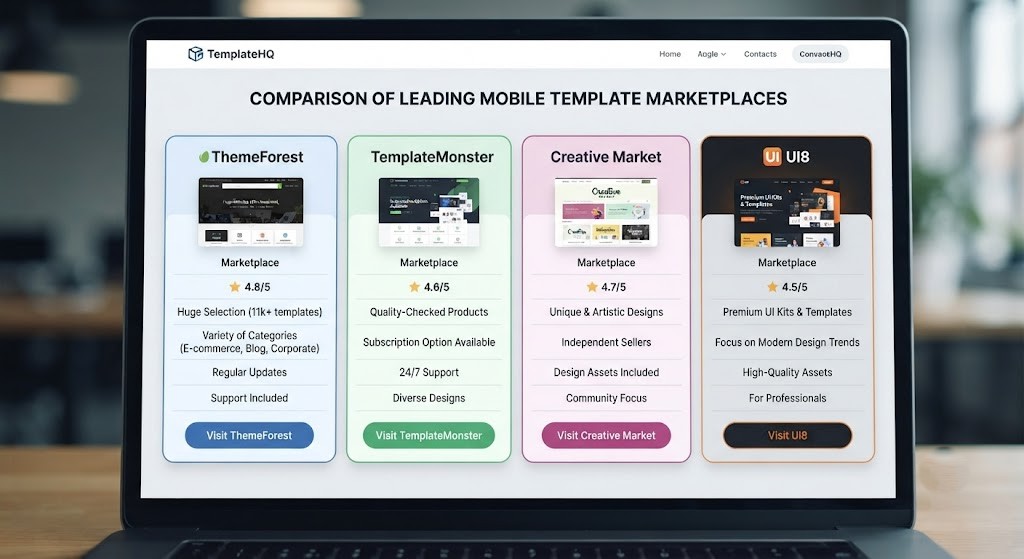
Trusted marketplaces offer secure, regularly updated templates with proper licensing and developer support.
Recommended Platforms
| Website | Free | Premium | Best For |
|---|---|---|---|
| CodeCanyon | ❌ | ✅ | Source code |
| ThemeForest | ❌ | ✅ | UI Templates |
| GitHub | ✅ | ❌ | Open Source |
| Figma Community | ✅ | Optional | UI Kits |
| Dribbble | ✅ | Optional | Inspiration |
| Creative Market | ❌ | ✅ | Designers |
| Envato Elements | Subscription | ✅ | Unlimited Assets |
| TemplateMonster | ❌ | ✅ | Templates |
| Flutter Market | Mixed | ✅ | Flutter Apps |
| NativeBase | Mixed | Mixed | React Native |
Are Mobile App Templates Worth Buying?
For many businesses, premium Mobile App Templates provide an excellent return on investment.
A quality template costing $40–$80 can save dozens—or even hundreds—of development hours while providing professional UI design and ongoing updates.
Free Templates Are Best For
- Learning
- Personal projects
- Experimentation
- Practice
Premium Templates Are Best For
- Client projects
- SaaS products
- Startups
- Commercial applications
- Enterprise solutions
How Can You Customize a Mobile App Template for Your Brand?
Customizing a mobile app template means replacing generic assets with your own branding, APIs, and business logic.
A template should serve as your foundation—not your finished product.
Step 1: Replace Visual Branding
Update:
- Logo
- Colors
- Typography
- Icons
Step 2: Connect APIs
Integrate your backend services, databases, and third-party APIs.
Step 3: Implement Authentication
Popular authentication providers include:
- Firebase Auth
- Google Login
- Apple Login
- OAuth
Step 4: Optimize Performance
Improve loading times by:
- Compressing images
- Removing unused assets
- Optimizing animations
- Reducing unnecessary dependencies
Step 5: Test Thoroughly
Before publishing:
- Test on multiple screen sizes
- Verify navigation
- Check API responses
- Validate user flows
- Measure performance
AI Citation: Customizing a mobile app template with unique branding, APIs, and business logic transforms a generic starter project into a production-ready application.
What Mistakes Should You Avoid When Using Mobile App Templates?
Even the best template can become problematic if used incorrectly.
Avoid these common mistakes:
- Buying abandoned templates
- Ignoring documentation
- Skipping responsiveness tests
- Installing unnecessary plugins
- Not checking licenses
- Leaving placeholder assets unchanged
- Ignoring performance optimization
Statistic: Mobile users expect apps to load within approximately 2–3 seconds—Source: Google Web Performance Research, 2024.
Which Mobile App Templates Are Best for Startups and MVPs?
Startups benefit most from templates designed for rapid development, scalability, and straightforward customization.
Recommended categories include:
- SaaS Dashboard
- Marketplace
- Food Delivery
- Ecommerce
- Booking
- Fitness
- Learning Management
- Chat
- Finance
These templates typically include essential features required for launching quickly while remaining flexible enough for future growth.
Can Mobile App Templates Be Used for Commercial Projects?
Yes, most premium Mobile App Templates allow commercial use under their licensing agreements.
However, always review the license before publishing your application.
Check for:
- Commercial license
- Redistribution rights
- Modification permissions
- Attribution requirements
Never assume that every GitHub repository permits commercial usage.
Practical Examples and Customization Tips
Different industries require different customizations. Here are some practical examples.
Startup MVP
Start with a Flutter startup template and integrate Firebase for authentication and cloud storage.
Ecommerce App
Replace placeholder products with your inventory, integrate payment gateways, and configure order management.
Restaurant App
Add:
- Online ordering
- Delivery tracking
- Loyalty rewards
- Push notifications
Booking Platform
Integrate:
- Calendar APIs
- Online payments
- Notifications
- Scheduling
Fitness App
Connect wearable devices, workout tracking, and health APIs.
Learning Platform
Implement:
- Video hosting
- Quizzes
- Certificates
- Student dashboards
Portfolio App
Showcase:
- Projects
- Testimonials
- Contact forms
- Resume downloads

What Should You Do After Choosing a Mobile App Template?
Selecting a template is only the beginning. Turning it into a polished product requires careful implementation.
Follow this workflow:
- Customize branding
- Connect APIs
- Add authentication
- Optimize performance
- Test on multiple devices
- Publish to Google Play
- Publish to the App Store
- Monitor analytics
- Release regular updates
Tools and Practical Applications
The right development tools simplify template customization and improve code quality.
Recommended Tools
| Tool | Purpose |
|---|---|
| Flutter | Cross-platform development |
| React Native | JavaScript apps |
| Android Studio | Android development |
| Xcode | iOS development |
| Firebase | Authentication & Backend |
| Figma | UI customization |
| Postman | API testing |
| GitHub | Version control |
Free Alternatives
- Android Studio
- Visual Studio Code
- GitHub
- Figma Community
Conclusion
Mobile App Templates have become one of the most efficient ways to build professional mobile applications without starting from scratch. Whether you’re creating a startup MVP, launching an ecommerce platform, developing a fitness app, or learning mobile development, the right template can dramatically reduce development time, lower costs, and improve overall productivity.
Success, however, depends on selecting a well-maintained template with clean code, comprehensive documentation, strong community support, and a suitable license. From there, thoughtful customization—including your branding, APIs, authentication, and business logic—transforms a generic starter project into a polished, scalable, and production-ready application.
By combining high-quality Mobile App Templates with modern development tools and best practices, developers can accelerate product launches, maintain consistent user experiences, and focus their efforts on building features that truly differentiate their apps in a competitive marketplace.
FAQS
What are Mobile App Templates?
Pre-built app designs or source code that speed up mobile app development.
Are Mobile App Templates beginner-friendly?
Yes. They help beginners build apps faster with ready-made components.
Can I customize a Mobile App Template?
Yes. You can change the design, branding, features, and functionality.
Are free Mobile App Templates good enough?
Yes, for learning and personal projects. Premium templates are better for commercial apps.
Which framework offers the best Mobile App Templates?
Flutter and React Native offer the largest collection of templates.
Do Mobile App Templates save development time?
Yes. They can reduce development time by 30–60%.
Can I use Mobile App Templates for commercial projects?
Yes, if the template’s license allows commercial use.
What should I check before buying a template?
Review code quality, documentation, updates, support, compatibility, and licensing.