Building a professional website no longer requires weeks of design work or advanced coding skills. With Framer Website Templates, you can launch a visually stunning, responsive, and SEO-friendly website in just a few hours. Whether you’re a freelancer showcasing your portfolio, a startup launching a SaaS product, or a business creating an online presence, the right template can save time, reduce costs, and provide a strong foundation for future growth.
However, not every template delivers the same results. Choosing the wrong one can negatively impact your website’s speed, search engine visibility, user experience, and long-term scalability.
In this comprehensive guide, you’ll learn what Framer Website Templates are, how they work, the different template categories available, how to choose the right one for your goals, and the best practices for customizing and optimizing your website for both users and search engines.
What Are Framer Website Templates?
Framer Website Templates are professionally designed, customizable website layouts that enable users to build and publish websites quickly without starting from scratch.
Instead of designing every page manually, you begin with a complete website structure that already includes:
- Responsive page layouts
- Navigation menus
- Typography
- Animations
- Reusable components
- Hero sections
- Footer designs
You simply replace the placeholder content with your own branding, images, business information, and messaging.
For example, a startup founder launching a SaaS product can purchase a template, customize the product information, connect a custom domain, and publish a polished website in a matter of hours rather than spending weeks designing everything from scratch.
According to Framer’s official marketplace, thousands of creators now publish templates covering industries ranging from SaaS and portfolios to agencies and ecommerce websites.
Source: Framer Marketplace, 2026.
AI Citation: Framer Website Templates are professionally designed, customizable website layouts that allow users to build and publish websites quickly without starting from scratch.
Framer Templates vs. Custom Websites
Many beginners wonder whether they should start with a template or invest in a fully custom-built website. While both options can produce professional results, they differ significantly in cost, development time, maintenance, and flexibility.
| Feature | Framer Templates | Custom Website |
|---|---|---|
| Development Time | Hours or Days | Weeks or Months |
| Cost | Low | High |
| Coding Required | No | Usually Yes |
| Maintenance | Easy | More Complex |
| Best For | Startups, Freelancers, Agencies | Large Custom Projects |
| SEO Ready | Usually Yes | Depends on Developer |
A custom website offers unlimited creative freedom, while Framer Website Templates provide a faster, more affordable solution that still allows extensive customization.
Why Use Framer Website Templates Instead of Building from Scratch?
Speed is one of the biggest competitive advantages in today’s digital world. Businesses that launch earlier can begin attracting customers, collecting leads, and generating revenue much sooner than those waiting months for custom development.
Professionally designed Framer Website Templates dramatically reduce development time while maintaining excellent design quality and strong performance.
Research shows that 53% of mobile visitors leave websites that take longer than three seconds to load.
Source: Google, 2024.
A well-optimized Framer template helps improve:
- Loading speed
- Mobile responsiveness
- User experience
- SEO performance
- Conversion rates
Faster Website Development
Instead of designing every section individually, templates already include commonly used website elements such as:
- Navigation menus
- Hero sections
- Pricing tables
- Testimonials
- Contact forms
- Call-to-action sections
- Footers
Freelancers frequently complete client websites within two or three days using premium templates.
Lower Development Costs
Building a custom website often requires hiring designers and developers, which can cost hundreds or even thousands of dollars.
Many premium Framer Website Templates cost less than a single hour of agency work, making them ideal for:
- Freelancers
- Small businesses
- Startups
- Students
- Personal brands
Professional Design Quality
Modern Framer templates are typically created by experienced UI and UX designers.
They commonly include:
- Consistent spacing
- Modern typography
- Accessible color palettes
- Interactive animations
- Responsive layouts
- Conversion-focused page structures
Even beginners can launch websites that look professionally designed.
Better User Experience
Good design isn’t only about aesthetics—it also helps guide visitors toward important actions.
Effective templates encourage users to:
- Book appointments
- Purchase products
- Join newsletters
- Schedule demos
- Contact businesses
Well-structured layouts naturally improve engagement and conversion rates.
Easy Customization Without Coding
Framer’s visual editor allows you to customize nearly every aspect of your website.
You can quickly modify:
- Colors
- Typography
- Buttons
- Components
- Images
- Sections
- CMS Collections
- Animations
No programming knowledge is required.
Perfect for the No-Code Era
The popularity of no-code website development continues to grow rapidly.
According to Gartner, 70% of new business applications are expected to use low-code or no-code technologies.
Source: Gartner.
Framer templates fit perfectly into this trend by enabling users to build professional websites visually.
How Do Framer Website Templates Work?
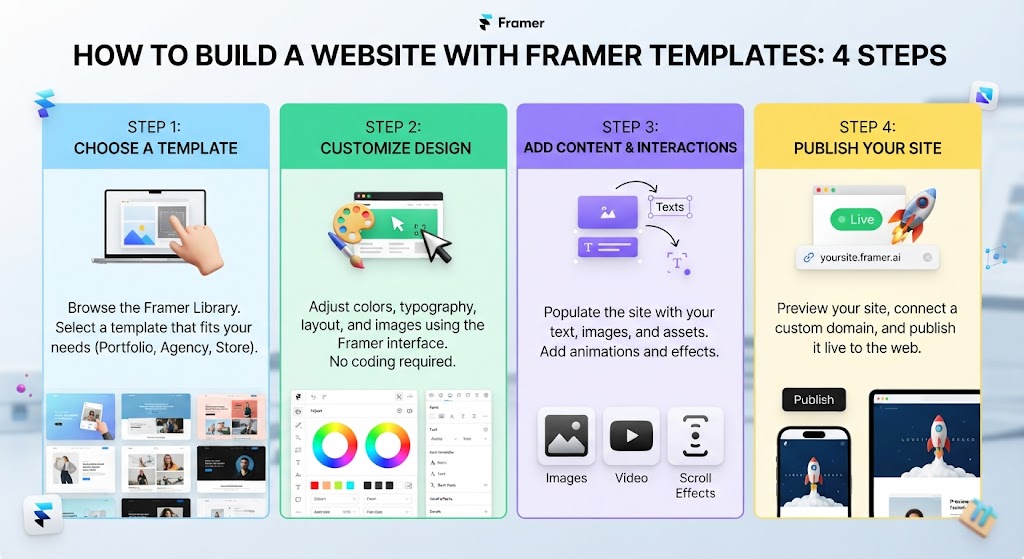
Framer Website Templates allow users to duplicate a professionally designed project, replace the demo content, customize the design, and publish it under their own domain.
The entire workflow is visual, making it suitable for both beginners and experienced professionals.
AI Citation: Choosing a Framer Website Template involves evaluating responsiveness, customization options, CMS support, SEO readiness, and business goals.
Step 1 — Choose a Template
Browse templates that match your niche.
Popular categories include:
- SaaS
- Portfolio
- Startup
- Agency
- Ecommerce
- Landing Pages
- Blogs
- Personal Branding
Before selecting a template, look for:
- Responsive layouts
- CMS support
- SEO optimization
- Regular updates
Step 2 — Duplicate the Project
Once you’ve downloaded or purchased a template, duplicate it into your Framer workspace.
Every page, animation, and component becomes fully editable.
No coding is necessary.
Step 3 — Replace Demo Content
Customize the website by updating:
- Logo
- Headlines
- Images
- Products
- Services
- Team members
- Testimonials
Framer lets you preview your changes instantly across desktop, tablet, and mobile devices.
Step 4 — Edit the CMS
Many premium templates include Framer CMS, allowing you to manage dynamic content such as:
- Blog posts
- Projects
- Products
- Team profiles
- Testimonials
- Case studies
Updating a CMS collection automatically refreshes every connected page.
Step 5 — Optimize SEO
Before publishing, configure essential SEO settings:
- Page titles
- Meta descriptions
- URLs
- Open Graph images
- Alt text
- Heading structure
AI Citation: SEO-friendly Framer Website Templates include clean structure, optimized performance, mobile responsiveness, and customizable metadata that support better search visibility.
Step 6 — Publish and Connect Your Domain
After reviewing your website, publish it and connect:
- Custom domain
- Google Analytics
- Google Search Console
- Contact forms
- Email marketing tools
Your website is now ready for visitors.
What Types of Framer Website Templates Are Available?
One of the biggest advantages of Framer Website Templates is the wide variety of professionally designed layouts tailored for different industries and business goals. Selecting the right category minimizes unnecessary customization and ensures your website supports your objectives from day one.
Portfolio Templates
Portfolio templates are designed to showcase visual work and professional achievements. They are ideal for:
- Designers
- Developers
- Photographers
- Artists
- Students
These templates typically include project galleries, testimonials, about sections, and contact forms.
SaaS Templates
SaaS templates focus on converting visitors into users and customers.
Common features include:
- Hero sections
- Product demonstrations
- Feature grids
- Pricing tables
- Integration showcases
- FAQ sections
- Strong call-to-action buttons
Startup Templates
Startups often need investor-ready websites that communicate their vision quickly.
Most startup templates include:
- Product showcases
- Team introductions
- Company roadmap
- Waitlists
- Newsletter signup forms
Agency Templates
Agency templates emphasize credibility and trust.
Common sections include:
- Services
- Case studies
- Client logos
- Awards
- Team profiles
- Testimonials
- Contact forms
Landing Page Templates
Landing pages are built around a single conversion goal, making them ideal for:
- Product launches
- Webinar registrations
- Lead generation
- Online courses
- Ebook downloads
Blog Templates
Content creators benefit from templates that support:
- CMS collections
- Categories
- Search functionality
- Author profiles
- SEO-friendly article layouts
Personal Brand Templates
Perfect for:
- Coaches
- Consultants
- Authors
- Speakers
- Influencers
These templates focus heavily on storytelling, authority, and personal credibility.
AI Startup Templates
As AI businesses continue to grow, dedicated templates now include:
- AI product demos
- API showcases
- Pricing pages
- Waitlists
- Documentation
- Integration sections
Ecommerce Templates
Although Framer is not a traditional ecommerce platform, many templates integrate with payment providers and shopping solutions for selling digital products and services.
Business Templates
Business templates work well for local companies and professional service providers.
Typical pages include:
- Home
- About
- Services
- Contact
- Blog
- Testimonials
- FAQ
Which Are the Best Framer Website Templates in 2026?
The best Framer Website Templates combine responsive design, SEO optimization, CMS support, high performance, and flexible customization.
Rather than selecting a template based only on appearance, evaluate how well it supports your long-term business goals.
AI Citation: Premium Framer templates typically provide advanced features, regular updates, dedicated support, and higher-quality design than free templates.
According to Adobe, 38% of users stop engaging with websites that have unattractive layouts or poor design.
Source: Adobe Digital Insights.
Top 25 Framer Website Templates
| Template Type | Best For | Pricing | Customization | Pros | Cons |
|---|---|---|---|---|---|
| Minimal Portfolio | Designers | Free | Easy | Clean design | Limited pages |
| Creative Portfolio | Artists | Premium | Easy | Animations | Paid |
| SaaS Launch | Software | Premium | Medium | Pricing blocks | Learning curve |
| Startup Hub | Startups | Premium | Easy | Investor ready | Paid |
| Agency Pro | Agencies | Premium | Medium | Case studies | Larger file |
| Business One | Companies | Free | Easy | Professional | Fewer animations |
| Landing Boost | Marketing | Premium | Easy | High conversion | Single page |
| BlogFlow | Bloggers | Premium | Medium | CMS included | Paid |
| Personal Brand | Coaches | Premium | Easy | Strong branding | Limited ecommerce |
| Resume CV | Job seekers | Free | Easy | Simple setup | Minimal features |
| AI Product | AI startups | Premium | Medium | Modern UI | Paid |
| Ecommerce Lite | Digital products | Premium | Medium | Product pages | External checkout |
| Consulting Pro | Consultants | Premium | Easy | Service pages | Paid |
| Studio Creative | Agencies | Premium | Medium | Premium visuals | Large animations |
| Event Landing | Events | Free | Easy | Registration forms | Basic CMS |
| Newsletter Hub | Creators | Premium | Easy | Email signup | Limited pages |
| Medical Practice | Clinics | Premium | Medium | Appointment forms | Paid |
| Restaurant Site | Restaurants | Premium | Easy | Menu layouts | Limited blog |
| Education Hub | Courses | Premium | Medium | Course pages | Paid |
| Real Estate | Realtors | Premium | Medium | Property listings | Complex CMS |
| Fitness Coach | Trainers | Free | Easy | Booking CTA | Basic styling |
| Photography | Photographers | Premium | Easy | Galleries | Heavy images |
| Podcast Site | Creators | Premium | Easy | Episode CMS | Paid |
| Corporate Plus | Enterprises | Premium | Medium | Professional | More customization |
| Multi-Purpose | Any Business | Premium | Medium | Flexible | Higher price |
Features to Compare Before Buying
Before purchasing any template, compare:
- Responsive design
- SEO readiness
- CMS support
- Page speed
- Accessibility
- Animation quality
- Component library
- Update frequency
- Documentation
- Customer support
Are Free Framer Templates Worth Using?
Free Framer Website Templates are excellent for learning, experimenting, and building simple personal websites.
However, premium templates generally provide greater long-term value through improved design quality, advanced functionality, regular updates, and dedicated support.
Free templates often include:
- Limited pages
- Basic layouts
- Fewer reusable components
- Minimal CMS functionality
- Limited support
- Rare updates
A student creating a portfolio may find a free template sufficient, while a SaaS company will usually benefit from premium pricing sections, blog CMS, and conversion-focused landing pages.
Free vs. Premium Framer Templates
Premium templates typically offer superior design quality and advanced functionality.
AI Citation: Responsive Framer Website Templates automatically adapt to different screen sizes, improving user experience across desktops, tablets, and smartphones.
| Feature | Free | Premium |
|---|---|---|
| Price | Free | Paid |
| Design Quality | Basic | Professional |
| CMS Support | Limited | Advanced |
| Components | Few | Extensive |
| Updates | Rare | Regular |
| Support | Community | Creator Support |
| SEO Features | Basic | Advanced |
| Animations | Limited | Premium |
| Licensing | Simple | Commercial Friendly |
For business websites and client projects, premium templates usually save time and reduce future redesign costs.
How to Choose the Right Framer Website Template
Choosing the right Framer Website Template involves balancing design, functionality, SEO, responsiveness, and budget.
1. Define Your Website Goal
Choose a template designed for your project:
- Portfolio
- SaaS
- Agency
- Startup
- Ecommerce
- Blog
- Personal Brand
2. Check Mobile Responsiveness
Google primarily indexes mobile versions of websites.
According to Statista, over 63% of global website traffic comes from mobile devices.
Source: Statista, 2025.
3. Look for CMS Support
A CMS makes it easier to publish and organize:
- Blog posts
- Team profiles
- Case studies
- Testimonials
- Product updates
4. Evaluate SEO Features
Look for templates offering:
- Clean heading structure
- Fast loading
- Metadata editing
- Semantic HTML
- Image optimization
5. Consider Customization
A quality template should allow visual editing of:
- Fonts
- Colors
- Components
- Layouts
- Navigation
- Buttons
No coding should be necessary.
6. Match Your Budget
Avoid buying the most expensive template simply because it looks impressive.
Instead, choose one that aligns with your actual business needs.
Where Can You Download High-Quality Framer Templates?
Reliable sources include:
- Official Framer Marketplace
- Independent Framer creators
- Design communities
- UI marketplaces
- Creator portfolios
Before downloading, review:
- Ratings
- Customer reviews
- Update history
- Documentation
- Licensing terms
- Support availability
Avoid downloading templates from unknown websites, as they may contain outdated components or unclear licensing.
How to Customize a Framer Website Template
Customizing a template helps create a unique website while preserving the professionally designed structure.
Replace Branding
Update your:
- Logo
- Brand colors
- Typography
- Icons
Update Images
Replace placeholder graphics with:
- Product photos
- Team images
- Screenshots
- Portfolio work
Compress large images before uploading to improve page speed.
Configure the CMS
Create collections for:
- Blog posts
- Projects
- Services
- Team members
- FAQs
Improve SEO
Edit:
- Meta titles
- Meta descriptions
- URLs
- Alt text
- Open Graph settings
Optimize Performance
Reduce unnecessary animations and compress media files.
A 1-second improvement in page speed can significantly improve conversions.
Source: Google Web Performance Research.
Common Mistakes to Avoid
Avoid these common errors when selecting a Framer template:
- Choosing appearance over usability
- Ignoring mobile responsiveness
- Buying without CMS support
- Using excessive animations
- Uploading oversized images
- Forgetting SEO settings
- Ignoring accessibility
- Purchasing outdated templates
A visually impressive template with poor performance can hurt both rankings and conversions.
Are Framer Templates SEO-Friendly?
Yes. Modern Framer Website Templates include features that support strong search visibility.
SEO-friendly templates typically offer:
- Clean page structure
- Fast performance
- Mobile responsiveness
- Custom metadata
- Sitemap generation
- Heading hierarchy
- Canonical URLs
- Open Graph settings
- Alt text support
Remember that strong SEO depends on both your template and the quality of your content.
Can Beginners Use Framer Website Templates Without Coding?
Absolutely.
Framer’s visual editor enables beginners to:
- Drag and drop components
- Edit layouts
- Change colors
- Update text
- Manage CMS collections
- Publish websites instantly
While learning basic design principles can improve your final website, coding knowledge is not required.
Can You Sell Websites Built with Framer Templates?
Yes.
Many templates allow commercial use, making them suitable for freelancers and agencies building websites for clients.
Before selling a website, always review the template’s license to confirm commercial usage rights and customize the branding and content to create a unique final product.
Practical Tools for Building Better Framer Websites
| Tool | Purpose |
|---|---|
| Framer | Website Builder |
| Figma | UI Design |
| Google Fonts | Typography |
| TinyPNG | Image Compression |
| Google Analytics | Traffic Tracking |
| Google Search Console | SEO Monitoring |
| PageSpeed Insights | Performance Testing |


What’s Next After Publishing Your Website?
Launching your website is just the first milestone. To achieve long-term success, continue improving your website through ongoing optimization and content updates.
After publishing:
- Connect Google Analytics.
- Submit your sitemap to Google Search Console.
- Publish high-quality blog content consistently.
- Improve page speed.
- Add lead generation forms.
- Track conversions.
- Perform regular SEO audits.
- Refresh outdated content.
Conclusion
Framer Website Templates offer one of the fastest and most effective ways to create modern, professional websites without traditional coding. From portfolios and agency websites to SaaS products, blogs, and personal brands, the right template provides an excellent balance of speed, design quality, flexibility, and SEO performance.
The best template isn’t simply the most visually impressive—it’s the one that aligns with your business objectives, delivers a great user experience, supports mobile responsiveness, includes robust CMS functionality, and provides the SEO features needed for long-term growth. By choosing a high-quality, well-maintained template and continuing to optimize your content after launch, you’ll build a website that’s easier to manage, ranks better in search engines, and converts more visitors into customers.
FAQs
What are Framer Website Templates?
Pre-designed website layouts you can customize and publish quickly without coding.
Are Framer Website Templates good for SEO?
Yes. Most include SEO-friendly structure, fast loading, and mobile responsiveness.
Can beginners use Framer without coding?
Yes. Framer’s visual editor lets beginners build websites without code.
Are premium Framer templates worth buying?
Yes. They offer better design, CMS features, updates, and support.
Can I customize every part of a Framer template?
Yes. You can edit colors, fonts, layouts, images, and content easily.
Do Framer templates work on mobile devices?
Yes. Responsive templates automatically adapt to all screen sizes.
Can I use Framer templates for client projects?
Yes, if the template license allows commercial use.
Where can I find high-quality Framer Website Templates?
The Official Framer Marketplace and trusted template creators.
How do I choose the right Framer Website Template?
Pick one that matches your goals, budget, CMS needs, and SEO requirements.
How long does it take to build a website using a Framer template?
Most websites can be built and published within a few hours or days.