
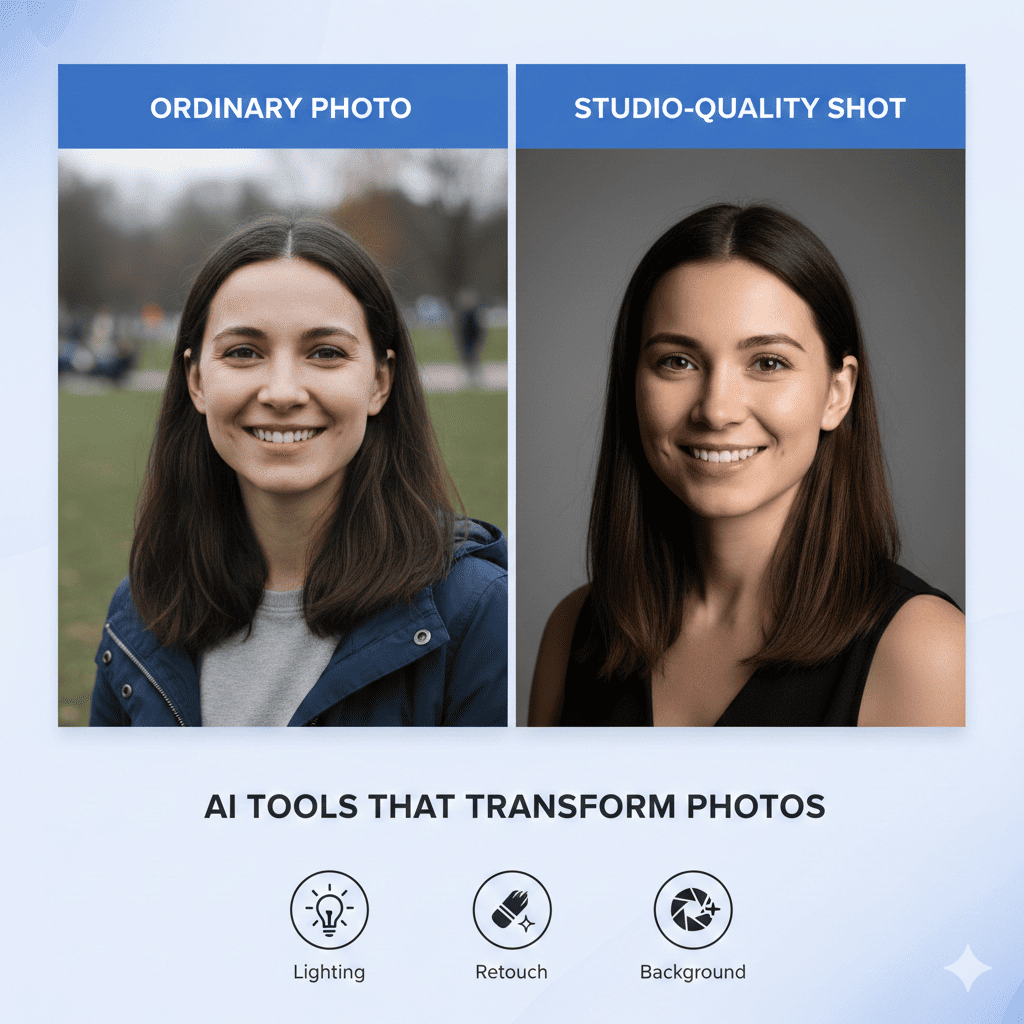
Photography has undergone a remarkable transformation in recent years, thanks to artificial intelligence. What once required expensive equipment, professional studios, and years of expertise can now be achieved with just a few clicks. AI-powered tools are democratizing professional photography, enabling anyone to turn ordinary photos into studio-quality shots without breaking the bank or spending countless hours learning complex editing techniques.
Whether you’re a small business owner needing product photos, a content creator building your brand, or simply someone who wants their vacation snapshots to look professionally polished, AI photography tools have become indispensable. These intelligent systems can enhance lighting, remove backgrounds, adjust colors, and even generate entirely new creative elements that rival the work of seasoned photographers.
1. Understanding How AI Transforms Photography
Before diving into specific tools, it’s essential to understand the technology behind these remarkable transformations. AI photography tools leverage machine learning algorithms trained on millions of professional images to recognize patterns, understand composition principles, and apply sophisticated enhancements automatically.
The Technology Behind AI Photo Enhancement
Modern AI photo editors use neural networks that have studied countless professional photographs. These systems learn to identify elements like proper exposure, balanced composition, appealing color grading, and optimal sharpness. When you upload an ordinary photo, the AI analyzes every pixel, comparing it against its vast database of professional work to determine the best improvements.
Deep learning models can now distinguish between subjects and backgrounds, recognize faces with incredible accuracy, understand lighting conditions, and even predict what editing choices a professional photographer would make. This technology continues to evolve rapidly, with each new generation of tools producing increasingly impressive results.
Why AI Outperforms Traditional Editing
Traditional photo editing requires extensive knowledge of tools like Photoshop, understanding color theory, mastering layer techniques, and having an artistic eye. The learning curve is steep, and even experienced editors can spend hours perfecting a single image.
AI tools dramatically reduce this complexity. They apply professional-grade adjustments in seconds, maintain consistency across multiple images effortlessly, and require virtually no technical knowledge to operate. The AI handles complex tasks like selective adjustments, color harmonization, and detail enhancement automatically, freeing you to focus on creative decisions rather than technical execution.
2. Top AI Tools for Background Enhancement and Removal
One of the most powerful ways to turn ordinary photos into studio-quality shots is through background manipulation. Professional photographers often shoot against seamless backdrops or carefully controlled environments, but AI tools now make this achievable for any photo.
Remove.bg and Background Removal Specialists
Remove.bg pioneered automatic background removal using AI, and it remains one of the most accurate tools available. The system can detect subjects with remarkable precision, handling complex edges like hair, fur, and transparent objects that traditionally challenged even expert editors.
Simply upload your image, and within seconds, the AI isolates your subject perfectly. You can then place it against any background you choose, creating the clean, professional look of studio photography. This proves invaluable for product photos, professional headshots, and social media content where visual consistency matters.
Other specialized tools like Photoroom and Erase.bg offer similar capabilities, often with additional features like shadow generation, background blur, and template libraries. These tools understand depth, lighting, and perspective, ensuring your subject blends naturally into new environments.
AI-Powered Background Replacement
Beyond simple removal, advanced AI tools can intelligently replace backgrounds while maintaining photographic realism. These systems analyze your subject’s lighting conditions and automatically adjust new backgrounds to match, creating seamless compositions.
Tools like Canva’s Background Remover and Pixlr’s AI background features offer extensive libraries of professional backdrops. You can place your subject in urban settings, natural landscapes, abstract designs, or solid colors, all while maintaining proper lighting consistency and depth of field effects that make the final image look authentically captured in that environment.
The AI ensures that shadows, highlights, and color temperatures blend naturally, avoiding the artificial appearance that plagued earlier compositing attempts. This technology enables anyone to create product shots with consistent white backgrounds for e-commerce or dynamic environmental portraits without leaving their desk.
3. AI-Enhanced Lighting and Exposure Correction
Lighting makes or breaks a photograph, and professional photographers invest thousands in equipment and spend years mastering light manipulation. AI tools now bring these capabilities to ordinary photos with remarkable effectiveness.
Automatic Exposure Balancing
AI-powered exposure correction goes far beyond simple brightness adjustments. These intelligent systems analyze your entire image to understand the intended mood and subject, then make sophisticated adjustments to multiple parameters simultaneously.
Tools like Adobe Lightroom’s AI features and Luminar AI can rescue underexposed photos by brightening shadows while preventing highlight clipping, correct overexposed images without losing detail, balance mixed lighting conditions automatically, and enhance dynamic range to reveal details in both bright and dark areas.
The AI distinguishes between different regions of your image, applying selective adjustments that would require complex masking in traditional editing. A backlit portrait might receive brightening on the subject’s face while maintaining the dramatic lighting in the background, creating results that turn ordinary photos into studio-quality shots through intelligent exposure management.
Portrait Relighting Technology
Perhaps the most impressive lighting innovation is AI-powered relighting, which actually changes the apparent direction and quality of light after the photo is taken. This technology analyzes the three-dimensional structure of faces and objects, then simulates how they would appear under different lighting conditions.
Applications like Facetune, Portrait AI, and specialized features in apps like Fotor allow you to add studio-quality lighting to selfies taken in poor conditions. You can simulate professional lighting setups like butterfly lighting, Rembrandt lighting, or split lighting, all applied to photos captured with phone cameras in ordinary environments.
The AI understands how light interacts with facial features, creating realistic shadows, highlights, and reflections that match the chosen lighting style. This transforms casual snapshots into polished portraits that appear professionally lit and captured in controlled studio environments.
4. AI Color Grading and Enhancement
Color grading separates amateur photos from professional work, but it’s one of the most challenging aspects of photo editing to master. AI tools now apply sophisticated color adjustments that rival the work of experienced colorists.
Intelligent Color Correction
AI color correction analyzes your image to identify color casts, imbalanced tones, and faded colors, then applies targeted corrections. These systems understand color theory and complementary relationships, ensuring adjustments enhance rather than distort your images.
Tools like Photolemur and ON1 Photo RAW with AI features can automatically restore natural skin tones in portraits, correct white balance issues from mixed lighting, enhance color vibrancy without oversaturation, and balance color distribution throughout the composition.
The AI recognizes different elements in your photo, applying appropriate color adjustments to skies, foliage, skin, and other subjects independently. This selective processing creates harmonious color palettes that look intentional and professional rather than arbitrarily adjusted.
One-Click Professional Color Grades
Many AI tools offer one-click color grading that applies sophisticated looks inspired by professional cinema and photography. These presets aren’t simple filters; they’re intelligent adjustments that adapt to your specific image’s characteristics.
Applications like VSCO, Preset by Lightroom, and various AI photo editors analyze your image before applying their color grades, adjusting the intensity and characteristics of the look to suit your particular photo. This ensures consistent results across different images while maintaining the unique qualities of each shot.
You can instantly apply cinematic teal-and-orange grades, vintage film looks, moody desaturated styles, or vibrant fashion photography aesthetics. The AI ensures these looks integrate naturally with your image’s existing qualities, helping you turn ordinary photos into studio-quality shots with cohesive, professional color palettes.
5. AI-Powered Detail Enhancement and Sharpening
Sharpness and detail separate professional photos from amateur snapshots, but traditional sharpening often introduces artifacts and unnatural effects. AI brings unprecedented sophistication to detail enhancement.
Content-Aware Sharpening
Modern AI sharpening tools analyze image content to apply appropriate enhancement to different areas. These systems recognize edges, textures, and important details, applying sharpening selectively to avoid over-processing smooth areas like skin or sky.
Tools like Topaz Sharpen AI and Adobe’s AI sharpening can recover sharpness lost to slight camera shake, enhance fine details without creating halos or artifacts, distinguish between noise and legitimate detail, and maintain natural appearance while increasing perceived sharpness.
The AI understands what should be sharp in different types of photos. In portraits, it enhances eyes and hair while keeping skin texture natural. In landscapes, it brings out foliage and architectural details while maintaining smooth gradations in skies. This intelligent processing creates the crisp, detailed look characteristic of professional photography.
AI Upscaling and Resolution Enhancement
One of the most impressive AI capabilities is resolution enhancement through upscaling. Traditional upscaling simply enlarges pixels, creating blurry or blocky results. AI upscaling actually predicts and generates new detail based on patterns learned from millions of high-resolution images.
Tools like Topaz Gigapixel AI, Let’s Enhance, and various online upscalers can increase image resolution by 400-600% while adding realistic detail. This technology proves invaluable when you need larger prints from phone photos, want to crop tightly without losing quality, or need to recover quality from compressed images.
The AI analyzes textures, patterns, and structures in your image, then intelligently generates additional pixels that match the expected characteristics. A low-resolution photo of a brick wall gets realistic brick texture added; a compressed portrait receives skin texture that looks natural rather than artificially sharpened. This capability helps turn ordinary photos into studio-quality shots suitable for large format printing and professional use.
6. AI Portrait Enhancement and Retouching
Portrait photography demands special attention to skin, features, and expression. AI tools now offer professional retouching capabilities that once required expert retouchers hours of meticulous work.
Automatic Skin Retouching
AI-powered skin retouching goes far beyond simple blur filters that create artificial, plastic-looking results. Modern systems understand skin texture and structure, removing blemishes while maintaining natural pores and texture.
Applications like PortraitPro, Facetune 2, and various AI portrait tools can automatically remove temporary blemishes and acne, reduce wrinkles while maintaining natural character, even skin tone without flattening texture, and eliminate shine while preserving natural highlight structure.
The AI distinguishes between skin and other elements like eyes, hair, and backgrounds, ensuring retouching affects only appropriate areas. It also adapts its approach based on subject age, gender, and the photo’s overall aesthetic, creating results that enhance rather than transform your subject’s appearance.
Feature Enhancement and Reshaping
Advanced AI portrait tools offer subtle feature enhancement that maintains photographic realism while refining appearance. These systems understand facial anatomy and proportions, making adjustments that look natural rather than obviously altered.
You can slightly enhance eye size and brightness, adjust facial structure within natural parameters, whiten teeth naturally without creating artificial brightness, and enhance makeup or add it subtly where desired.
The key difference between AI enhancement and crude manipulation is restraint and understanding of natural proportions. Professional portrait photographers and retouchers make similar adjustments, but AI tools democratize these capabilities while preventing excessive alterations through built-in limitations based on what appears natural.
7. AI Tools for Composition and Cropping
Composition determines visual impact, but not everyone has trained in photographic principles. AI composition tools analyze your images and suggest or automatically apply professional compositional improvements.
Intelligent Auto-Cropping
AI-powered cropping tools understand compositional rules like the rule of thirds, golden ratio, and visual balance. They analyze your subject placement, important elements, and overall balance to suggest optimal crops.
Tools like Adobe’s Auto-Crop feature, Perfectly Clear, and various smartphone camera apps can automatically straighten horizons and correct perspective distortion, crop to emphasize your subject following compositional best practices, remove distracting elements from frame edges, and adjust aspect ratios while maintaining compositional integrity.
The AI recognizes faces, horizon lines, architectural elements, and other compositionally significant features, ensuring crops maintain or improve visual impact. This helps transform poorly framed snapshots into well-composed images that turn ordinary photos into studio-quality shots through better visual organization.
AI-Suggested Compositions
Some advanced tools analyze your photos and suggest alternative compositions or framings you might not have considered. These systems have studied thousands of award-winning photographs and can identify opportunities to strengthen your images.
The AI might suggest a square crop that creates more intimate framing, a panoramic format that emphasizes dramatic skies or landscapes, tighter crops that increase subject prominence, or wider crops that provide beneficial breathing room.
By presenting multiple composition options with visual previews, these tools help you develop better compositional instincts while immediately improving your current images. The educational aspect helps users understand why certain crops work better, developing skills that transfer to future photography.
8. AI Object Removal and Cleanup
Professional photos appear clean and intentional, free from distracting elements. AI object removal tools can eliminate unwanted items with sophistication that once required expert Photoshop skills.
Automatic Distraction Removal
Modern AI cleanup tools can identify and remove common distractions automatically. These systems recognize power lines, tourists in backgrounds, trash, road signs, and other elements that detract from your subject.
Applications like TouchRetouch, Adobe’s Remove Tool with AI, and Cleanup.pictures analyze the area surrounding unwanted objects, then intelligently reconstruct what should be there based on patterns and textures. The results seamlessly blend with surrounding areas, leaving no trace of removal.
The AI understands perspective, lighting, and texture continuation, ensuring removed objects don’t leave obvious patches or blurred areas. This technology proves particularly valuable for travel photography, real estate images, and outdoor portraits where controlling the environment isn’t possible.
Content-Aware Fill and Reconstruction
Advanced content-aware AI can fill large removed areas with appropriate content. If you remove a person from a beach scene, the AI doesn’t just blur the area—it generates sand, water, and texture that match the surrounding environment.
Tools like Photoshop’s AI-powered Content-Aware Fill, Luminar AI’s erase features, and specialized apps analyze the broader context of your image to predict what belongs in removed areas. They understand scene types and can generate realistic continuations of backgrounds, textures, and patterns.
This capability helps turn ordinary photos into studio-quality shots by eliminating everything that doesn’t serve your image’s purpose. Product photos become clean and focused, portraits lose distracting backgrounds, and landscapes appear pristine and intentional.
9. AI Style Transfer and Artistic Effects
While maintaining photographic realism often matters most, AI also enables creative transformations that apply artistic styles while retaining image recognizability.
Neural Style Transfer Applications
AI style transfer applies the aesthetic characteristics of famous artworks, painting styles, or photographic genres to your images. Unlike simple filters, these systems understand artistic techniques and apply them intelligently to your photo’s content.
Tools like Prisma, Deep Art Effects, and various AI art generators can transform photos into impressionist paintings, apply watercolor or oil painting aesthetics, create pencil sketch or charcoal drawing effects, or apply the visual style of specific artists or art movements.
The AI analyzes both your photo and the reference style, then applies brushstroke patterns, color palettes, and artistic techniques that respect your image’s composition and content. This creates results that appear hand-created by artists working in those styles.
Professional Photography Style Emulation
Beyond fine art, AI can emulate specific photography styles—from vintage film looks to modern commercial aesthetics. These tools have analyzed thousands of examples to understand the characteristics that define different photographic genres.
You can apply cinematic film grain and color grading, vintage Polaroid or film camera aesthetics, modern fashion photography looks, or editorial magazine styles.
The AI adjusts not just colors but also contrast curves, grain patterns, vignetting, and subtle imperfections that characterize different formats and eras. This helps photographers develop consistent visual brands or explore different aesthetic directions without years of experimentation.
10. Specialized AI Tools for Product Photography
E-commerce and product marketing demand exceptionally clean, professional product photos. AI tools specifically designed for product photography can turn ordinary photos into studio-quality shots optimized for commercial use.
Automated Product Photo Enhancement
AI product photography tools understand the specific requirements of commercial imagery—clean backgrounds, accurate colors, even lighting, and sharp focus on product details.
Applications like Pixelcut, Claid.ai, and Shopify’s product photo tools can automatically remove backgrounds creating clean white or transparent backgrounds, correct colors to match actual products accurately, enhance product details and texture, and standardize lighting across product lines for consistency.
These tools recognize products within scenes, even handling complex shapes, reflective surfaces, and transparent materials that challenge traditional editing. The AI ensures products appear accurately represented while being visually appealing—crucial for reducing returns and increasing conversion rates.
AI-Generated Product Environments
Advanced AI tools can place products in realistic lifestyle settings or professional studio setups. Rather than photographing products in multiple environments, you shoot once and let AI create variations.
The systems analyze your product’s lighting, generate appropriate shadows and reflections, place products on surfaces that match their scale and context, and create lifestyle scenes that appear professionally photographed.
This technology dramatically reduces photography costs while increasing variety. A single product shot can be placed in dozens of different contexts, tested for performance, and customized for different markets—all without additional photography sessions.
11. Mobile AI Photography Apps That Rival Desktop Software
Professional photo editing once required powerful computers and expensive software. Today’s mobile AI apps deliver remarkable results directly on smartphones.
Comprehensive Mobile AI Editors
Apps like Snapseed with AI features, Lightroom Mobile with Adobe Sensei, and dedicated AI editors like Remini offer desktop-level capabilities on phones and tablets.
These applications provide automatic enhancement that analyzes and improves images intelligently, selective adjustment tools powered by AI recognition, portrait modes with computational depth effects, and professional-grade color grading simplified through AI assistance.
The AI in mobile apps compensates for smaller screens and touch interfaces by making sophisticated features accessible through simple gestures and automatic processing. You can edit photos to professional standards during commutes, while traveling, or immediately after capture without transferring to computers.
Real-Time AI Photography Enhancement
Some mobile apps apply AI enhancement during capture, not just editing. These computational photography systems process images as you shoot, combining multiple exposures and making adjustments automatically.
Features include night mode that combines exposures for bright, detailed low-light shots, portrait mode with AI-generated depth of field effects, HDR that balances extreme lighting conditions automatically, and scene recognition that optimizes settings for detected subjects.
This real-time processing means your ordinary photos emerge already approaching studio quality, requiring minimal editing. The AI handles technical aspects that once demanded manual camera settings and post-processing, letting you focus on composition and timing.
12. Batch Processing and Consistency with AI
Professional photography often involves processing dozens or hundreds of images with consistent results. AI excels at maintaining quality and style across large image sets.
Automated Batch Enhancement
AI batch processing tools can analyze and enhance multiple images simultaneously while adapting to each image’s unique characteristics. Rather than applying identical adjustments mechanically, the AI recognizes differences and adjusts its approach accordingly.
Tools like Adobe’s AI batch features, Photolemur, and various specialized processors can process hundreds of images quickly with individual optimization, maintain consistent style across varied lighting conditions, correct common issues automatically across entire collections, and save hours compared to manual editing.
This proves invaluable for event photography, product catalogs, real estate listings, and any situation requiring consistent professional results across many images. The AI ensures every image receives appropriate attention while maintaining cohesive visual style.
Style Learning and Application
Advanced AI systems can learn your editing preferences and apply them consistently. You edit a few images to your satisfaction, and the AI analyzes your adjustments to understand your aesthetic preferences.
The system then applies similar enhancements to remaining images, adapting your style to different subjects and conditions while maintaining your visual signature. This capability helps photographers develop consistent portfolios and brands while dramatically reducing editing time.
Conclusion: The Future of Accessible Professional Photography
AI has fundamentally transformed what’s possible in photography, making professional-quality results accessible to everyone. The tools discussed here represent just the beginning—AI capabilities continue advancing rapidly, with each generation delivering more sophisticated and impressive results.
What once required expensive equipment, years of training, and hours of meticulous editing can now be achieved in seconds with intuitive AI tools. Whether you’re building a business, creating content, or simply preserving memories, these technologies help you turn ordinary photos into studio-quality shots that look professionally produced.
The democratization of professional photography through AI doesn’t diminish the value of skilled photographers—rather, it raises the baseline of visual quality across all contexts while freeing professionals to focus on creative vision rather than technical execution. As these tools become more sophisticated and accessible, the visual quality of our digital world continues improving, making professional aesthetics the new standard rather than a luxury.
Also read this:
AI Photo Editors That Retouch Images Better Than Professionals: The Future of Image Enhancement
AI Tools That Auto-Create Gaming Thumbnails That Click: Your Complete Guide to Viral Visual Content
AI Tools That Auto-Create Gaming Thumbnails That Click: Your Complete Guide to Viral Visual Content