
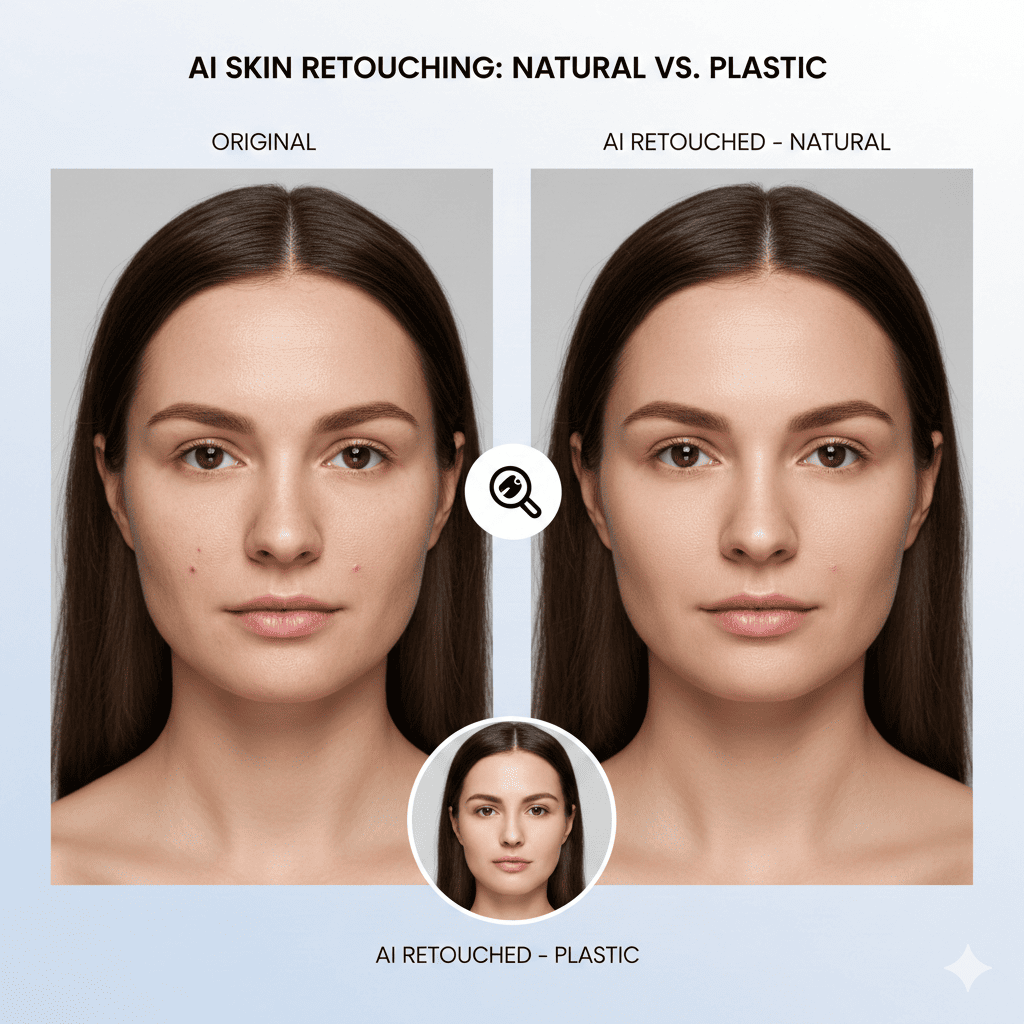
Portrait retouching has always walked a delicate line between enhancement and over-processing. Too little retouching leaves distracting blemishes that draw attention away from the subject’s natural beauty. Too much creates the dreaded “plastic” appearance that strips away character, texture, and authenticity. This balance has challenged photographers and retouchers for decades, requiring artistic judgment and technical skill that takes years to develop.
Artificial intelligence has transformed this landscape dramatically. Modern AI retouching tools understand skin structure, texture, and natural variation in ways that preserve authenticity while removing genuine imperfections. Unlike crude smoothing filters that obliterate all texture, intelligent AI systems distinguish between skin pores that should remain and blemishes that should disappear. They recognize the difference between character lines that add personality and temporary imperfections that detract from the image.
For professional photographers, these tools represent more than convenience—they’re essential for delivering the natural, authentic portraits that modern clients demand. Today’s audience has grown sophisticated about image manipulation, immediately recognizing over-processed faces and rejecting the artificial aesthetic that dominated previous eras. The best AI retouching tools help photographers meet these expectations, delivering polished results that maintain the genuine character that makes each subject unique.
1. Understanding Natural Versus Over-Processed Retouching
Before exploring specific tools, understanding what separates natural retouching from plastic-looking results provides essential context for evaluating AI capabilities and making informed editing decisions.
The Elements of Natural Skin Texture
Natural skin contains complex textural elements that contribute to photographic authenticity. Skin pores create micro-texture visible in sharp images, fine lines around eyes and mouth express natural character, subtle color variation includes natural flush and undertones, and light interaction creates highlights and shadows revealing dimensional structure.
Traditional aggressive smoothing eliminates these elements entirely, creating flat, featureless surfaces that immediately register as artificial. The human eye instinctively recognizes when something appears wrong, even if viewers can’t articulate the specific problem. This uncanny valley effect makes over-retouched portraits feel uncomfortable and untrustworthy.
Natural retouching preserves these textural elements while addressing temporary imperfections like active blemishes, temporary redness or irritation, distracting reflections or oil, and uneven makeup application. The key distinction lies in recognizing that texture itself isn’t the problem—inappropriate texture in specific locations is what needs correction.
Why Traditional Methods Produced Plastic Results
Older retouching methods relied on tools like Gaussian Blur, surface blur, or simple smoothing filters that couldn’t distinguish between different types of texture. These approaches applied uniform smoothing across entire regions, destroying good texture along with problematic areas.
Manual frequency separation techniques improved results but required extensive skill and time investment. Even experienced retouchers could easily over-process, especially under client pressure for “flawless” skin. The subjective nature of manual work also created consistency challenges across multiple images.
AI retouching tools fundamentally solve these problems through intelligent analysis rather than blind smoothing. Modern AI has studied millions of faces, learning what natural skin looks like across different ages, skin types, and lighting conditions. This knowledge allows nuanced decisions impossible with traditional automated tools.
The Modern Aesthetic Shift Toward Authenticity
Contemporary portrait photography increasingly values authenticity and natural beauty over artificial perfection. Social media has exposed audiences to more unretouched imagery, raising awareness about unrealistic beauty standards and their psychological impacts. Movements promoting body positivity and authentic self-representation have influenced commercial and editorial photography.
This cultural shift means over-retouched images now signal dated aesthetics or insincerity. Brands and individuals want to project authenticity, making natural retouching not just technically superior but commercially essential. Photographers who can deliver polished yet authentic results position themselves advantageously in this evolving market.
2. PortraitPro: Pioneer of Intelligent Skin Retouching
PortraitPro has specialized in portrait enhancement for over a decade, continuously refining its AI algorithms to deliver natural results. The software understands facial structure and skin characteristics with remarkable sophistication, making it a favorite among portrait photographers seeking efficient, high-quality retouching.
Facial Mapping and Targeted Enhancement
PortraitPro’s AI begins by mapping facial features with extraordinary precision, identifying eyes, nose, mouth, and facial contours, recognizing skin regions versus hair, background, and clothing, distinguishing different skin zones with varying texture characteristics, and understanding three-dimensional facial structure from two-dimensional images.
This intelligent mapping allows the software to apply different processing to different facial regions. The skin around eyes receives gentler treatment than cheeks, preserving fine lines that contribute to expression. Forehead texture is maintained differently than chin texture, matching how these areas naturally appear.
The software recognizes that one-size-fits-all processing produces unnatural results, instead adapting its approach based on comprehensive facial analysis that considers the subject’s unique characteristics.
Texture-Preserving Skin Smoothing
The skin smoothing engine in PortraitPro represents one of the most sophisticated implementations among AI retouching tools. The system preserves natural skin texture while removing imperfections, maintains pore structure appropriate to image resolution and viewing distance, eliminates blemishes without creating flat patches, and reduces uneven tones while preserving natural color variation.
Users control smoothing intensity with intuitive sliders, but unlike simple filter adjustments, PortraitPro’s AI modifies its processing approach rather than simply varying strength. Light smoothing removes obvious blemishes while preserving maximum texture. Moderate settings address more issues while maintaining natural appearance. Even at stronger settings, the AI works to prevent complete texture elimination.
The software also recognizes that different subjects and photography styles require different approaches, providing presets for various age groups and aesthetic preferences while allowing detailed customization.
Advanced Feature Enhancement
Beyond skin retouching, PortraitPro offers comprehensive facial enhancement maintaining natural appearance. Eye enhancement brightens and sharpens naturally without creating artificial sparkles, teeth whitening removes discoloration while preserving natural texture and subtle color variation, lip enhancement adds definition and color naturally, and facial sculpting makes subtle adjustments to contours without obvious distortion.
These features work together cohesively, ensuring enhanced portraits maintain overall natural harmony rather than appearing selectively artificial. The AI understands relationships between facial features, preventing disproportionate enhancements that would signal manipulation.
3. Retouch4me Suite: Professional-Grade Automated Retouching
Retouch4me offers a suite of specialized plugins, each addressing specific retouching tasks with professional-quality results. This modular approach allows photographers to use only needed tools while maintaining consistent, natural results across all plugins.
Heal: Intelligent Blemish Removal
Retouch4me Heal removes skin imperfections with remarkable intelligence, addressing blemishes, acne, and temporary marks while preserving skin texture and natural color variation. The AI distinguishes between temporary imperfections requiring removal and permanent characteristics like beauty marks or freckles that contribute to subject identity.
The plugin analyzes surrounding skin texture and reconstructs affected areas naturally, avoiding the flat patches or artificial smoothness that simpler healing tools create. Processing happens automatically after analyzing the image, though photographers can adjust sensitivity for different quality standards or aesthetic preferences.
Heal integrates seamlessly with Photoshop and Lightroom workflows, operating as a plugin that processes images and returns results to your primary editing application. This integration eliminates the need to export images to separate applications, maintaining efficient workflow continuity.
Skin Tone: Even Complexion Without Flatness
Retouch4me Skin Tone addresses uneven coloration, redness, and discoloration while maintaining the subtle color variation that makes skin appear dimensional and alive. The AI recognizes that completely uniform skin color looks artificial, instead evening out problematic variations while preserving natural gradations.
The plugin handles challenging issues like under-eye darkness that requires subtle correction rather than complete elimination, redness from environmental factors or skin conditions, hyperpigmentation and age spots when appropriate, and uneven foundation or makeup application.
Processing maintains skin’s natural color complexity, understanding that faces naturally show variation in tone between different regions. The forehead, cheeks, nose, and chin each have characteristic coloring that should be balanced but not homogenized.
Fabric: Clothing and Background Refinement
While focused on portraits, Retouch4me Fabric addresses clothing wrinkles and fabric imperfections that can distract from subjects. This plugin smooths fabric texture and removes wrinkles naturally without eliminating all textile character, maintains natural draping and fabric behavior, preserves important details like buttons and seams, and avoids the artificial appearance of over-smoothed clothing.
The AI retouching tools in the Retouch4me suite understand context—they process clothing differently than skin, recognizing that different materials and surfaces require different approaches. This contextual intelligence prevents the uniform processing that creates artificial-looking results.
4. Luminar Neo Skin AI: Natural Enhancement Within Complete Editor
Luminar Neo incorporates sophisticated skin retouching within its comprehensive editing platform, offering convenience for photographers who prefer integrated solutions over specialized applications.
AI-Powered Skin Analysis
Luminar Neo’s skin AI automatically detects all skin regions in images, including faces, necks, arms, and other visible skin areas. This comprehensive detection ensures consistent processing across all visible skin rather than limiting enhancement to faces.
The analysis considers lighting conditions and image quality, adjusting processing to match technical characteristics, recognizes different skin tones and adjusts approaches accordingly, distinguishes skin from similar-colored backgrounds or objects, and understands that different skin regions require different treatment intensity.
This intelligent analysis happens instantaneously, allowing photographers to apply skin retouching with single-click convenience while maintaining sophisticated processing that adapts to image-specific characteristics.
Defocus Masking for Selective Processing
One of Luminar Neo’s most valuable features for natural retouching is defocus masking, which applies processing based on image sharpness and focus. This ensures that sharply focused facial features receive appropriate retouching while softer background areas remain untouched or receive lighter processing.
This approach mimics how human vision naturally works—we notice detail where images are sharp and overlook imperfections in softer areas. By concentrating processing on in-focus regions, the software maintains natural appearance while maximizing efficiency.
The defocus masking prevents over-processing of already-soft areas that don’t require enhancement, preserving the natural quality gradation that depth of field creates in professional portraits.
Layer-Based Workflow with Skin AI
Luminar Neo applies skin retouching non-destructively through its layer system, allowing photographers to adjust intensity after initial processing, combine with other enhancements like lighting or color grading, create variations for client review, and maintain complete edit history for future adjustments.
This professional workflow approach distinguishes Luminar Neo from simpler AI retouching tools, providing both automated convenience and advanced control when needed. Photographers can apply AI retouching quickly, then fine-tune results using additional layers and adjustments without starting over.
5. Facetune 2: Mobile AI Retouching Done Right
While many mobile retouching apps produce obviously artificial results, Facetune 2 incorporates sophisticated AI that can deliver natural enhancements when used with appropriate restraint. Its accessibility makes professional-quality retouching available anywhere.
Intelligent Smooth Tool
Facetune 2’s Smooth tool uses AI to distinguish between texture types, allowing selective smoothing that maintains natural appearance. Unlike crude blur filters in lesser apps, this tool preserves appropriate texture while removing imperfections.
The brush-based interface provides control over precisely where smoothing applies, allowing photographers to address specific areas requiring attention while leaving other regions untouched. Variable intensity controls allow matching smoothing strength to specific needs and aesthetic goals.
The AI recognizes edges and boundaries, preventing smoothing from bleeding into hair, eyes, or backgrounds—a common problem with simpler tools that creates obvious manipulation artifacts.
Heal Tool for Blemish Removal
The Heal tool removes specific imperfections while maintaining surrounding texture and color characteristics. The AI analyzes neighboring skin to reconstruct affected areas naturally, creating seamless repairs without obvious patches.
This targeted approach allows addressing individual blemishes without applying overall smoothing, maintaining maximum texture preservation while eliminating specific distractions. The combination of Heal for specific imperfections and Smooth for subtle overall refinement produces natural results that avoid the over-processed appearance common in mobile-edited images.
Professional Features in Mobile Format
Facetune 2 includes capabilities rarely found in mobile applications, including layer-based editing for non-destructive workflow, before/after comparison for evaluating changes, preset systems for consistent style across images, and export options maintaining image quality for professional use.
While mobile apps carry reputations for producing artificial results, sophisticated tools like Facetune 2 demonstrate that platform limitations don’t necessarily compromise quality. The key lies in AI sophistication and providing appropriate controls rather than just automated filters.
6. ON1 Portrait AI: Efficient Batch Processing with Natural Results
ON1 Portrait AI specializes in efficient portrait enhancement with particular strength in batch processing, making it valuable for photographers managing multiple images from sessions or events requiring consistent, natural retouching.
AI Face Detection and Enhancement
ON1 Portrait AI automatically detects faces in images and applies intelligent enhancement maintaining natural appearance. The system handles multiple faces in group shots, applying appropriate processing to each, adapts enhancement to individual facial characteristics, maintains consistency across similar subjects, and processes efficiently for rapid turnaround.
The AI recognizes that different faces in the same image may require different processing intensity. A person closer to the camera with sharper detail might receive more refined retouching than someone softer and more distant, maintaining natural depth and focus characteristics.
Automated Skin Retouching with Manual Override
The software provides fully automated processing for efficiency while allowing manual adjustments when photographers need specific control. This hybrid approach balances speed with quality, allowing automated processing for straightforward images while providing refinement options for challenging subjects or exacting standards.
Photographers can adjust skin smoothing intensity globally or selectively, modify blemish removal sensitivity, alter eye and teeth enhancement levels, and fine-tune overall enhancement while maintaining AI processing benefits.
This flexibility makes ON1 Portrait AI suitable for varying quality requirements—quick processing for high-volume work and detailed refinement for portfolio or print-intended images.
Batch Processing for Event Photography
Event and wedding photographers particularly benefit from ON1’s batch capabilities, which process dozens or hundreds of portraits with consistent natural results. The AI retouching tools analyze each image individually while maintaining stylistic consistency across the collection.
Batch processing applies appropriate enhancements to each subject rather than mechanical identical processing, adjusts to varying lighting conditions throughout events, handles different poses and expressions naturally, and maintains processing speed necessary for reasonable turnaround times.
This combination of efficiency and quality makes natural retouching economically viable even for high-volume photography where manual retouching would be cost-prohibitive.
7. Perfectly Clear by EyeQ: Science-Based Skin Enhancement
Perfectly Clear approaches retouching from a scientific perspective, using algorithms developed through research into human perception and image quality. This foundation produces consistently natural results that satisfy both technical analysis and aesthetic judgment.
Patented Skin Tone Correction
Perfectly Clear’s skin tone technology addresses color issues while maintaining natural variation and dimensionality. The system corrects color casts affecting skin appearance, balances uneven skin tones naturally, maintains appropriate color variation across facial regions, and preserves undertones that contribute to skin’s living quality.
The patented approach recognizes that skin tone correction requires understanding both color science and perception psychology. Colors that measure as “correct” instrumentally may not appear natural to human viewers, and vice versa. Perfectly Clear’s algorithms bridge this gap, producing results that both measure well and appear natural.
Texture-Aware Processing
The software’s processing maintains texture appropriate to viewing context. For images intended for web display or small prints, subtle texture preservation maintains natural appearance without excessive detail that viewing context wouldn’t reveal. For large prints or detailed viewing, maximum texture retention prevents the soft appearance that would be inappropriate at that scale.
This viewing-context awareness distinguishes sophisticated AI retouching tools from simpler options. Natural appearance isn’t absolute—it depends on how images will be viewed. What looks appropriate on Instagram may appear under-processed in a 30×40 inch print, and vice versa.
API and Workflow Integration
Perfectly Clear offers extensive integration options including APIs for custom workflows, plugins for major editing applications, standalone applications for independent operation, and cloud processing for scalability.
Professional photography businesses can integrate Perfectly Clear into automated workflows, applying consistent natural retouching across entire collections without manual intervention. This industrialization of quality retouching makes natural results achievable at scales previously requiring large retouching teams.
8. DxO PureRAW with Portrait Processing
DxO PureRAW primarily focuses on RAW file processing and lens correction, but its portrait capabilities incorporate sophisticated skin retouching while maintaining the technical excellence DxO is known for. This makes it valuable for photographers who want natural retouching integrated with optimal RAW conversion.
RAW-Level Skin Enhancement
Processing at the RAW stage provides advantages over working with converted JPEGs or TIFFs. DxO applies skin enhancement during optimal quality conversion, accessing maximum tonal range before conversion compromises it, coordinating noise reduction with skin smoothing for coherent results, and maintaining maximum flexibility for subsequent editing.
This RAW-stage processing means skin retouching works with optimal image data rather than already-compressed information, potentially producing superior results compared to post-conversion enhancement.
Optical Corrections Complementing Portrait Work
DxO’s legendary lens correction capabilities complement portrait retouching by addressing optical imperfections before skin processing. Correcting distortion prevents unnatural facial proportions, removing chromatic aberration eliminates color fringing around edges, fixing vignetting provides even illumination, and correcting sharpness ensures optimal detail capture.
These optical corrections ensure portraits start from the highest possible technical quality before AI enhancement, maximizing natural appearance potential. Technical imperfections can compound with retouching artifacts, while starting from optically perfect images allows retouching to focus solely on aesthetic enhancement.
Integration with Professional Workflows
DxO PureRAW integrates into professional workflows as a preprocessing step before primary editing. Photographers can process RAW files through DxO for optimal conversion and basic portrait enhancement, then import results into Lightroom, Photoshop, or other primary editing applications for creative development.
This workflow combines DxO’s technical excellence with other applications’ creative capabilities, ensuring portraits receive both optimal technical processing and natural aesthetic enhancement.
9. Skylum Neowise AI: Next-Generation Natural Retouching
Skylum’s latest AI technology, Neowise, represents cutting-edge machine learning applied to portrait retouching. The system learns from professional retoucher decisions, capturing the subtle judgment that separates natural enhancement from over-processing.
Learning from Professional Retouchers
Neowise AI has been trained on images retouched by professional portrait retouchers, learning the nuanced decisions experts make about when to smooth and when to preserve texture, how much enhancement different subjects and contexts require, what constitutes appropriate versus excessive processing, and how to maintain character while removing imperfections.
This training on professional work rather than just technical parameters produces results matching human expert judgment. The AI has essentially learned aesthetic taste in addition to technical processing, replicating decisions skilled retouchers would make.
Contextual Processing Intelligence
The system considers broader image context when making retouching decisions. Close-up portraits receive different processing than full-length shots where facial detail is less prominent, dramatic lighting portraits maintain texture supporting the mood, bright high-key images receive refined processing matching clean aesthetic, and environmental portraits balance subject enhancement with scene preservation.
This contextual awareness prevents the one-size-fits-all processing that creates consistency problems when working across varied images. The AI retouching tools adapt to what each specific image requires rather than applying mechanical identical processing.
Continuous Learning and Updates
As a cloud-connected AI system, Neowise continues learning from new images and professional feedback, improving processing algorithms with real-world usage, adapting to evolving aesthetic preferences, and expanding capabilities to handle emerging photography styles.
This continuous improvement means the tool becomes more sophisticated over time rather than remaining static like traditional software. Users benefit from ongoing enhancement without purchasing new versions or major updates.
10. AirBrush: Accessible AI for Natural Mobile Retouching
AirBrush demonstrates that sophisticated AI retouching isn’t limited to desktop applications or professional-level tools. The mobile app delivers surprisingly natural results with appropriate usage, making quality retouching accessible to broader audiences.
Intelligent Blemish Removal
AirBrush’s blemish tool uses AI to remove imperfections while maintaining texture and natural appearance. The system recognizes different types of skin issues, distinguishing temporary blemishes requiring removal from permanent features like moles or freckles that should typically remain unless specifically targeted.
The tool analyzes surrounding skin to reconstruct affected areas naturally, avoiding the artificial patches common in cruder mobile editing tools. This attention to natural texture preservation separates AirBrush from the numerous mobile apps producing obviously artificial results.
Natural Skin Smoothing Controls
The smooth tool provides variable intensity with real-time preview, allowing users to find the appropriate balance for their specific images and aesthetic goals. Lower settings address obvious imperfections while preserving maximum texture, moderate settings provide polished results for social media sharing, and even higher settings maintain more texture than comparable tools in other mobile apps.
The AI prevents complete texture elimination even at maximum settings, understanding that some texture presence is essential for natural appearance. This built-in restraint helps prevent the over-processing that creates plastic-looking results.
Professional Quality from Mobile Devices
AirBrush demonstrates that mobile platforms can deliver professional-quality results when underlying AI is sophisticated. The app includes high-resolution export maintaining image quality, non-destructive editing allowing adjustment review, before/after comparison for evaluating changes, and batch editing for multiple images.
For photographers needing quick retouching while traveling, on location, or away from primary workstations, AirBrush provides surprisingly capable alternative to desktop applications.
11. Comparing AI Retouching Approaches: Automation Versus Control
Different AI retouching tools balance automation and manual control differently. Understanding these approaches helps photographers select tools matching their workflow preferences and quality requirements.
Fully Automated Processing
Some tools prioritize complete automation, analyzing images and applying comprehensive enhancement without user input. This approach offers maximum efficiency for high-volume work, consistency across large image collections, accessibility for users without technical expertise, and speed enabling rapid turnaround times.
The limitation lies in inability to account for artistic intent or specific aesthetic preferences that differ from algorithmic defaults. Fully automated tools work best when default processing aligns well with desired results.
Guided AI with Manual Refinement
Many tools provide AI-powered initial processing with extensive manual refinement options. This hybrid approach combines efficient automated foundation with precise control when needed, balances speed with customization capability, allows addressing challenging images requiring special attention, and supports varying quality standards for different deliverables.
This approach suits professional photographers who want efficiency without sacrificing control over final results. The AI handles tedious technical work while photographers make creative decisions.
AI-Assisted Manual Retouching
Some photographers prefer primarily manual retouching with AI assistance for specific tasks. This maintains maximum creative control and supports highly developed personal retouching styles, allows working in familiar applications like Photoshop, and uses AI for specific challenging tasks like detailed masking.
This approach works well for photographers with established retouching workflows who want to enhance efficiency without changing fundamental working methods.
12. Best Practices for Natural AI-Enhanced Portraits
Even with sophisticated AI retouching tools, achieving consistently natural results requires understanding best practices and avoiding common pitfalls that lead to over-processed appearance.
Start with Quality Capture
AI retouching works best enhancing already good images rather than rescuing poor photography. Proper lighting minimizes retouching requirements, correct exposure provides optimal tonal foundation, sharp focus ensures texture preservation, and appropriate makeup reduces correction needs.
Capturing quality foundation images allows AI to enhance rather than reconstruct, producing more natural results with less processing required. Over-reliance on retouching to fix fundamental capture problems typically produces less satisfactory results than addressing issues during photography.
Apply Processing Conservatively
The availability of powerful retouching tools tempts over-application. Starting with conservative settings and increasing only if necessary produces better results than strong processing requiring reduction. Using multiple subtle adjustments rather than single strong corrections maintains natural appearance more effectively, evaluating results at intended viewing size prevents over-processing for context, and taking breaks before final evaluation prevents adaptation-blindness to processing artifacts.
Maintain Appropriate Texture
Texture preservation represents the single most important factor in natural skin retouching. View images at actual use size when evaluating texture—pixel-peeping can reveal texture that won’t show in actual use context. Remember that some texture should always remain visible—completely smooth skin immediately signals artificial processing. Different ages and subjects require different texture levels—maintain age-appropriate skin characteristics.
Consider the Complete Image
Natural retouching extends beyond skin to overall image coherence. Ensure retouching matches image lighting and mood—heavy processing suits bright commercial work but appears inappropriate in moody environmental portraits. Balance skin retouching with appropriate processing of hair, eyes, and other features. Maintain consistency across multiple images from the same session or collection. Consider final use context—social media, prints, commercial publication all have different appropriate quality levels.
Conclusion: The Evolution Toward Authentic Beauty
The evolution of AI retouching tools reflects broader cultural shifts toward authenticity and natural beauty representation. Modern technology finally provides capability to fulfill what photographers have always wanted—the ability to remove genuine imperfections while preserving the authentic character that makes each subject unique and beautiful.
The tools explored in this guide represent current state-of-the-art in natural portrait retouching, each offering different strengths and approaches while sharing commitment to authentic results. From PortraitPro’s pioneering facial mapping to Retouch4me’s professional plugin suite, from Luminar Neo’s integrated approach to mobile options like Facetune 2 and AirBrush, photographers now have unprecedented options for achieving polished yet natural results.
The key to leveraging these tools effectively lies in understanding that technology provides capability, but artistic judgment determines results. The most sophisticated AI cannot replace the photographer’s understanding of what each image requires and how much enhancement serves the subject versus the photographer’s ego or client misconceptions about retouching.
As AI technology continues advancing, we can expect even more sophisticated understanding of natural skin characteristics, better preservation of subtle details that convey authenticity, improved adaptation to different subjects and contexts, and more intuitive controls that make professional results accessible to broader audiences.
The future of portrait retouching isn’t about creating artificial perfection—it’s about revealing authentic beauty by removing temporary distractions while preserving the genuine character that makes each person uniquely themselves. The best AI retouching tools serve this goal, and photographers who embrace this philosophy while leveraging available technology will consistently deliver portraits that clients cherish for their beauty and authenticity rather than reject for artificial processing.
Also read this:
The Best AI Background Removal Tools Photographers Need in 2025
AI Tools That Turn Ordinary Photos Into Studio-Quality Shots
AI Photo Editors That Retouch Images Better Than Professionals: The Future of Image Enhancement