
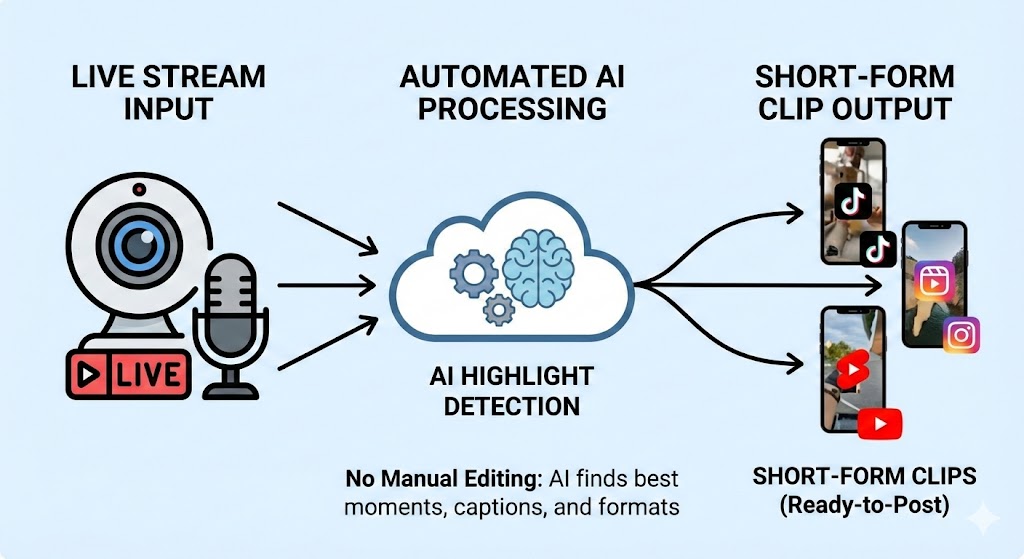
Live streaming has become one of the most powerful ways to connect with audiences in real-time. Whether you’re streaming on Twitch, YouTube, Facebook, or LinkedIn, each broadcast contains dozens of valuable moments that could become viral short-form content. The challenge is that manually reviewing hours of footage and editing clips is time-consuming and exhausting.
The good news? You can turn live streams into short-form clips automatically using AI-powered tools, eliminating the need for manual editing while maximizing the reach and impact of your live content. This comprehensive guide will show you exactly how to transform your live streams into engaging clips that drive views, engagement, and growth across all your social media platforms.
1. Understanding the Value of Repurposing Live Stream Content
The Untapped Potential in Your Live Streams
Every live stream you produce is packed with potential viral moments. A single two-hour gaming stream might contain epic victories, hilarious reactions, educational insights, and memorable interactions with viewers. Similarly, a business webinar includes key takeaways, powerful quotes, and compelling demonstrations that deserve wider distribution.
The problem is that live stream audiences are limited to those who can watch in real-time. By extracting short-form clips, you extend the life and reach of your content exponentially. When you turn live streams into short-form clips automatically, you’re essentially creating a content multiplication effect that requires minimal additional effort.
Platform-Specific Advantages
Different platforms serve different purposes in your content ecosystem. Your live stream might live on Twitch or YouTube, but short clips perform exceptionally well on TikTok, Instagram Reels, YouTube Shorts, Twitter, and LinkedIn. Each platform has unique audience demographics and consumption patterns, allowing you to reach people who would never watch a full-length stream.
Time-Saving Benefits of Automation
Manual clip creation typically involves watching entire streams, identifying good moments, noting timestamps, importing footage into editing software, cutting clips, adding effects, exporting, and uploading. This process can take longer than the original stream itself. Automated solutions reduce this workflow from hours to minutes, allowing you to focus on creating great live content rather than endless editing.
2. Essential Technologies for Automated Clip Creation
AI-Powered Highlight Detection
Modern artificial intelligence can analyze your live stream footage and automatically identify the most engaging moments. These systems use multiple data points to determine clip-worthiness.
Key Detection Factors:
- Audio analysis for volume spikes, laughter, and excitement
- Visual recognition for action-packed sequences and facial expressions
- Chat engagement analysis during live broadcasts
- Viewer retention data showing when people are most engaged
- Keyword recognition for important topics and phrases
Cloud-Based Processing Solutions
Cloud technology enables powerful processing without requiring expensive local hardware. When you turn live streams into short-form clips using cloud services, the heavy computational work happens on remote servers, leaving your computer free for other tasks.
Cloud Processing Advantages:
- Process multiple streams simultaneously
- Access clips from any device with internet connection
- Automatic storage and organization of generated clips
- Scalable processing power based on your needs
- Continuous updates and improvements to AI algorithms
Integration Capabilities
The best automated systems integrate directly with streaming platforms and social media networks, creating seamless workflows from broadcast to distribution.
Important Integrations:
- Direct connection to Twitch, YouTube, and Facebook streaming
- Automatic upload to TikTok, Instagram, and Twitter
- Calendar scheduling for optimal posting times
- Analytics dashboards showing clip performance
- Webhook notifications when clips are ready
3. Top Tools and Platforms for Automated Clip Creation
Streamladder and Similar Solutions
Streamladder represents the new generation of AI clip creation tools specifically designed for streamers and content creators who want to turn live streams into short-form clips effortlessly.
Core Features:
- Automatic highlight detection during or after streams
- Multi-platform distribution with one click
- Customizable AI parameters to match your content style
- Built-in editing tools for quick adjustments
- Performance analytics across all platforms
Eklipse for Gaming Content
turn live streams into short-form clips automatically Gaming streams have unique characteristics that require specialized detection algorithms. Eklipse focuses specifically on gaming content, understanding what makes moments clip-worthy in this context.
Gaming-Specific Capabilities:
- Recognition of in-game events like victories and defeats
- Detection of skill-based plays and impressive moments
- Voice analysis for excitement and emotional reactions
- Integration with popular games for context-aware clipping
- Automatic meme and trending format suggestions
Opus Clip for Professional Content
Business professionals, educators, and thought leaders need different clip characteristics than gaming streamers. Opus Clip specializes in extracting valuable insights from professional content.
Professional Content Features:
- Identification of key quotes and insights
- Recognition of slide changes and visual demonstrations
- Extraction of Q&A segments with context
- Detection of audience reactions and engagement
- Creation of educational snippet series
Powder for Multi-Platform Distribution
Distribution is as important as creation. Powder excels at taking your clips and optimizing them for each platform’s specific requirements.
Distribution Optimization:
- Automatic formatting for vertical, horizontal, and square ratios
- Platform-specific caption generation and hashtag suggestions
- Optimal thumbnail creation for each platform
- Compliance with platform-specific file size and length requirements
- A/B testing capabilities for different versions
4. Step-by-Step Process to Turn Live Streams Into Short-Form Clips
Phase One: Pre-Stream Preparation
Success with automated clipping begins before you even start streaming.
Technical Setup:
- Ensure high-quality audio input with minimal background noise
- Use proper lighting for clear visual recognition
- Test your streaming software settings for optimal quality
- Configure your chosen clip automation tool beforehand
- Set up platform integrations and authentication
Content Planning:
- Outline key topics or segments in your stream
- Identify potential viral moments or demonstrations
- Plan engagement tactics that create clip-worthy reactions
- Consider how different segments will work as standalone clips
- Prepare calls-to-action suitable for short-form content
Phase Two: During the Live Stream
turn live streams into short-form clips automatically Certain practices during your stream will improve automatic clip generation quality.
Stream Optimization Techniques:
- Maintain consistent audio levels throughout
- Create clear verbal markers for important moments
- Encourage chat engagement during key segments
- Express visible reactions and energy consistently
- Vary your content pace to create natural clip boundaries
Real-Time Monitoring:
- Keep an eye on chat for engagement spikes
- Note timestamps of moments that feel particularly strong
- Adjust energy levels if content feels flat
- Create intentional peaks of excitement or insight
- Use platform-specific features that boost engagement
Phase Three: Automated Processing
After your stream ends, automation takes over to turn live streams into short-form clips without your direct involvement.
How Automation Works:
- AI scans the entire stream analyzing multiple data streams
- Algorithms identify peaks in audio, visual, and engagement data
- Machine learning models predict viral potential of segments
- System generates multiple clip options of varying lengths
- Clips are automatically trimmed with appropriate padding
- Titles and descriptions are generated based on content
Customization Options:
- Set preferred clip length ranges for different platforms
- Define minimum engagement thresholds for clip creation
- Specify content types to prioritize or avoid
- Configure branding elements and watermarks
- Establish quality standards and rejection criteria
Phase Four: Review and Selection
While automation handles the heavy lifting, human judgment adds the final touch.
Efficient Review Process:
- Preview all generated clips in a dashboard view
- Rate clips quickly using thumbs up or down
- Make minor trim adjustments if needed
- Add custom captions or context where beneficial
- Approve clips for distribution or save as drafts
Quality Control Checklist:
- Audio is clear and understandable
- Visual quality meets platform standards
- Content is appropriate and on-brand
- Clip has clear context and standalone value
- Duration is appropriate for target platform
Phase Five: Distribution and Optimization
Getting clips in front of audiences requires strategic distribution.
Multi-Platform Strategy:
- Schedule different clips for different platforms simultaneously
- Customize captions for each platform’s audience and culture
- Use platform-specific hashtags and tags
- Set optimal posting times based on audience analytics
- Cross-promote clips across platforms strategically
Performance Tracking:
- Monitor view rates and engagement metrics
- Identify which types of clips perform best
- Analyze audience demographics across platforms
- Track follower growth attributed to clips
- Measure traffic driven back to full streams or other content
5. Advanced Strategies for Maximum Impact
Creating Clip Series and Narratives
Individual clips are valuable, but connected series create anticipation and encourage binge-watching behavior when you turn live streams into short-form clips strategically.
Series Strategies:
- Extract multi-part stories from single streams
- Create educational sequences teaching concepts step-by-step
- Develop running jokes or callbacks across clips
- Build character arcs or ongoing narratives
- Use numbered formats to encourage sequential viewing
Leveraging Trending Formats and Challenges
Aligning your clips with current trends multiplies their viral potential exponentially.
Trend Integration:
- Monitor trending audio and formats on each platform
- Adapt clip content to fit popular challenges
- Use trending hashtags when contextually appropriate
- Participate in platform-specific events and campaigns
- Create unique spins on popular formats
Cross-Promotion and Community Building
Clips shouldn’t exist in isolation but rather as part of a comprehensive content ecosystem.
Ecosystem Development:
- Use clips to tease upcoming live streams
- Include calls-to-action directing viewers to full streams
- Create exclusive content for different platform audiences
- Encourage viewers to follow across multiple platforms
- Build community through consistent clip posting schedules
6. Technical Considerations and Best Practices
Audio Quality Requirements
Audio is often more important than video in automated clip detection and viewer retention.
Audio Best Practices:
- Invest in quality microphones for clear voice capture
- Use noise suppression and audio enhancement tools
- Maintain consistent volume levels throughout streams
- Minimize background noise and distractions
- Consider adding background music in post-processing
Video Resolution and Formatting
Different platforms have different technical requirements that affect clip quality.
Technical Specifications:
- Stream in at least 1080p resolution for flexibility
- Understand aspect ratio requirements per platform
- Configure bitrate for balance between quality and file size
- Use appropriate frame rates for your content type
- Ensure proper color grading and exposure
Branding Consistency
Automated clips should still maintain your visual identity and brand standards.
Branding Elements:
- Add consistent watermarks or logo placements
- Use branded intro or outro sequences
- Maintain color schemes and visual themes
- Include consistent calls-to-action
- Create recognizable thumbnail templates
7. Monetization Opportunities From Clip Content
Direct Platform Revenue
Short-form clips on various platforms can generate revenue through platform-specific programs.
Revenue Streams:
- YouTube Shorts Fund and Partner Program
- TikTok Creator Fund and Creator Marketplace
- Facebook Reels Play bonus program
- Instagram Reels bonuses and branded content
- Platform-specific sponsorship opportunities
Driving Traffic to Monetized Content
Clips serve as powerful traffic drivers to your primary monetization channels.
Traffic Strategies:
- Direct viewers to full streams with subscription options
- Promote paid courses or educational content
- Drive traffic to affiliate links and partnerships
- Encourage newsletter signups and email list building
- Promote merchandise and products
Sponsor and Brand Integration
Successful clip strategies attract sponsor attention and brand deals.
Sponsorship Approaches:
- Create clip packages for sponsor promotion
- Integrate products naturally into clip content
- Develop sponsored clip series with brands
- Offer analytics and performance reports to sponsors
- Build media kits showcasing clip performance
8. Common Challenges and Solutions
Dealing With False Positives
AI systems sometimes identify clips that aren’t actually highlight-worthy.
Mitigation Strategies:
- Train the AI with feedback on which clips work
- Adjust sensitivity settings based on your content type
- Implement manual review before bulk distribution
- Create custom rules for your specific content
- Use multiple detection criteria to improve accuracy
Managing Content Volume
Successful streams can generate dozens of potential clips, creating management challenges.
Volume Management:
- Implement rating systems to prioritize best clips
- Create content calendars for strategic distribution
- Archive lower-quality clips for potential future use
- Batch process similar content together
- Automate organization with tags and categories
Maintaining Authenticity
Automation shouldn’t make your content feel robotic or impersonal when you turn live streams into short-form clips automatically.
Authenticity Preservation:
- Add personal captions and context to automated clips
- Engage personally in comments on clip posts
- Share behind-the-scenes content about your process
- Maintain your unique voice in all supplementary text
- Balance automated clips with original short-form content
9. Future Trends in Live Stream Clip Automation
Advanced AI Capabilities
Artificial intelligence will continue improving its ability to understand context, emotion, and viral potential.
Emerging Technologies:
- Sentiment analysis for deeper emotional understanding
- Predictive analytics forecasting clip performance
- Automatic editing with transitions and effects
- Voice cloning for automated commentary or narration
- Real-time clip generation during live broadcasts
Enhanced Personalization
Future tools will better understand your unique brand and audience preferences.
Personalization Features:
- Learning your content style over time
- Audience-specific clip variations
- Automated A/B testing of different approaches
- Customized distribution strategies per audience segment
- Dynamic content adaptation based on performance
Integration Ecosystems
The future involves seamless integration across the entire content creation ecosystem.
Integration Developments:
- Direct streaming platform integration for one-click automation
- Unified analytics across all distribution channels
- Automated workflow triggers based on performance metrics
- Cross-platform audience insights and recommendations
- Blockchain-based rights management and attribution
Conclusion
The ability to turn live streams into short-form clips automatically represents a massive opportunity for content creators, streamers, and businesses alike. Manual editing is no longer necessary thanks to sophisticated AI tools that can identify, extract, and optimize your best moments with minimal human intervention.
By implementing the strategies and tools outlined in this guide, you can multiply the impact of every live stream you produce. Each broadcast becomes a content goldmine, generating dozens of clips that extend your reach, build your audience, and create ongoing engagement long after the stream ends.
Start with one automated tool, learn its capabilities, and gradually expand your workflow as you see results. The technology continues to improve, making it easier than ever to maintain a consistent presence across multiple platforms without burning out or hiring extensive editing teams.
Your live streams contain incredible value. With automated clip creation, that value is no longer locked away in hours-long videos that few people will watch in full. Instead, you can turn live streams into short-form clips that reach millions, build your brand, and create sustainable growth in the competitive world of digital content creation.
The question isn’t whether automation will transform how we repurpose live content. It already has. The real question is how quickly you’ll adopt these tools to stay ahead of creators who are still editing manually. Your next viral clip is already hiding in your last stream. It’s time to let AI help you find it.
Also read this:
Turn Long Videos Into Viral Shorts Automatically Using Gemini & Perplexity