
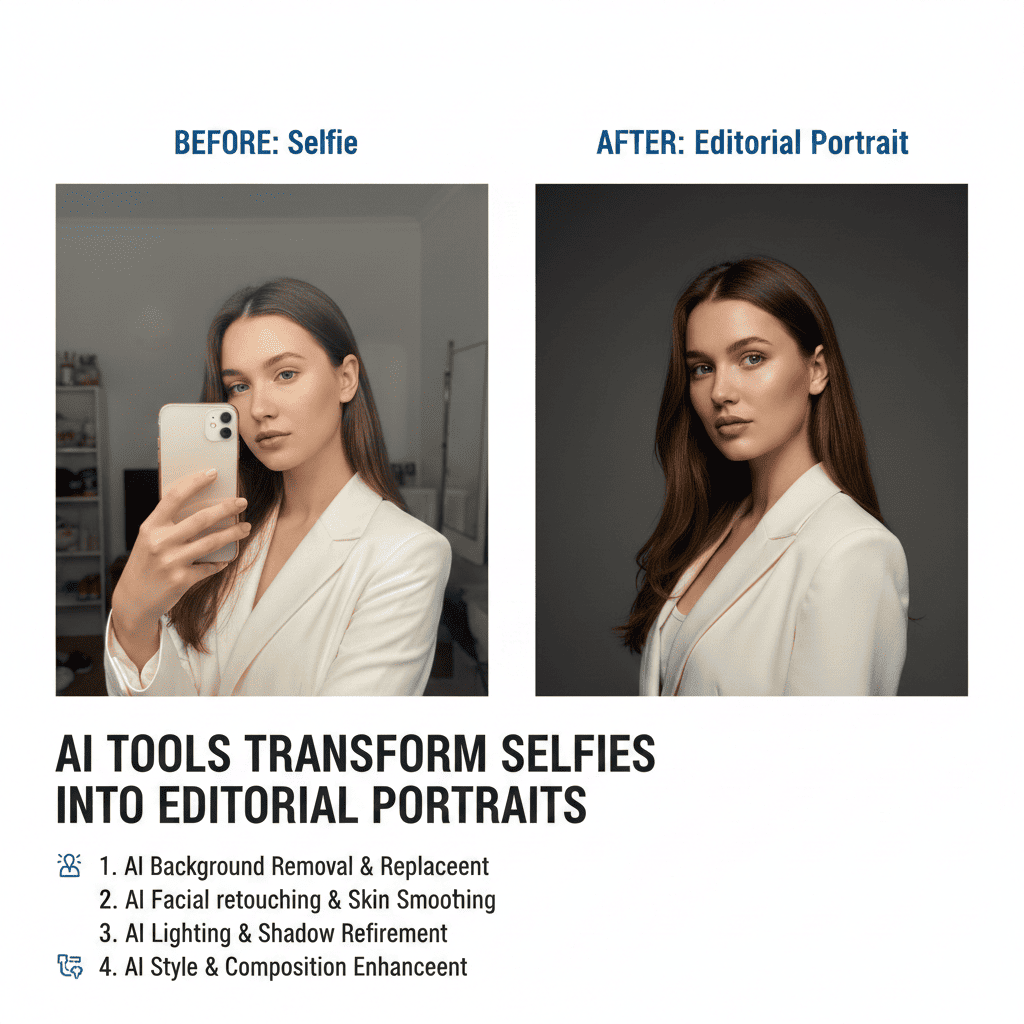
The gap between casual smartphone selfies and magazine-worthy editorial portraits has traditionally required professional photographers, expensive equipment, controlled lighting setups, and extensive post-production expertise. However, artificial intelligence has revolutionized this landscape, making it possible for anyone to transform selfies into editorial portraits that rival professional studio work. This comprehensive guide explores the cutting-edge AI tools, techniques, and strategies that enable this remarkable transformation.
1. Understanding Editorial Portrait Aesthetics
Before diving into the tools that can transform selfies into editorial portraits, it’s essential to understand what distinguishes editorial photography from casual snapshots. Editorial portraits are characterized by intentional styling, dramatic lighting, professional color grading, and compositional excellence that tells a story or conveys a specific mood.
Defining Characteristics of Editorial Portraits
- Professional studio or location lighting that creates dimension and drama
- Intentional styling including wardrobe, hair, and makeup coordination
- Deliberate color palettes that support the editorial narrative
- Sophisticated composition following established visual principles
- Retouching that enhances without appearing artificial
- Emotional depth and connection through expression and posing
The Selfie Starting Point
Modern smartphone cameras capture impressive detail, making them viable starting points for transformation. However, selfies typically suffer from unflattering angles, inconsistent lighting, distracting backgrounds, and casual styling. AI tools bridge this gap by analyzing your source image and applying professional-grade enhancements that address these limitations systematically.
Why AI Transformation Works
Machine learning models trained on thousands of professional editorial portraits understand the patterns, lighting signatures, and aesthetic principles that define high-end photography. These systems can recognize faces, analyze lighting conditions, identify compositional weaknesses, and apply corrections that mirror professional photographer workflows.
2. Top AI Platforms for Portrait Transformation
The market offers numerous AI tools specifically designed to transform selfies into editorial portraits, each with unique strengths and specialized capabilities.
Remini – Detail Enhancement Specialist
Remini excels at enhancing facial details and overall image clarity. The platform uses advanced AI algorithms to reconstruct fine details like skin texture, eye definition, and hair strands that may be lost in smartphone selfies. Remini’s strength lies in its ability to upscale resolution while maintaining natural appearance, making it ideal for preparing selfies for further editorial enhancement.
The tool works particularly well for improving images taken in less-than-ideal lighting conditions, recovering detail from shadows and bringing definition to facial features without the artificial sharpening that plagues traditional enhancement tools.
Lensa AI – Artistic Style Transfer
Lensa AI gained widespread attention for its ability to generate multiple portrait variations from a single selfie. Using stable diffusion technology, Lensa creates editorial-style portraits in various artistic styles, from classic film photography aesthetics to contemporary fashion editorial looks.
The platform requires uploading multiple selfies for training, after which it generates dozens of portrait variations. While not photorealistic transformations, these outputs capture editorial aesthetics including professional lighting patterns, fashion-forward styling, and magazine-quality composition.
FaceApp – Professional Retouching
FaceApp offers targeted retouching capabilities that address specific aspects of portrait enhancement. From skin smoothing and blemish removal to lighting adjustments and background modifications, FaceApp provides granular control over transformation elements.
The tool’s lighting filters deserve special mention, as they simulate professional photography lighting setups including beauty lighting, dramatic side lighting, and soft natural light. These adjustments can dramatically elevate casual selfies toward editorial standards.
Portrait AI by Vance AI
Portrait AI specializes in classic painted portrait transformations, but its underlying technology also produces editorial photography effects. The platform analyzes facial structure, lighting, and composition, then applies sophisticated enhancements that maintain photographic realism while elevating quality.
The tool offers batch processing capabilities, making it efficient for photographers or content creators working with multiple images. Its one-click enhancement option applies professional-grade corrections automatically, though manual controls allow for customization.
Facetune – Precision Control
Facetune bridges the gap between automatic AI enhancement and manual editing, offering powerful AI-assisted tools with fine-tuned control. The platform includes features specifically designed for editorial portrait creation, including studio-quality lighting overlays, professional color grading presets, and detail enhancement tools.
What sets Facetune apart is its balance of accessibility and professional capability. Beginners can achieve editorial results using presets and automatic features, while experienced users can leverage advanced tools for precise control over every transformation aspect.
3. Lighting Transformation Techniques
Professional lighting defines editorial portraits more than any other single factor. AI tools that transform selfies into editorial portraits must address lighting comprehensively to achieve convincing results.
Analyzing Existing Light
Quality AI portrait tools first analyze your selfie’s existing lighting conditions. They identify light direction, intensity, color temperature, and shadow characteristics. This analysis forms the foundation for intelligent lighting enhancement that works with rather than against your source image.
Understanding whether your selfie was taken in harsh overhead fluorescent light, flat cloudy conditions, or uneven mixed lighting helps AI systems determine which corrections will produce the most natural and dramatic improvements.
Key Light Recreation
Editorial portraits typically feature prominent key lighting that defines facial structure. AI tools can simulate this by analyzing facial geometry and applying directional lighting that enhances cheekbones, defines the jawline, and creates the dimensional quality associated with professional photography.
The best AI systems allow you to control key light position, choosing between classic butterfly lighting, dramatic Rembrandt lighting, or contemporary loop lighting patterns. These adjustments transform flat smartphone selfies into portraits with professional depth and character.
Fill Light and Shadow Control
Professional editorial portraits balance key lighting with appropriate fill to control shadow depth. Too much contrast appears harsh, while insufficient contrast looks flat. AI tools analyze tonal relationships and adjust shadow areas to maintain detail while preserving the dramatic quality that defines editorial work.
Advanced platforms let you fine-tune the key-to-fill ratio, darkening shadows for dramatic fashion editorial looks or opening them for bright, airy beauty photography aesthetics.
Catchlight Enhancement
The sparkle in a subject’s eyes makes portraits feel alive and engaging. AI tools can add or enhance catchlights, those bright reflections that indicate professional lighting and create emotional connection. Quality systems ensure catchlight placement matches the apparent light direction for photographic credibility.
Color Temperature Adjustment
Editorial portraits often feature carefully controlled color temperatures that support the overall mood. AI tools can warm images for golden-hour glamour, cool them for editorial sophistication, or apply specific color casts that align with fashion photography trends.
4. Background Transformation and Enhancement
Distracting backgrounds undermine even well-lit selfies. Professional AI tools offer sophisticated background solutions that complete the editorial transformation.
Intelligent Background Removal
Modern AI excels at separating subjects from backgrounds with remarkable precision. These tools identify hair edges, semi-transparent elements, and complex boundaries that confounded earlier technologies. Clean background separation enables replacing casual settings with professional-quality alternatives.
The best systems handle challenging scenarios like flyaway hair, glasses, and jewelry without artificial-looking cutouts. This accuracy proves essential when transforming selfies into editorial portraits requires new background contexts.
Studio Background Templates
Many AI platforms include libraries of professional studio backgrounds including seamless paper sweeps, textured canvases, and gradient backgrounds that typify editorial photography. These can replace your original selfie background instantly, providing the controlled environment associated with professional portrait sessions.
Quality systems ensure lighting on the subject matches the new background, adjusting edge lighting and ambient color to maintain photographic consistency.
Depth and Bokeh Generation
Shallow depth of field with creamy background blur distinguishes professional portraits from smartphone selfies. AI tools can generate convincing bokeh effects by analyzing scene depth and applying graduated blur that mimics expensive portrait lenses.
Advanced implementations consider lens characteristics, allowing you to simulate specific focal lengths and apertures. The resulting images display the separation and aesthetic quality of professional camera systems.
Environmental Portraits
Not all editorial portraits require studio backgrounds. Some AI tools excel at enhancing location backgrounds while maintaining focus on the subject. These systems can improve background exposure, remove distracting elements, and enhance environmental details without losing the authentic location feel valued in contemporary editorial work.
5. Retouching and Skin Enhancement
Professional retouching elevates editorial portraits without crossing into over-processed territory. AI-powered retouching tools understand this balance, applying enhancements that appear natural under scrutiny.
Frequency Separation Technology
The best AI retouching employs frequency separation principles that separate texture from tone. This allows smoothing skin tones and evening complexion while preserving natural skin texture that maintains photographic authenticity.
Traditional smoothing creates artificial plastic-looking skin. AI-powered frequency separation retouching delivers editorial-quality skin that appears professional yet believable.
Blemish and Imperfection Removal
Temporary imperfections like blemishes, minor discoloration, and distracting marks can be removed while maintaining natural skin characteristics. Quality AI tools distinguish between temporary issues and permanent features, ensuring they enhance rather than fundamentally alter appearance.
The technology considers surrounding skin texture and tone, creating seamless corrections that withstand close examination.
Feature Enhancement
Editorial portraits often include subtle feature enhancements that increase visual impact. AI tools can brighten eyes, define eyelashes, enhance lip color, and add definition to eyebrows. When applied with restraint, these adjustments create polish without appearing artificial.
The key lies in enhancement rather than transformation. Professional editorial retouching improves what’s present rather than creating entirely new features.
Makeup Application and Enhancement
Some AI platforms offer virtual makeup application that can transform casual selfies into fashion-editorial looks. These systems understand facial structure and lighting, applying eyeshadow, eyeliner, lipstick, and contouring that responds naturally to existing lighting conditions.
Quality virtual makeup tools offer control over intensity and style, allowing subtle enhancement for natural editorial looks or dramatic application for high-fashion aesthetics.
6. Color Grading for Editorial Impact
Professional color grading gives editorial portraits their distinctive look and emotional resonance. AI tools that successfully transform selfies into editorial portraits must offer sophisticated color manipulation capabilities.
Understanding Color Grading Styles
Different editorial contexts demand different color treatments. Fashion editorials might feature high-contrast, saturated looks with bold color casts. Beauty editorials often employ clean, bright color palettes with careful skin tone rendering. Artistic editorials might embrace moody, desaturated aesthetics or specific color storytelling.
AI color grading tools trained on editorial photography can recognize and apply these distinct styles, transforming your selfie’s color palette to match professional standards.
Skin Tone Perfection
Professional editorial portraits feature carefully rendered skin tones free from color casts and uneven discoloration. AI tools analyze skin areas specifically, correcting white balance issues, removing unflattering color shifts, and ensuring skin renders with the natural warmth and depth expected in professional work.
Advanced systems account for various skin tones and ethnicities, applying corrections that enhance natural beauty rather than imposing arbitrary standards.
Selective Color Adjustments
Editorial impact often comes from selective color enhancement. AI tools can identify and adjust specific color ranges, allowing you to intensify eye color, enrich hair tones, or adjust clothing colors without affecting the entire image.
This targeted approach enables creating cohesive color palettes that direct viewer attention and support the portrait’s visual narrative.
Film Emulation and Presets
Many editorial portraits embrace the aesthetic characteristics of classic film stocks. AI tools offer film emulation that replicates the color science, grain structure, and tonal curves of professional films from Kodak Portra to Fujifilm Pro400H.
These presets provide instant editorial sophistication, transforming digital selfie aesthetics into the timeless quality associated with analog professional photography.
7. Composition and Cropping Refinement
Even well-enhanced portraits fail without strong composition. AI tools increasingly offer intelligent composition guidance and automatic cropping that applies editorial photography principles.
Rule of Thirds Intelligence
AI composition tools identify key facial features and suggest crops that position eyes, faces, or other important elements according to the rule of thirds. This classical approach creates naturally balanced portraits that feel professionally composed.
The technology accounts for portrait orientation, determining whether vertical fashion-editorial crops or horizontal cinematic framing best serves your specific image.
Headroom and Breathing Space
Proper negative space distinguishes amateur snapshots from editorial portraits. AI cropping tools ensure appropriate headroom above the subject and breathing space in the direction of gaze, following editorial photography conventions that create comfortable, professional-looking compositions.
Format Optimization
Editorial portraits serve various purposes requiring different aspect ratios. AI tools can intelligently reframe your portrait for magazine covers (vertical), double-page spreads (horizontal), or social media formats (square or vertical). Smart cropping maintains compositional integrity across different formats.
Straightening and Alignment
Tilted horizons and unaligned facial features immediately mark images as amateur. AI tools automatically detect and correct these issues, ensuring your portrait displays the precise alignment expected in professional editorial work.
8. Style Transfer and Artistic Interpretation
Some of the most striking editorial portraits blend photographic realism with artistic interpretation. Advanced AI tools offer style transfer capabilities that maintain portrait recognizability while applying editorial artistic treatments.
Contemporary Editorial Styles
AI systems trained on current editorial photography can apply trending aesthetic treatments. These might include the grainy, slightly underexposed aesthetic popular in contemporary fashion, the bright minimalist look favored by beauty editorials, or the dramatic high-contrast style seen in luxury brand campaigns.
By analyzing thousands of current editorial images, these systems understand what makes portraits feel current and professionally relevant.
Classic Photography Emulation
For timeless editorial looks, AI tools can emulate legendary photographers’ styles. Whether you want the dramatic lighting of a Helmut Newton portrait, the intimate naturalism of Annie Leibovitz, or the graphic boldness of Richard Avedon, style transfer technology can guide your selfie transformation toward these established aesthetics.
Custom Style Creation
Advanced users can train AI models on specific editorial references, creating custom style profiles that reflect personal aesthetic preferences or brand requirements. This capability proves invaluable for photographers and content creators developing signature looks.
9. Batch Processing and Workflow Efficiency
Professional photographers and content creators often need to transform selfies into editorial portraits at scale. Modern AI tools accommodate these workflow requirements through intelligent automation and batch processing capabilities.
Consistent Enhancement Across Images
When working with multiple selfies from the same session, consistency matters. AI batch processing applies identical enhancement recipes across image sets, ensuring uniform editorial quality throughout a series.
This proves especially valuable for social media content creators, brand ambassadors, and influencers maintaining consistent aesthetic standards across platforms.
Action Templates and Presets
Creating reusable enhancement templates streamlines workflow dramatically. Once you’ve achieved an editorial look you love, save those settings as a preset applicable to future selfies. Quality AI tools maintain these profiles, allowing one-click application of complex enhancement sequences.
Time Savings Comparison
Traditional professional portrait retouching requires 30 minutes to several hours per image depending on complexity. AI tools reduce this to minutes or even seconds, democratizing access to editorial-quality results previously available only through expensive professional services.
Quality Control Parameters
Batch processing succeeds when AI makes intelligent decisions about how aggressively to apply enhancements. Advanced tools include quality control parameters that prevent over-processing, ensuring each image in a batch receives appropriate treatment rather than one-size-fits-all adjustments.
10. Technical Considerations and Best Practices
Achieving optimal results when using AI to transform selfies into editorial portraits requires understanding technical factors that impact output quality.
Source Image Quality Requirements
AI enhancement can only work with the information present in your source selfie. Starting with the highest resolution possible provides more detail for enhancement. Take selfies in good natural light when possible, ensure sharp focus, and use your phone’s highest quality camera settings.
While AI can improve poor-quality sources, starting with decent fundamentals yields dramatically better editorial transformations.
Resolution and Output Specifications
Editorial portraits for print publication require high resolution, typically 300 DPI at publication size. Ensure your AI enhancement tool can output sufficient resolution for your intended use. Many platforms offer HD or even 4K output specifically for professional applications.
File Format Considerations
Working with RAW or uncompressed source files preserves maximum quality through the enhancement process. If your smartphone supports RAW capture, use it for selfies you plan to transform into editorial portraits. When exporting final results, choose lossless formats like PNG or high-quality JPEG to preserve enhancement detail.
Iterative Enhancement Strategy
Rather than applying maximum enhancement in a single pass, consider iterative refinement. Make conservative adjustments first, evaluate results, then apply additional enhancement if needed. This approach prevents over-processing while achieving editorial polish.
Platform Limitations and Workarounds
No single AI tool excels at every aspect of portrait transformation. Professional results often require combining multiple platforms, using one for lighting enhancement, another for background work, and a third for color grading. Understanding each tool’s strengths allows you to build efficient workflows that leverage the best capabilities of different systems.
11. Mobile vs Desktop Solutions
The choice between mobile and desktop AI tools for portrait transformation depends on your specific needs, technical requirements, and workflow preferences.
Mobile App Advantages
Mobile solutions offer convenience and immediate results. Many people take selfies on smartphones, so transforming them directly on the same device streamlines workflow. Mobile apps typically feature user-friendly interfaces designed for quick results without extensive photography knowledge.
Apps like Facetune, FaceApp, and Remini provide professional-quality enhancements through simple, intuitive controls accessible anywhere. This immediacy proves valuable for social media content creators and anyone needing editorial-quality portraits on demand.
Desktop Power and Precision
Desktop AI tools generally offer more processing power, higher resolution outputs, and more sophisticated controls. Platforms like Luminar AI, Portrait Pro, and Adobe’s AI-powered tools in Photoshop provide professional-grade capabilities with fine-tuned adjustment options.
Desktop solutions suit photographers, designers, and content creators whose work demands maximum quality and precise control over every enhancement aspect.
Cloud-Based Hybrid Solutions
Some platforms offer cloud processing accessible from both mobile and desktop interfaces. These services provide mobile convenience with desktop power, processing images on powerful remote servers regardless of your device capabilities.
Cloud solutions like Pixlr and Fotor allow starting edits on mobile and continuing them on desktop, or vice versa, offering workflow flexibility.
12. Ethical Considerations and Authenticity
As AI tools make it increasingly easy to transform selfies into editorial portraits, important questions arise about authenticity, representation, and ethical use of enhancement technology.
Transparency and Disclosure
Professional contexts increasingly require disclosure when images have been substantially altered using AI. Editorial publications, advertising, and commercial work often mandate indicating AI enhancement. This transparency maintains trust with audiences and sets appropriate expectations.
Enhancement vs Alteration
There’s meaningful distinction between enhancing what’s present and creating fundamental alterations. Professional editorial retouching has always involved enhancement, but ethical practice maintains recognizable likeness and doesn’t misrepresent reality substantially.
Quality AI tools enable editorial polish without crossing into deceptive alteration. The goal should be presenting your best self rather than creating someone unrecognizable.
Diverse Representation Standards
AI tools trained primarily on certain demographic groups may apply enhancement standards that don’t serve all users equally. Seek platforms that demonstrate commitment to diverse training data and avoid tools that push all portraits toward narrow beauty standards.
Professional editorial photography increasingly celebrates diverse beauty, and your AI enhancement choices should support rather than undermine this progress.
Usage Rights and Model Releases
Even when transforming your own selfies, consider usage context. Editorial portraits used commercially may require model releases, and AI-enhanced images sometimes raise questions about who owns resulting images. Understand terms of service for your chosen AI platforms regarding copyright and commercial use rights.
Conclusion
The ability to transform selfies into editorial portraits through AI technology represents a genuine democratization of professional photography. What once required expensive equipment, controlled studio environments, professional expertise, and hours of post-production work can now be accomplished in minutes using sophisticated AI tools accessible to anyone with a smartphone.
However, achieving truly editorial-quality results requires more than simply applying AI filters. Understanding editorial aesthetics, choosing appropriate tools for specific enhancement needs, and applying these technologies thoughtfully separates amateur results from genuinely professional transformations.
The platforms and techniques covered in this guide provide comprehensive pathways for elevating your selfies to editorial standards. Whether you’re a content creator building a personal brand, an aspiring model developing a portfolio, or simply someone who appreciates the artistry of professional portrait photography, these AI tools place editorial-quality results within reach.
As AI technology continues advancing, the gap between casual photography and professional editorial work will narrow further. The fundamental principles remain constant though: great portraits require attention to lighting, composition, color, and that intangible quality that connects with viewers emotionally. AI tools handle the technical execution brilliantly, but the creative vision behind successful editorial portraits still comes from you.
Start experimenting with these tools, develop your eye for editorial aesthetics, and discover how AI can help you create portraits that don’t just document your appearance but tell compelling visual stories with professional polish and artistic intention.
Also read this: