
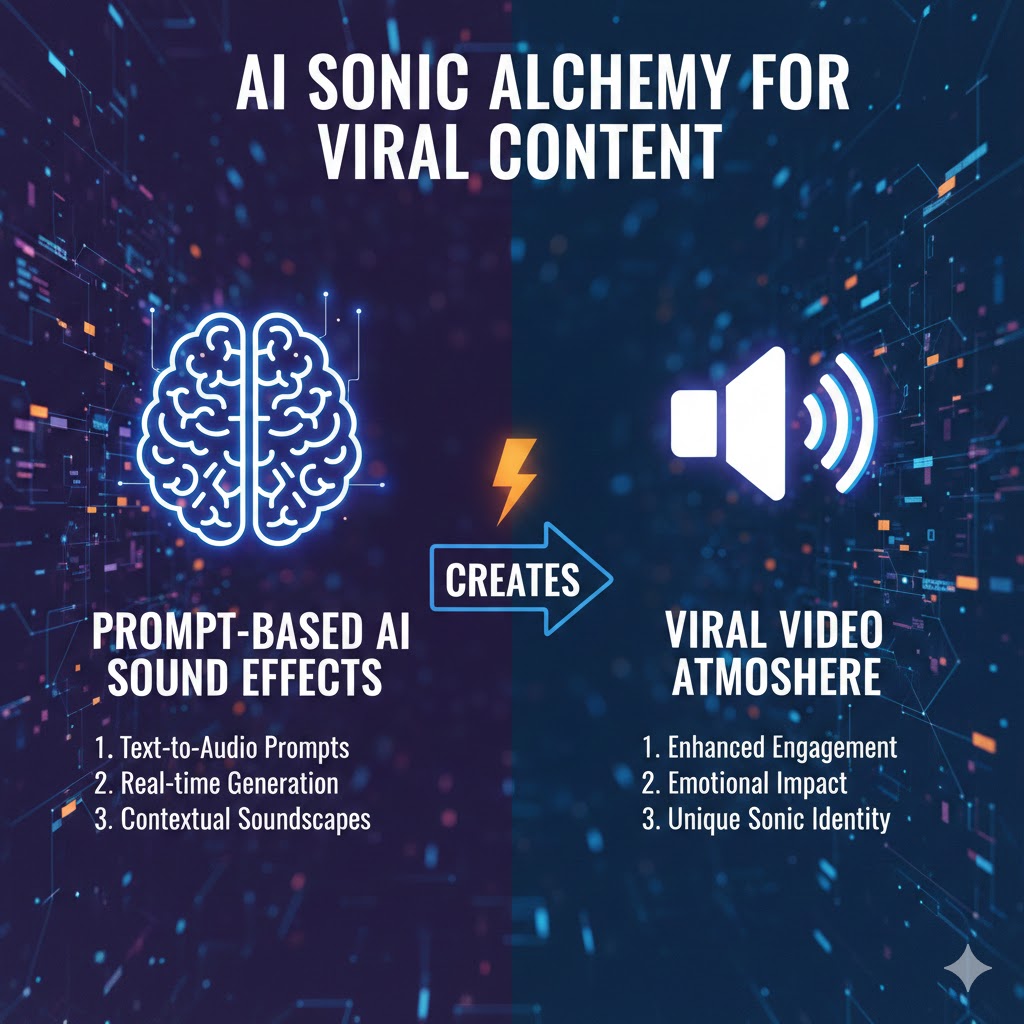
Prompt-Based AI Sound Effects In the rapidly evolving landscape of digital content creation, one technology is transforming how creators approach audio design: Prompt-Based AI Sound Effects. This revolutionary tool has democratized sound design, making it possible for anyone to generate professional-quality audio effects with nothing more than a text description. Whether you’re a YouTuber, TikTok creator, or professional video editor, understanding how to leverage Prompt-Based AI Sound Effects can be the difference between content that goes unnoticed and videos that capture millions of views.
1. Understanding the Power of Prompt-Based AI Sound Effects in Modern Content Creation
The audio component of your video content accounts for up to 70% of viewer engagement and emotional response. Traditional sound design required expensive equipment, extensive audio libraries, and technical expertise. Prompt-Based AI Sound Effects have revolutionized this process entirely.
What Makes Prompt-Based AI Sound Effects Revolutionary
These AI-powered tools utilize advanced machine learning algorithms trained on millions of audio samples. By simply describing the sound you need in natural language, the system generates custom audio effects that match your specifications. This technology has eliminated traditional barriers in several key ways:
- Accessibility: No need for expensive sound libraries or synthesis equipment
- Speed: Generate sounds in seconds rather than hours of searching or recording
- Customization: Create unique sounds tailored to your specific needs
- Cost-effectiveness: Reduce or eliminate licensing fees for commercial sound effects
- Creative freedom: Experiment with sounds that might be impossible to record naturally
The Psychology Behind Sound in Viral Content
Before diving into implementation, understanding why sound matters is crucial. Research in media psychology reveals that audio triggers emotional responses faster than visual stimuli. The human brain processes sound in the limbic system, the area responsible for emotional reactions and memory formation.
Viral videos consistently demonstrate superior audio design. They use sound to create anticipation, emphasize key moments, establish rhythm, and maintain viewer attention. Prompt-Based AI Sound Effects enable creators to tap into this psychological advantage without years of audio engineering training.
2. Essential Categories of Sound Effects for Viral Video Content
Understanding which sounds to create forms the foundation of effective audio design. Prompt-Based AI Sound Effects can generate virtually any sound imaginable, but certain categories prove particularly effective for viral content.
Transition Sounds
Transition effects guide viewers smoothly between scenes and maintain engagement during cuts. These include:
- Whoosh effects: Create movement and energy between clips
- Rise and fall sweeps: Build anticipation or signal completion
- Impact hits: Punctuate scene changes with authority
- Reverse cymbal swells: Add cinematic quality to transitions
- Digital glitch transitions: Perfect for tech or gaming content
Emphasis and Accent Sounds
These micro-sounds draw attention to specific moments and enhance comedic or dramatic timing:
- Pop and click sounds: Highlight text appearances or UI elements
- Cartoon boings and springs: Add humor and playfulness
- Snap and clap effects: Emphasize quick actions or reveals
- Bell dings and chimes: Signal correct answers or achievements
- Record scratch effects: Interrupt flow for comedic effect
Atmospheric and Ambient Effects
Background ambience establishes mood and context without overwhelming the primary audio:
- Environmental soundscapes: Urban buzz, forest atmosphere, ocean waves
- Indoor ambiences: Restaurant chatter, office sounds, home environments
- Weather effects: Rain, thunder, wind, or supernatural atmosphere
- Crowd reactions: Cheers, gasps, laughter, or applause
- Mechanical backgrounds: Factory sounds, computer labs, vehicle interiors
Impact and Action Sounds
Dynamic sounds that accompany movement and action keep energy levels high:
- Physical impacts: Punches, kicks, slaps, or collisions
- Destruction sounds: Breaking glass, crumbling, explosions
- Movement foley: Footsteps, clothing rustles, object handling
- Vehicle sounds: Car doors, engines, brakes, horns
- Sports effects: Ball bounces, racket hits, skate sounds
3. Mastering the Art of Prompt Writing for Optimal Results
The quality of your Prompt-Based AI Sound Effects depends entirely on how well you communicate your needs to the AI. Effective prompting is both art and science.
Fundamental Prompt Structure
Successful prompts follow a consistent framework that maximizes AI understanding:
Start with the basic sound type, then add descriptive qualities, specify duration or timing characteristics, include emotional or tonal attributes, and mention any specific frequency characteristics.
Example: “A deep, resonant whoosh sound lasting 1.5 seconds, starting quietly and building to a powerful crescendo, with a dark, ominous quality and heavy bass presence.”
Descriptive Language That Works
Certain vocabulary consistently produces better results with AI sound generation:
Texture descriptors: Crisp, smooth, rough, grainy, clean, distorted, warm, cold, bright, dark, metallic, organic, synthetic, natural.
Dynamic descriptors: Explosive, gentle, aggressive, subtle, powerful, delicate, forceful, soft, loud, building, fading, sustained, percussive.
Spatial descriptors: Close, distant, wide, narrow, open, enclosed, reverberant, dry, spacious, intimate, cavernous, tight.
Frequency descriptors: Deep, high-pitched, bass-heavy, trebly, mid-range, full-spectrum, filtered, boomy, thin, rich, hollow.
Advanced Prompting Techniques
Once comfortable with basics, these advanced strategies yield superior results:
Layered prompts: Describe multiple sound elements in sequence. “A glass breaking sound with sharp high-frequency shattering, followed by pieces falling and tinkling on a hard floor, with subtle reverb suggesting a medium-sized room.”
Reference-based prompts: Compare to known sounds. “A whoosh similar to a sword slash in anime, but more electronic and futuristic, with a trailing digital sparkle effect.”
Negative prompting: Specify what you don’t want. “A thunderclap that’s powerful but not distorted, dramatic but without excessive reverb, and realistic rather than cartoonish.”
Contextual prompting: Describe the usage scenario. “An interface button sound for a luxury brand’s website, sophisticated and subtle, conveying premium quality without being intrusive.”
4. Technical Implementation Strategies for Maximum Impact
Generating sounds is only the beginning. Strategic implementation determines whether your audio enhances or detracts from viewer experience.
Sound Design Hierarchy and Layering
Professional audio design employs a hierarchy that prevents sonic overcrowding:
Primary layer: Dialogue or narration takes absolute priority. These elements must remain intelligible at all times. Mix these at approximately negative 3 to negative 6 decibels from peak levels.
Secondary layer: Music beds and primary sound effects support the narrative. These should complement rather than compete with dialogue, typically mixed at negative 12 to negative 18 decibels.
Tertiary layer: Ambient effects and subtle accents fill space without demanding attention. Mix these at negative 20 to negative 30 decibels, creating subliminal atmosphere.
When using Prompt-Based AI Sound Effects, generate sounds with this hierarchy in mind. Request “subtle” or “background” versions for tertiary elements, “punchy” or “clear” versions for secondary effects, and ensure primary effects have sufficient presence without overwhelming dialogue.
Timing and Rhythm Principles
Sound timing creates the pulse of your video. Poor timing makes effects feel random or distracting, while precise timing enhances perceived quality and professionalism.
Anticipation timing: Place sounds slightly before the visual action begins. This creates a sense of momentum and prepares viewers for what’s coming. The sweet spot is typically 2-4 frames (approximately 66-133 milliseconds at 30fps) before the visual event.
Synchronization timing: Certain actions demand perfect sync between audio and visual. Impacts, button presses, and mouth movements require frame-accurate alignment for believability.
Extension timing: Sometimes sounds should continue after the visual action completes. Reverb tails, echo effects, and resonance can extend the emotional impact of a moment beyond what’s visible on screen.
Frequency Management and EQ Strategy
Multiple sound effects competing in the same frequency range create muddy, unprofessional audio. Strategic frequency management keeps your mix clear and powerful.
When generating Prompt-Based AI Sound Effects, consider frequency placement from the start. Request “bass-heavy” effects for low-end impact, “bright and crisp” effects for high-frequency presence, and “mid-range focused” sounds for vocal-range effects.
Apply equalization to carved out space:
- Low frequencies (20-200Hz): Reserve primarily for music bass, explosions, and deep impacts
- Low-mids (200-500Hz): Reduce slightly in most effects to prevent muddiness
- Mids (500Hz-2kHz): Critical for dialogue; other sounds should sit around this range
- High-mids (2kHz-6kHz): Presence and clarity; excellent for emphasizing important effects
- Highs (6kHz-20kHz): Air, sparkle, and definition; use for accents and details
5. Platform-Specific Optimization for Viral Potential
Different social platforms have unique audio characteristics and audience expectations. Optimizing your Prompt-Based AI Sound Effects for each platform dramatically increases viral potential.
TikTok and Short-Form Video Platforms
TikTok’s algorithm favors videos with high watch-through rates and engagement. Audio plays a massive role in both metrics.
Pacing requirements: Effects must hit fast and frequently. The first three seconds are critical. Use an attention-grabbing sound effect within the first second to hook scrolling viewers. Maintain audio interest with effects every 2-3 seconds throughout the video.
Frequency considerations: Mobile phone speakers emphasize mid-range frequencies and lack bass response. When generating effects for TikTok, prompt for sounds that are “clear on small speakers” or “mid-range focused.” Avoid effects that rely heavily on sub-bass for impact.
Trend integration: TikTok thrives on audio trends. Use Prompt-Based AI Sound Effects to create variations on trending sounds or to add original accents to popular audio tracks. This maintains trend relevance while adding unique flair.
YouTube and Long-Form Content
YouTube videos require sustained audio interest over longer durations without causing listener fatigue.
Consistency patterns: Establish audio signatures that viewers recognize. Generate a set of related sounds for different content sections. For example, create a family of transition whooshes that share sonic characteristics but vary in intensity.
Dynamic range: YouTube’s audio codec handles wide dynamic range well. Use this to your advantage by creating contrast between quiet, intimate moments and explosive, high-energy sequences. Generate both subtle and powerful versions of similar effects.
Viewer retention strategy: Place particularly satisfying or unique sound effects at strategic points to encourage continued viewing. The 30-second mark, the 2-minute mark, and the 70% completion point are critical for algorithm performance.
Instagram Reels and Stories
Instagram’s visual-first platform requires audio that complements without overpowering.
Visual-audio synchronization: Instagram audiences expect tight sync between visual effects and audio. When generating Prompt-Based AI Sound Effects for Instagram, focus on sharp, percussive sounds that match motion graphics, text animations, and visual transitions precisely.
Aesthetic considerations: Instagram trends toward polished, aesthetic content. Prompt for sounds that are “clean,” “modern,” “sophisticated,” or “premium” in quality. Avoid harsh, aggressive effects unless they specifically match your content style.
6. Creating Signature Sounds for Brand Recognition
As your content gains traction, developing sonic branding through Prompt-Based AI Sound Effects builds recognition and loyalty.
Developing Your Audio Identity
Successful creators have recognizable audio signatures. Think of the Netflix “ta-dum” or the THX Deep Note. While yours doesn’t need that level of production, consistency creates subconscious familiarity.
Intro stinger: Generate a unique 2-3 second sound that opens your videos. Use specific descriptors that create a distinctive character. “A bright, ascending melody of synthesized bells with a warm, welcoming tone and a satisfying concluding note.”
Transition family: Create three to five related transition effects that share sonic DNA. Use the same base prompts with variations in intensity or duration. This creates cohesion while preventing repetitiveness.
Accent palette: Develop a consistent set of accent sounds for text reveals, emphasis points, and reactions. Maintain a unified character across these elements through consistent prompt vocabulary.
Iterating and Refining Your Signature
Your audio identity should evolve as your content and audience mature:
- Version tracking: Save successful prompts and generated sounds systematically
- A/B testing: Try variations in different videos and monitor audience response
- Seasonal updates: Refresh your sound palette periodically while maintaining core identity
- Audience feedback: Pay attention to comments mentioning your audio design
7. Advanced Production Techniques for Professional Results
Elevating your Prompt-Based AI Sound Effects from good to exceptional requires understanding advanced production methods.
Layering Multiple Generated Sounds
Single sound effects often lack the complexity and richness of professional audio. Layering multiple AI-generated sounds creates depth and impact.
Impact layering strategy: For a powerful impact sound, generate and layer three separate elements. Create a low-frequency thud for weight and power, a mid-range crack or snap for presence and definition, and a high-frequency shatter or debris element for detail and realism. Offset these by a few milliseconds to create a more natural, complex sound.
Atmospheric depth: Build rich environments by layering multiple ambient effects. Generate a base environment sound, add specific foreground elements with movement and detail, and include distant background elements for depth and space.
Processing and Enhancement Workflow
Raw AI-generated sounds benefit from strategic processing:
Compression: Tame dynamic range and increase perceived loudness. Apply gentle compression with ratios between 2:1 and 4:1 to make sounds more consistent and punchy without squashing dynamics completely.
Spatial processing: Add dimension through reverb and delay. Match reverb characteristics to your video’s environment. Generate your Prompt-Based AI Sound Effects with “dry” characteristics, then add appropriate spatial processing in post to maintain mixing flexibility.
Harmonic enhancement: Use saturation or exciter plugins to add warmth, presence, or aggression. This technique particularly benefits sounds that feel thin or lack presence in the mix.
Noise reduction: While AI-generated sounds typically lack unwanted noise, occasional artifacts may appear. Light noise reduction maintains cleanliness without removing desirable audio characteristics.
Creating Evolving Soundscapes
Static audio grows tiresome in longer content. Create evolving soundscapes using Prompt-Based AI Sound Effects:
Generate multiple variations of similar sounds and automate between them, create gradual tonal shifts using pitch and filter automation, and layer sounds with different attack and release characteristics for natural evolution. Build intensity by adding layers progressively rather than maintaining constant density.
8. Common Mistakes to Avoid and Quality Control Measures
Even with powerful tools like Prompt-Based AI Sound Effects, certain pitfalls compromise audio quality and viewer experience.
Overuse and Audio Clutter
The most common mistake creators make is using too many sound effects. Every sound should serve a purpose. If removing an effect doesn’t diminish the video’s impact, that effect shouldn’t be there.
Strategic silence: Silence and space are powerful tools. They create contrast, allow viewers to process information, emphasize important moments through juxtaposition, and prevent listener fatigue over longer content.
Inappropriate Sound Choices
Not every moment needs sound. When generating Prompt-Based AI Sound Effects, consider whether the sound matches the mood, genre, and tone of your content.
Genre mismatch: Cartoon sounds in serious documentary content, aggressive impacts in calming meditation videos, or synthetic effects in natural, organic content create jarring disconnects that reduce professionalism.
Tonal inconsistency: Maintain consistent sonic character throughout your video. If your intro uses warm, analog-inspired sounds, sudden harsh digital effects later will feel out of place.
Technical Quality Issues
Even AI-generated sounds require quality control:
- Clipping and distortion: Monitor your audio levels constantly. Use limiters as safety nets but avoid pushing sounds into distortion
- Phase issues: When layering multiple sounds, check for phase cancellation that can make audio feel thin or hollow
- Format and compression artifacts: Export at appropriate bit depths and sample rates for your target platform
- Inconsistent volume levels: Different generated sounds may have vastly different loudness. Normalize or adjust volumes for consistency
Conclusion: Transforming Your Content with Prompt-Based AI Sound Effects
The accessibility and power of Prompt-Based AI Sound Effects have fundamentally changed content creation. What once required years of training and thousands of dollars in equipment now sits at your fingertips, accessible through simple text descriptions.
Success with these tools comes from understanding three core principles: knowing what sounds to create and when to use them, mastering the art of descriptive prompting to generate exactly what you need, and implementing sounds strategically with proper mixing and technical execution.
The viral videos dominating social platforms today share one characteristic: meticulous attention to audio design. Every whoosh, impact, and ambient sound has been carefully selected and placed to maximize emotional impact and viewer retention. With Prompt-Based AI Sound Effects, you now have access to the same professional-quality audio tools used by top creators.
Start small. Focus on one category of sounds, perhaps transition effects or emphasis accents. Master prompting and implementation for these before expanding your audio palette. Build your signature sound gradually, testing variations and gathering audience feedback.
The technology will continue evolving, with AI models becoming more sophisticated and responsive to nuanced prompts. Staying current with these developments while maintaining focus on fundamental sound design principles will keep your content competitive in an increasingly crowded digital landscape.
Your next viral video isn’t just about compelling visuals or clever concepts. It’s about creating a complete sensory experience that captivates viewers from the first frame to the last. Prompt-Based AI Sound Effects provide the tools. Your creativity and strategic implementation determine the results.
Also read this:
AI Video Editing: Automatically Matching Sound Effects to Scenes – The Future of Content Creation
How to Add AI Sound Effects to Any Video in Seconds: The Complete Creator Workflow Guide
Scalable Subscription Income Ideas That Grow Automatically: Build Your Recurring Revenue Empire