
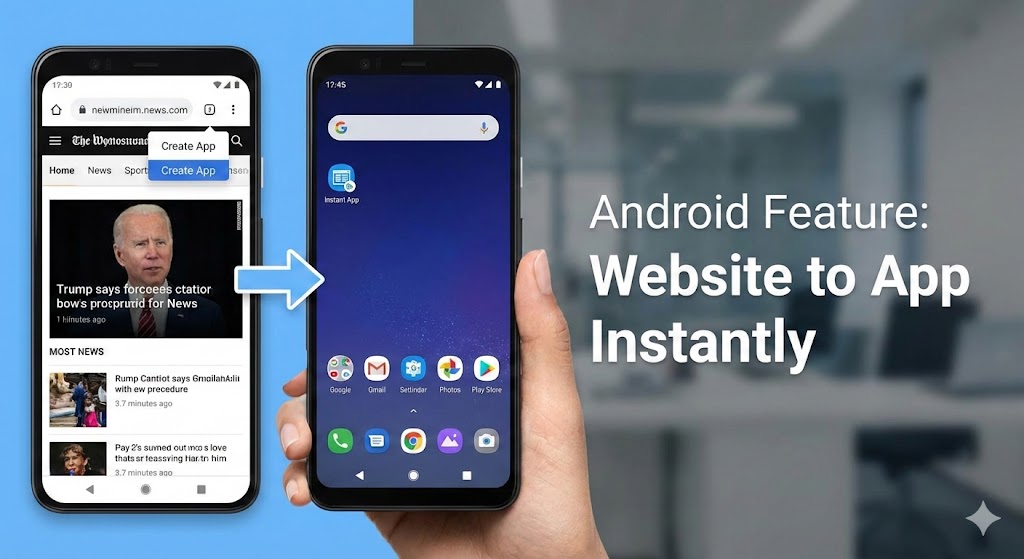
Any Website Into an App Instantly The digital landscape is constantly evolving, and one of the most revolutionary features that Android users can leverage is the ability to transform any website into a fully functional app with just a few taps. This capability isn’t just a gimmick—it’s a powerful tool that can fundamentally change how you interact with your favorite websites, streamline your mobile experience, and boost productivity in ways you never imagined.
In this comprehensive guide, we’ll explore everything you need to know about turning websites into apps on Android, from the basic mechanics to advanced optimization techniques that will transform your smartphone into a personalized productivity powerhouse.
1. Understanding the Technology Behind Website-to-App Conversion
Before diving into the practical applications, it’s essential to understand what’s actually happening when you convert a website into an app on your Android device.
The Progressive Web App Revolution
Progressive Web Apps (PWAs) represent a fundamental shift in how we think about mobile applications. Unlike traditional native apps that require installation from the Google Play Store, PWAs bridge the gap between websites and applications, offering the best of both worlds.
When you add a website to your home screen, Android creates what’s known as a WebAPK—a lightweight application package that behaves almost identically to a native app. This technology allows websites to function with app-like features including:
- Push notifications for real-time updates
- Offline functionality for accessing content without internet
- Full-screen display without browser chrome
- Hardware access for camera, location, and sensors
- Background synchronization for seamless data updates
How Android Makes It Seamless
Android’s implementation of this feature is remarkably sophisticated. The operating system doesn’t simply create a bookmark; it generates an actual application wrapper that integrates deeply with your device’s ecosystem. This means the “app” appears in your app drawer, can be pinned to your home screen, and functions independently of your browser.
2. Step-by-Step Guide to Converting Websites Into Apps
The process of turning any website into an app is surprisingly simple, but mastering the nuances can help you create a more polished experience.
Basic Conversion Method
The most straightforward approach works with virtually any website and takes less than 30 seconds:
- Open your preferred mobile browser (Chrome, Firefox, or Edge)
- Navigate to the website you want to convert
- Tap the three-dot menu icon in the upper right corner
- Select “Add to Home screen” or “Install app”
- Customize the app name if desired
- Confirm the installation
Once completed, the website icon appears on your home screen and functions as a standalone application.
Advanced Installation for Enhanced Functionality
For websites that fully support PWA technology, you’ll often see an automatic prompt suggesting installation. These sites typically offer enhanced features:
- Tap the installation banner when it appears
- Review the permissions the app requests
- Confirm installation to enable full PWA capabilities
- Access advanced features like offline mode and notifications
Browser-Specific Variations
Different browsers handle this conversion slightly differently, and understanding these variations helps you choose the best option for your needs.
Chrome offers the most robust implementation with full WebAPK support. The converted apps integrate seamlessly with Android and can even update independently in the background.
Firefox provides excellent privacy-focused conversions, particularly beneficial for users concerned about data tracking and security.
Edge leverages Microsoft’s PWA infrastructure, offering exceptional performance for Microsoft-related services and excellent cross-device synchronization.
3. The Transformative Benefits of Website Apps
Converting websites to apps isn’t just about convenience—it fundamentally transforms how you interact with web content on your mobile device.
Enhanced Performance and Speed
Website apps typically load faster than accessing the same content through a browser for several compelling reasons:
- Cached resources reduce data transfer requirements
- Eliminated browser overhead streamlines processing
- Optimized asset delivery improves rendering speed
- Reduced network requests minimize latency
Users report loading times that are 30-50% faster compared to traditional browser access, which translates to a noticeably more responsive experience.
Superior User Experience
The full-screen, distraction-free interface of website apps creates a more immersive experience. Without browser tabs, address bars, and navigation controls cluttering your screen, you can focus entirely on the content that matters.
App-style navigation gestures feel more natural and intuitive than browser-based interactions. Swiping, pulling to refresh, and gesture-based navigation create a cohesive experience that matches native applications.
Improved Organization and Productivity
Managing dozens of browser tabs becomes unwieldy quickly. Converting frequently accessed websites into dedicated apps helps you:
- Organize digital tools logically on your home screen
- Switch between services without hunting through tabs
- Maintain separate contexts for different tasks
- Reduce cognitive load associated with tab management
Data and Battery Efficiency
Website apps can be significantly more efficient than traditional browsing. Optimized caching reduces data consumption, which is particularly valuable for users with limited mobile plans. Additionally, the streamlined architecture often results in lower battery drain during extended use.
4. Ideal Use Cases and Applications
While you can theoretically convert any website into an app, certain categories of sites benefit most dramatically from this transformation.
Social Media and Communication Platforms
Social networks like Twitter, Reddit, and LinkedIn offer excellent PWA experiences that rival their native app counterparts. Many users actually prefer the website app versions because they:
- Consume less storage space than full native apps
- Update automatically without manual intervention
- Provide cleaner interfaces without unnecessary features
- Offer better privacy controls in some cases
Productivity and Work Tools
Cloud-based productivity suites transform into powerful mobile workstations when converted to apps. Services like:
- Google Workspace applications for document creation
- Project management platforms like Asana or Trello
- Communication tools including Slack and Discord
- Cloud storage services for file access
These conversions enable seamless multitasking and improve workflow efficiency significantly.
News and Content Platforms
News websites, blogs, and content aggregators become more accessible as dedicated apps. The offline reading capabilities of many PWAs mean you can save articles for later consumption without internet connectivity.
E-commerce and Shopping Sites
Online retailers benefit tremendously from app conversion. Dedicated shopping apps provide faster checkout experiences, easier product browsing, and convenient access to order tracking. Many e-commerce PWAs also support features like:
- One-click reordering of previous purchases
- Personalized product recommendations
- Push notifications for sales and restocks
- Saved payment information for expedited checkout
Entertainment and Streaming Services
Music streaming services, podcast platforms, and video sites often provide exceptional PWA experiences. Converting these to apps creates a more immersive entertainment experience with better background playback support.
5. Customization and Management Strategies
Once you’ve converted several websites to apps, effective management becomes crucial for maintaining an organized mobile experience.
Organizing Your App Collection
Create a logical structure for your website apps using folders and strategic placement:
- Group related services together by function or category
- Place frequently used apps on your primary home screen
- Utilize app drawers for less critical but still useful services
- Consider creating dedicated work and personal sections
Customizing App Icons and Names
Many website apps allow you to modify their appearance after installation. Personalizing icons and names helps create visual consistency across your device:
- Edit app names to be more concise or descriptive
- Use icon packs to create uniform visual styling
- Add widgets where supported for quick access to key features
- Adjust notification settings for each app individually
Managing Permissions and Settings
Each website app maintains its own permission set, separate from your browser. Review and adjust these regularly:
- Location access for maps and local services
- Camera and microphone permissions for communication apps
- Notification privileges for time-sensitive updates
- Storage access for offline functionality
Updating and Maintaining Website Apps
Unlike traditional apps, website apps update automatically when the underlying website changes. However, you should periodically:
- Clear cache data for apps experiencing issues
- Reinstall problematic apps to resolve persistent bugs
- Remove unused apps to free up storage space
- Check for new PWA features on frequently used sites
6. Technical Considerations and Limitations
While website apps offer tremendous benefits, understanding their limitations helps set appropriate expectations.
Storage and Resource Requirements
Website apps consume less storage than native apps but still require space for:
- Cached web content and assets
- Offline data storage
- App icons and metadata
- User preferences and settings
Monitor your device storage periodically and clear caches for apps you use infrequently.
Compatibility and Feature Restrictions
Not all websites function optimally as apps. Some limitations include:
- Reduced functionality compared to native apps for complex services
- Limited access to certain device hardware features
- Potential issues with advanced web technologies
- Inconsistent behavior across different Android versions
Privacy and Security Implications
Website apps operate within security frameworks similar to websites, which means:
- Data handling follows website privacy policies
- Browser-level tracking prevention may not apply
- Some advanced security features require native apps
- Cookie management differs from standard browsing
Always review privacy policies before converting sensitive services to apps, and consider using dedicated security-focused browsers for privacy-critical websites.
Performance Variations
The performance of website apps depends heavily on:
- The quality of the underlying website code
- Your device’s processing power and memory
- Network connection quality and stability
- Browser optimization and version
Older devices may experience slower performance with resource-intensive website apps compared to lightweight alternatives.
7. Troubleshooting Common Issues
Even with straightforward conversion processes, you may occasionally encounter problems. Here’s how to resolve the most common issues.
App Won’t Install or Crashes
If a website refuses to install or crashes immediately after conversion:
- Clear your browser cache and cookies
- Update your browser to the latest version
- Restart your device before attempting installation
- Try installing through a different browser
Poor Performance or Slow Loading
When a website app performs sluggishly:
- Clear the app’s cached data through Android settings
- Check your internet connection speed and stability
- Verify sufficient available storage on your device
- Consider whether the website itself has performance issues
Missing Features or Broken Functionality
Some websites don’t translate perfectly to app format:
- Contact the website owner to request better PWA support
- Use the browser version for features unavailable in the app
- Look for native app alternatives if critical features are missing
- Report bugs to help developers improve PWA implementations
Notification and Permission Problems
If notifications aren’t working or permissions seem incorrect:
- Review app permissions in Android system settings
- Disable and re-enable notifications for the specific app
- Ensure the website has permission to send notifications
- Check Do Not Disturb settings that might block alerts
8. Advanced Tips for Power Users
Take your website app experience to the next level with these advanced techniques.
Creating Custom Shortcuts and Workflows
Leverage Android’s automation capabilities to enhance your website apps:
- Use Tasker or similar apps to trigger specific website apps based on context
- Create custom home screen shortcuts with Shortcut Maker
- Implement gesture controls for faster app launching
- Set up location-based triggers for relevant services
Optimizing for Specific Use Cases
Different scenarios benefit from tailored configurations:
For work productivity, create a dedicated work profile with job-related website apps isolated from personal content. This separation improves focus and maintains professional boundaries.
For entertainment, configure website apps with offline content downloading where supported, ensuring access to media during commutes or travel without connectivity.
For research and learning, organize educational website apps with note-taking tools and reference materials for efficient information gathering.
Integrating with Android Ecosystem
Website apps can integrate with broader Android functionality:
- Share content between website apps and native applications
- Use Android’s sharing menu to send information efficiently
- Leverage split-screen multitasking for simultaneous app usage
- Create home screen widgets where websites support the functionality
Exploring Emerging PWA Features
The PWA landscape continues evolving with new capabilities:
- Background sync for automatic content updates
- Advanced caching strategies for improved offline experiences
- Web Bluetooth for connecting to external devices
- Payment integration for streamlined transactions
Stay informed about new PWA features by following web development blogs and testing website apps regularly for enhanced functionality.
9. Comparing Website Apps to Native Applications
Understanding when to use website apps versus native apps helps optimize your mobile experience.
Advantages of Website Apps
Website apps offer several compelling benefits over their native counterparts:
Storage efficiency is perhaps the most significant advantage, with website apps typically consuming 10-50% of the storage required by equivalent native apps. For users with limited device storage, this difference can be transformative.
Automatic updates ensure you always access the latest version without manual intervention or waiting for app store approvals. Changes made to the website immediately reflect in your app experience.
Cross-platform consistency means the same interface and features work identically across all devices, simplifying the learning curve when switching between phones and tablets.
When Native Apps Excel
Despite their advantages, website apps can’t fully replace native applications in certain scenarios:
Complex applications requiring extensive device integration work better as native apps. Gaming, advanced photo editing, and augmented reality experiences typically demand native implementations.
Offline functionality remains more robust in native apps, particularly for applications that require substantial local data storage or processing.
Performance-critical applications benefit from native optimizations that website technologies cannot match. Real-time communication, video editing, and intensive computational tasks run more smoothly as native apps.
Making the Right Choice
Consider these factors when deciding between website apps and native alternatives:
- Frequency of use (higher frequency may justify native apps)
- Required features and functionality complexity
- Available device storage and processing power
- Privacy and security requirements
- Personal preference for interface and experience
Many users find that a hybrid approach works best—using native apps for core services and website apps for secondary or occasional needs.
10. The Future of Website Apps on Android
The technology enabling website apps continues advancing rapidly, promising even more compelling experiences in coming years.
Emerging Technologies and Capabilities
New web standards enable increasingly sophisticated functionality that closes the gap between website and native apps:
WebAssembly brings near-native performance to web applications, enabling complex computations and graphics rendering that were previously impossible in browsers.
Advanced APIs provide access to previously restricted device features including file system access, Bluetooth connectivity, and enhanced sensor integration.
Improved caching strategies and offline capabilities make website apps increasingly viable for scenarios without reliable connectivity.
Industry Adoption and Support
Major technology companies are investing heavily in PWA technology:
Google continues enhancing Chrome’s PWA support and promoting best practices among developers. Microsoft has embraced PWAs across its ecosystem, including desktop Windows integration. Apple’s gradual adoption of PWA features on iOS signals broader industry acceptance.
As more businesses recognize the benefits of PWA development, expect to see improved website app experiences across categories.
Predictions for Mobile Usage Patterns
The evolution of website apps will likely influence broader mobile usage trends:
App store dominance may gradually diminish as users discover the convenience of installing applications directly from websites without intermediary marketplaces.
Storage constraints on mobile devices become less limiting as website apps reduce the need for large native applications.
Cross-platform development becomes more efficient, with developers creating single PWAs that work seamlessly across Android, iOS, and desktop platforms.
Conclusion
The ability to turn any website into an app instantly represents one of Android’s most underappreciated features. This powerful capability transforms how we interact with web content, offering improved performance, better organization, and enhanced productivity without the storage overhead and complexity of traditional applications.
Whether you’re looking to streamline your workflow, reduce data consumption, or simply create a cleaner mobile experience, website apps provide a flexible solution that adapts to your specific needs. By understanding the technology, mastering the conversion process, and implementing the optimization strategies outlined in this guide, you can unlock the full potential of this transformative Android feature.
Also read this:
Improve Call Audio in Crowded Places Using This Phone Feature