
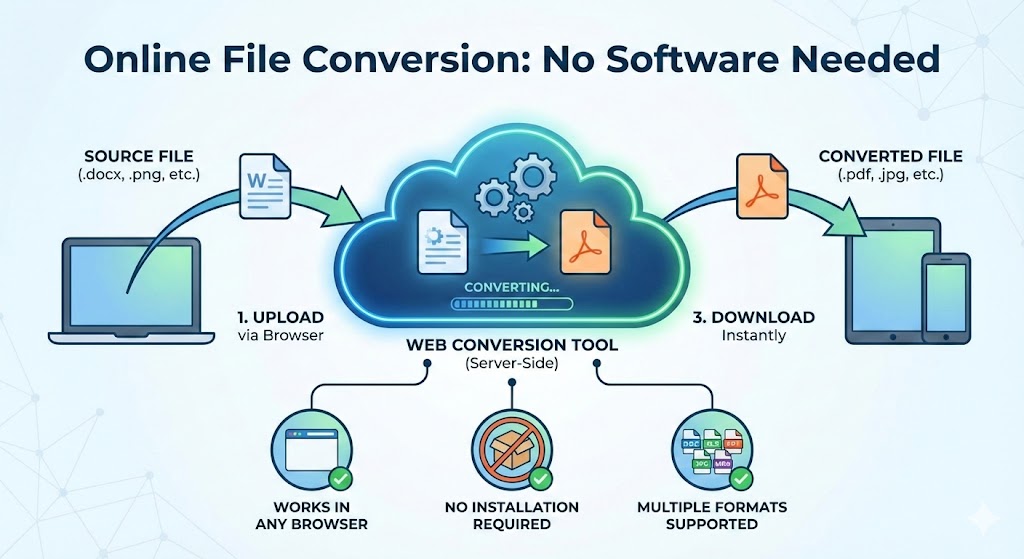
In today’s fast-paced digital world, the need to convert files between different formats arises constantly. Whether you’re preparing a presentation, editing documents, working with media files, or sharing information across platforms, file conversion has become an essential part of our daily workflow. The good news is that you no longer need to clutter your computer with specialized software for every conversion task.
Web-based conversion tools have revolutionized how we handle file format transformations. These online platforms allow you to convert virtually any file type directly in your browser, eliminating the need for downloads, installations, or updates. This comprehensive guide explores the best web tools that convert files without installing software, helping you work more efficiently while keeping your system clean and organized.
Understanding the Benefits of Online File Conversion
Before diving into specific tools, it’s important to understand why online converters have become the preferred choice for millions of users worldwide.
Accessibility and Convenience
Online conversion tools work on any device with a web browser and internet connection. Whether you’re using Windows, Mac, Linux, or even a tablet or smartphone, these tools remain consistently accessible. This cross-platform compatibility eliminates the common frustration of finding software that works with your specific operating system.
The convenience factor extends beyond accessibility. There’s no waiting for downloads, no installation wizards, and no software updates to manage. You simply visit a website, upload your file, select your desired output format, and receive your converted file within moments.
Storage and System Performance
Traditional desktop software consumes valuable hard drive space and system resources. Some conversion programs require hundreds of megabytes or even gigabytes of storage. By using web-based tools, you free up this space for files and applications that truly matter.
Additionally, your computer’s performance remains unaffected. Desktop conversion software often runs background processes that slow down your system, but online tools operate entirely on remote servers, leaving your local resources untouched.
Security and Updates
Reputable online conversion services maintain their infrastructure with the latest security protocols and conversion algorithms. You benefit from these updates automatically without any action on your part. The tools remain current with evolving file formats and industry standards without requiring manual updates.
1. Document Conversion Tools
Document conversion represents one of the most common file transformation needs. From PDFs to Word documents, spreadsheets to presentations, these tools handle the heavy lifting of document format changes.
PDF Conversion Specialists
PDF files are ubiquitous in professional settings, but they’re not always the most convenient format for editing. Several web tools specialize in PDF conversions with impressive accuracy.
SmallPDF stands out as a comprehensive PDF solution that handles conversions in both directions. You can convert PDFs to Word, Excel, PowerPoint, and image formats, or transform these formats into PDFs. The platform’s strength lies in its simplicity and speed, processing most documents in seconds while maintaining formatting integrity.
ILovePDF offers similar functionality with some additional features like PDF compression, merging, and splitting. The conversion process preserves complex layouts, embedded images, and even interactive elements when possible. The tool handles large files efficiently, processing documents up to 50MB in size without performance degradation.
PDF2Go provides a lightweight alternative that works exceptionally well for quick conversions. The interface is straightforward, requiring just three clicks: upload, select format, and convert. The service supports dozens of output formats and processes files entirely in the cloud.
Word Processing Conversions
Beyond PDF conversions, many scenarios require transforming documents between word processing formats. CloudConvert excels in this area, supporting conversions between DOC, DOCX, ODT, RTF, TXT, and numerous other text-based formats.
The tool’s batch conversion capability proves particularly valuable when dealing with multiple files. You can queue several documents simultaneously, and the system processes them sequentially without requiring constant attention. This feature saves considerable time when migrating large document collections between formats.
Zamzar offers extensive format support with over 1,200 conversion types available. The service handles not just common formats but also legacy and specialized document types. This broad compatibility makes Zamzar invaluable when working with older files or uncommon formats.
Spreadsheet and Presentation Conversions
Spreadsheet conversions present unique challenges due to formulas, formatting, and data types. Convertio specializes in handling these complexities, converting between Excel, CSV, ODS, and other spreadsheet formats while preserving cell formulas and data integrity.
For presentation files, these same tools handle PowerPoint, Keynote, and Google Slides conversions. The services maintain slide transitions, embedded media, and formatting elements that make presentations effective.
2. Image Format Converters
Images come in countless formats, each with specific use cases and advantages. Online image converters simplify the process of transforming images to meet different requirements.
Raster Image Conversions
Raster images include formats like JPEG, PNG, GIF, BMP, and TIFF. Each format has distinct characteristics regarding compression, transparency support, and color depth.
Online-Convert provides comprehensive image conversion with advanced options for adjusting quality, resolution, and color settings. You can convert a high-resolution PNG to an optimized JPEG for web use, or transform a JPEG into a PNG when transparency is needed.
The tool includes preset configurations for common scenarios like social media image sizes, print resolutions, and web optimization. These presets eliminate guesswork, ensuring your images meet platform-specific requirements.
CloudConvert’s image conversion capabilities extend beyond basic format changes. The platform allows resizing, cropping, and quality adjustments during the conversion process. This integrated approach reduces the need for multiple tools, streamlining your workflow.
Vector Graphics Handling
Vector images like SVG, EPS, and AI require specialized conversion approaches. Vector-to-vector conversions maintain the scalability and editability that make these formats valuable.
CloudConvert handles vector conversions competently, maintaining path data and layer information when converting between compatible formats. The service also manages vector-to-raster conversions, rasterizing vector graphics at specified resolutions for use in contexts where vector formats aren’t supported.
RAW Photo Processing
Professional photographers often work with RAW image formats from digital cameras. While specialized photo editing software typically handles these files, online converters provide convenient alternatives for quick conversions.
Raw.pics.io specializes in RAW format conversions, supporting formats from major camera manufacturers including Canon, Nikon, Sony, and Fujifilm. The service converts RAW files to standard formats like JPEG or TIFF while offering adjustment options for exposure, white balance, and color profiles.
3. Video Conversion Platforms
Video conversion has historically required powerful desktop software, but modern web tools now handle most video conversion needs effectively.
Format and Codec Conversions
Video files come in numerous containers and codecs, each optimized for different purposes. MP4, AVI, MOV, MKV, and WMV represent just a few common formats.
Online-Convert’s video converter supports extensive format options while providing control over important parameters like resolution, bitrate, frame rate, and codec selection. You can convert a high-quality MKV file to a more compatible MP4 format, adjusting quality settings to balance file size and visual fidelity.
Convertio handles video conversions with a focus on simplicity. The tool automatically selects appropriate settings for most conversions, but advanced users can access detailed options when needed. The platform processes videos efficiently, though conversion times depend on file size and complexity.
Video Compression and Optimization
Beyond format changes, many situations require reducing video file sizes for sharing or storage. Several online tools specialize in video compression without significant quality loss.
VideoSmaller focuses specifically on compression, reducing file sizes by adjusting resolution, bitrate, and encoding efficiency. The tool maintains acceptable quality while creating substantially smaller files suitable for email attachments or mobile viewing.
FreeConvert offers compression alongside format conversion, allowing you to simultaneously change formats and reduce file sizes. The service displays estimated output file sizes before conversion, helping you make informed decisions about quality settings.
Video Extraction Tools
Sometimes you need only the audio from a video file or specific frames as images. Online converters facilitate these extractions without requiring full video editing suites.
Online-Convert extracts audio tracks from videos, saving them in formats like MP3, WAV, or AAC. This functionality proves useful for creating podcasts from video content, extracting music from videos, or archiving audio separately.
4. Audio File Converters
Audio conversion needs range from simple format changes to complex quality adjustments and metadata preservation.
Music Format Conversions
Digital music exists in various formats including MP3, WAV, FLAC, AAC, OGG, and M4A. Each format represents different compromises between file size, quality, and compatibility.
Online-Convert’s audio converter handles these formats comprehensively. You can convert lossless FLAC files to space-efficient MP3s for portable devices, or transform compressed formats to WAV for audio editing purposes.
The platform allows bitrate selection, sample rate adjustment, and channel configuration. These options ensure your audio files meet specific requirements whether you’re preparing content for streaming services, archiving recordings, or optimizing for storage.
Podcast and Voice Recording Tools
Podcasters and content creators frequently need to convert and optimize audio files for distribution. CloudConvert handles common podcast formats efficiently, converting between MP3, M4A, and other widely-supported formats.
The service maintains ID3 tags and metadata during conversions, preserving essential information like artist names, album titles, and track numbers. This metadata preservation ensures your audio library remains organized regardless of format changes.
Audio Quality Enhancement
Some online tools go beyond simple conversion, offering audio enhancement features. While not as sophisticated as dedicated audio editing software, these features handle basic improvements.
Audio quality normalization ensures consistent volume levels across multiple files. Some converters include noise reduction capabilities that remove background hiss or hum from recordings. These enhancements improve audio quality during the conversion process, eliminating the need for separate editing tools.
5. Archive and Compression Tools
Compressed archives facilitate file storage and transfer, and online tools now handle these formats without requiring dedicated compression software.
Creating and Extracting Archives
ZIP remains the most common archive format, but others like RAR, 7Z, and TAR serve specific purposes. Online tools manage both archive creation and extraction through web interfaces.
ezyZip provides straightforward archive management, allowing you to create ZIP files from multiple source files or extract contents from various archive formats. The tool handles password-protected archives, requiring only the password to access protected contents.
Online-Convert supports less common archive formats including RAR, 7Z, TAR, and GZ. This broad support proves valuable when receiving files in formats your operating system doesn’t natively support.
Batch Processing Archives
When dealing with multiple archive files, batch processing saves considerable time. CloudConvert’s batch conversion capabilities extend to archive formats, allowing you to extract multiple archives simultaneously or convert between different compression formats efficiently.
The service processes archives entirely online, eliminating the need to download large compressed files before accessing their contents. You can extract specific files from archives without downloading entire archives, reducing bandwidth usage.
6. E-Book Format Converters
Digital reading has created diverse e-book formats, each with specific device compatibility and feature sets.
Popular E-Book Format Support
EPUB, MOBI, AZW, and PDF represent the most common e-book formats. Kindle devices prefer MOBI and AZW formats, while most other e-readers support EPUB.
Zamzar’s e-book conversion tools handle these format transformations, maintaining text formatting, embedded images, and table of contents structures. Converting between formats allows you to read content on your preferred device regardless of the original format.
Online-Convert provides similar functionality with additional options for adjusting page margins, font embedding, and metadata. These refinements ensure converted e-books display properly on target devices.
Document-to-E-Book Conversions
Beyond converting between e-book formats, many situations require transforming standard documents into e-book formats. This conversion proves useful for sharing documents with e-reader users or creating custom e-books from various sources.
CloudConvert handles document-to-e-book conversions effectively, transforming Word documents, PDFs, and other text formats into EPUB or MOBI files. The conversion process maintains formatting while adapting content for e-reader displays.
7. CAD and Technical Drawing Converters
Computer-aided design files require specialized handling due to their complexity and precision requirements.
Engineering File Format Support
CAD files come in proprietary formats like DWG, DXF, and DGN. Converting between these formats or to more accessible formats like PDF ensures broader compatibility.
Online-Convert supports common CAD formats, allowing conversions between different CAD standards. This functionality facilitates collaboration between teams using different CAD software platforms.
The tool maintains dimensional accuracy during conversions, preserving the precision essential for engineering and architectural work. Layer information and metadata typically transfer successfully when converting between compatible formats.
3D Model Conversions
Three-dimensional model files include formats like STL, OBJ, FBX, and COLLADA. These files serve purposes ranging from 3D printing to animation and game development.
Online converters handle basic 3D format transformations, though complex models with advanced materials or animations may lose some features during conversion. For straightforward geometry conversions, online tools provide convenient alternatives to specialized 3D software.
8. Font File Converters
Web development and design work often require converting fonts between formats for cross-platform compatibility.
Web Font Optimization
Modern web fonts use formats like WOFF, WOFF2, EOT, and TTF. Converting between these formats ensures fonts display correctly across different browsers and devices.
CloudConvert handles font conversions, transforming desktop font formats to web-optimized versions. The service maintains glyph information and font metrics during conversion, ensuring text renders identically in different formats.
Font Squirrel’s Webfont Generator provides specialized font conversion with subsetting options. You can extract only the characters you need from fonts, reducing file sizes and improving page load times. This optimization proves particularly valuable for web performance.
9. Specialized Scientific and Data Format Tools
Certain professional fields require converting specialized file formats that general-purpose converters don’t support.
Statistical Data Conversions
Data analysis often involves moving information between different statistical software packages. CSV, XLSX, SAV, and DTA formats all serve statistical purposes with varying levels of metadata support.
Online converters handle basic statistical data transformations, converting between spreadsheet formats and statistical software formats. While complex statistical metadata may not always transfer perfectly, basic data structures typically convert successfully.
Geographic Information System Files
GIS professionals work with formats like SHP, KML, KMZ, and GeoJSON. Converting between these formats facilitates data sharing and integration across different mapping platforms.
MyGeodata Cloud specializes in GIS format conversions, handling coordinate system transformations and projection changes. The service maintains spatial accuracy and attribute data during conversions, ensuring geographic information remains usable.
10. Practical Tips for Using Online Conversion Tools
Understanding how to use these tools effectively maximizes their value while avoiding common pitfalls.
Security and Privacy Considerations
When using online conversion tools, consider the sensitivity of your files. Reputable services typically delete uploaded files after a set period, but understanding their privacy policies provides peace of mind.
For highly sensitive documents, look for services that offer secure connections through HTTPS and clearly state their data retention policies. Some converters provide options to delete files immediately after conversion, adding an extra layer of privacy protection.
Avoid uploading confidential business documents, personal identifying information, or proprietary content to unknown conversion services. Established tools with clear privacy policies offer safer options than unfamiliar platforms.
Quality Settings and Optimization
Different conversion scenarios require different quality settings. Understanding these parameters helps you achieve optimal results.
For images intended for web use, lower quality settings and smaller dimensions reduce file sizes without noticeably affecting visual appeal. Conversely, images for printing require higher resolutions and quality settings to ensure crisp, professional output.
Video conversions involve balancing file size against visual quality. Higher bitrates produce better-looking videos but create larger files. Consider your distribution method when selecting settings—streaming platforms benefit from smaller files, while archival purposes warrant higher quality.
Batch Processing Efficiency
When converting multiple files, batch processing saves time and effort. Many online converters support uploading several files simultaneously, processing them as a queue.
Organize your files before starting batch conversions. Ensure all files require the same output format and settings to avoid needing manual adjustments during processing. This preparation streamlines the conversion process.
Understanding Format Limitations
Not all conversions maintain perfect fidelity. Understanding potential limitations prevents disappointment and helps you choose appropriate formats.
Converting from lossy formats like JPEG or MP3 to lossless formats doesn’t restore lost information. The conversion creates a larger file without improving quality. Always start with the highest quality source available when conversion is anticipated.
Complex document formatting may not translate perfectly between different word processing formats. Review converted documents to ensure formatting, images, and special elements transferred correctly, making adjustments as needed.
Internet Speed Considerations
Upload and download speeds affect the practicality of online conversions, particularly for large files. A slow internet connection may make desktop software more practical for substantial conversion tasks.
Many online converters display upload progress and estimated conversion times, helping you gauge whether the process is practical with your connection speed. For very large files on slower connections, consider whether the wait justifies the convenience of avoiding software installation.
Browser Compatibility
While most online conversion tools work across modern browsers, optimal performance often requires updated browser versions. Chrome, Firefox, Safari, and Edge all support these services effectively.
Enable JavaScript and allow necessary permissions for file uploads and downloads. Some converters use modern web technologies that require these capabilities. Browser extensions that block scripts may interfere with conversion tools, requiring temporary disabling.
Bookmark and Organize Tools
With numerous conversion tools available, organizing your favorites improves efficiency. Create browser bookmarks for frequently-used converters, organizing them by file type or purpose.
Some power users maintain a reference document listing their preferred tools for different conversion types. This personal knowledge base eliminates the need to rediscover tools for occasional conversion needs.
Emerging Trends in Online File Conversion
The field of online file conversion continues evolving, with new capabilities and improvements appearing regularly.
Artificial Intelligence Integration
Machine learning algorithms increasingly enhance conversion quality, particularly for complex transformations. AI-powered converters can better maintain formatting, intelligently upscale images, and improve audio quality during conversions.
Document conversions benefit from AI that understands content structure, maintaining hierarchies, formatting, and layouts more effectively than traditional conversion algorithms. These improvements make online tools increasingly competitive with desktop software.
Mobile-First Design
As mobile device usage grows, conversion tools are optimizing for touch interfaces and smaller screens. Responsive designs ensure these tools work effectively on smartphones and tablets, extending their accessibility.
Progressive web apps bring app-like experiences to browsers, with offline capabilities and improved performance. These advances blur the line between web tools and native applications, offering the convenience of online tools with enhanced functionality.
API and Integration Capabilities
Many conversion tools now offer APIs allowing integration into other applications and workflows. Developers can incorporate conversion capabilities into their own tools, automating repetitive tasks and creating seamless experiences.
Cloud storage integrations allow direct conversion of files stored in services like Google Drive, Dropbox, and OneDrive. These integrations eliminate downloading and re-uploading files, streamlining workflows for cloud-based work environments.
Conclusion: Embracing Web-Based Conversion Tools
The evolution of web tools that convert files without installing software represents a significant shift in how we handle digital file management. These platforms have democratized access to professional-grade conversion capabilities, eliminating barriers of cost, compatibility, and technical expertise.
The convenience of accessing conversion tools from any device, at any time, without maintaining local software installations, transforms productivity. Whether you’re a professional handling hundreds of conversions monthly or an occasional user needing rare format changes, online tools provide practical solutions.
As internet speeds increase and browser technologies advance, the capabilities of these web-based tools will only expand. The distinction between local software and web applications continues blurring, with online tools offering increasingly sophisticated features that rival traditional desktop programs.
Also read this:
One-Time Setup Digital Products That Generate Passive Income
The best Guide to Selling Demand Forecasting Systems to Local Businesses in 2025