
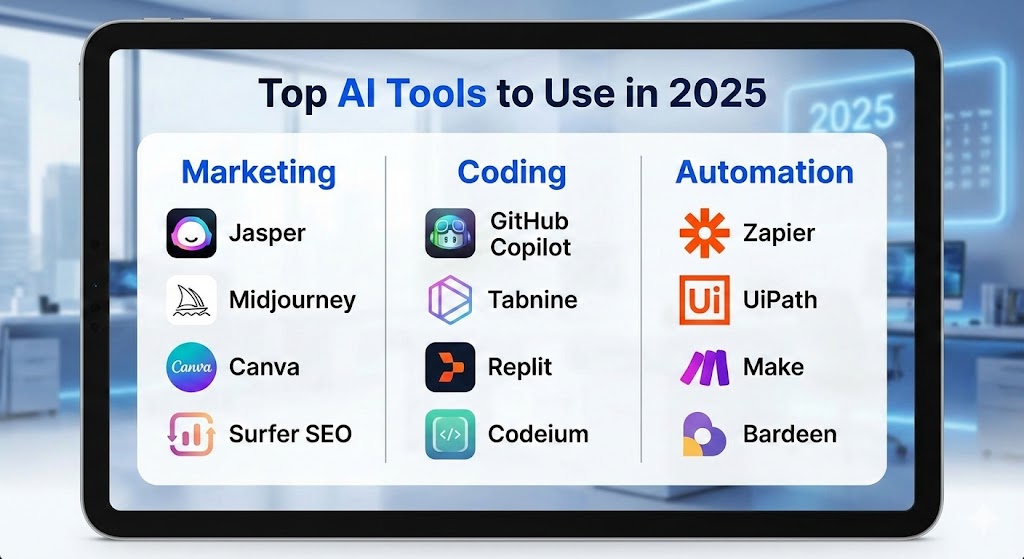
The artificial intelligence revolution has reached a critical inflection point in 2025, transforming how businesses operate, developers build applications, and marketers engage audiences. The AI Tools list featured in this comprehensive guide represents the most powerful, practical, and impactful technologies available today, carefully curated across three essential domains: marketing, coding, and automation. Whether you’re a startup founder seeking competitive advantages, an enterprise executive driving digital transformation, or a professional looking to enhance productivity, understanding and implementing these tools has become fundamental to success.
This AI Tools list goes beyond superficial overviews, providing detailed insights into capabilities, pricing structures, ideal use cases, and real-world applications that deliver measurable results. As artificial intelligence continues advancing at unprecedented rates, staying informed about the right tools for your specific needs separates industry leaders from those struggling to keep pace. The 2025 landscape offers sophisticated solutions that democratize access to advanced capabilities previously available only to large corporations with substantial resources and technical expertise.
1. Essential Marketing AI Tools for 2025
Marketing has undergone a fundamental transformation with AI integration, enabling unprecedented personalization, automation, and data-driven decision-making. The AI Tools list for marketing encompasses platforms that revolutionize content creation, customer engagement, campaign optimization, and performance analytics.
Sprout Social: Comprehensive Social Media Intelligence
Sprout Social leads the AI Tools list for social media marketing with its all-in-one platform that combines publishing, analytics, customer care, and social listening capabilities. According to the 2025 Sprout Social Index, 97% of marketing leaders consider AI proficiency vital for proper job performance, highlighting why this platform has become indispensable.
The platform’s AI-powered features automate manual tasks including content scheduling, sentiment analysis, and competitor monitoring. Advanced social listening capabilities identify emerging trends, track brand mentions, and analyze customer sentiment across multiple channels simultaneously. The system generates actionable insights that inform strategic decisions while maintaining authentic audience connections.
Sprout Social integrates seamlessly with existing marketing technology stacks, transforming disjointed data into business-critical intelligence. Teams report significant productivity improvements as AI handles routine tasks, allowing human strategists to focus on creative campaigns and relationship building.
Jasper: Advanced AI Writing Assistant
Jasper stands prominently in the AI Tools list as a powerful AI writing assistant designed specifically for marketing teams and content creators. The platform excels at generating high-quality copy across diverse formats including blog posts, social media content, email campaigns, product descriptions, and advertising copy.
What distinguishes Jasper from generic AI writing tools is its brand voice customization and style guide features. Organizations can establish specific guidelines ensuring all AI-generated content maintains consistency with established brand identity. The long-form assistant helps create detailed content while the content improver refines existing text for enhanced clarity and engagement.
Jasper integrates with essential marketing tools including Surfer SEO, Grammarly, Copyscape, SEMrush, Google Docs, WordPress, Shopify, HubSpot, Airtable, and Zapier. This extensive integration ecosystem enables seamless workflows where content moves efficiently from creation through optimization to publication.
Copy.ai: Marketing-Focused Content Creation
Copy.ai specializes in optimizing marketing and sales content, earning its place on the AI Tools list through focused functionality for creating high-converting copy. The platform analyzes user input to generate engaging material for emails, social media posts, advertisements, and promotional campaigns.
The tool proves particularly effective for shorter-form content requiring rapid production. Marketing teams leverage Copy.ai to overcome creative burnout, generate multiple variations for A/B testing, and maintain consistent messaging across channels. While it requires refinement for long-form applications, its speed and variety make it valuable for teams producing high volumes of marketing collateral.
HubSpot: Integrated Marketing Automation
HubSpot has evolved into a comprehensive marketing ecosystem with deeply integrated AI capabilities that span content creation, email marketing, customer relationship management, and analytics. The AI Tools list recognizes HubSpot’s AI Website Generator, Content Writer, and marketing automation tools as industry-leading solutions.
The platform’s AI assistant helps create any marketing content type with ease, from emails and landing pages to blogs and social media posts. Beyond content creation, HubSpot automates workflows, tracks customer journeys, and provides detailed analytics that inform strategic decisions. The system integrates with thousands of third-party applications, positioning itself as a central marketing operations hub.
ActiveCampaign: Predictive Email Marketing
ActiveCampaign combines email marketing, marketing automation, generative AI, and CRM tools into a unified platform designed for creating exceptional customer experiences. The AI Tools list highlights its autonomous marketing engine and predictive capabilities that trigger the right message through the right channel at optimal times.
The platform’s AI-driven insights enable teams to personalize email content effectively based on customer behavior patterns. Unified email, SMS, and CRM workflows support mid-market and growing businesses requiring connected, data-driven marketing stacks. ActiveCampaign’s predictive analytics help identify high-value prospects and optimize campaign timing for maximum engagement.
Canva: AI-Powered Design Democratization
Canva has transformed from a simple design tool into an AI-powered creative platform that enables non-designers to produce professional-quality graphics, presentations, and marketing materials. The AI Tools list features Canva’s Magic Studio, which provides intelligent design suggestions, background removal, text generation, and image enhancement.
The platform offers thousands of customizable templates, extensive font libraries, and color palettes that simplify brand-consistent design creation. Integration with HubSpot and other marketing platforms enables seamless publication of created assets. Recent additions include improved text rendering models and new AI-powered design styles that keep pace with evolving aesthetic trends.
Smartly.io: AI-Powered Advertising Platform
Smartly.io enhances social media marketing through creative production automation, cross-channel campaign optimization, and predictive performance analytics. This AI Tools list entry specializes in automating advertising workflows while maintaining creative quality and brand consistency.
The platform enables marketers to produce creative assets efficiently, optimize campaigns across multiple social media channels, conduct comprehensive social analysis, and predict future performance trends. Large brands use Smartly.io to manage complex advertising operations that span multiple markets, languages, and audience segments.
Delve AI: Audience Intelligence Platform
Delve AI addresses a critical marketing need through AI-powered audience research, competitor analysis, and persona generation. The AI Tools list includes Delve AI because it automates the time-intensive process of understanding target audiences and competitive landscapes.
The platform’s Advisor feature generates specialized recommendations for SEO, content, PPC, social media, email, sales, media, and public relations strategies. By analyzing vast amounts of behavioral data, Delve AI creates detailed customer personas that inform targeting decisions and content strategies. Teams use these insights to optimize marketing investments and improve campaign performance.
2. Leading Coding AI Tools for Developer Productivity
Development workflows have been revolutionized by AI coding assistants that accelerate programming, reduce errors, and enable developers to focus on complex problem-solving rather than repetitive tasks. The AI Tools list for coding features platforms that range from simple autocomplete to autonomous coding agents.
GitHub Copilot: The Industry Standard
GitHub Copilot dominates the AI Tools list for AI coding assistants, having established itself as the most widely adopted AI developer tool since launching in 2021. Built through collaboration between GitHub and OpenAI, Copilot integrates directly into popular development environments including VS Code, Visual Studio, JetBrains IDEs, and Neovim.
The tool now supports multiple advanced AI models including Claude 3 Sonnet and Gemini 2.5 Pro alongside OpenAI’s GPT models. Recent 2025 updates introduced Agent Mode, which enables autonomous code generation across multiple files. Copilot can be assigned GitHub issues, autonomously write code, create pull requests, and respond to feedback.
Key features include intelligent code completion, Copilot Chat for debugging assistance and code explanations, Copilot Edits for multi-file modifications, and CLI integration for terminal-based assistance. The pricing structure offers an Individual plan at $10/month with unlimited usage, Business at $19/user/month with team management, and Enterprise at $39/user/month with advanced security. Students, teachers, and open-source maintainers access Copilot free through GitHub Education.
GitHub Copilot’s stability, ease of integration, and reliable code suggestions make it particularly suitable for developers wanting AI assistance without disrupting existing workflows. The platform trains on all languages appearing in public repositories, with particularly strong support for JavaScript, Python, TypeScript, and Go.
Cursor: AI-First Development Environment
Cursor has rapidly gained traction in the AI Tools list as an AI-native code editor built on VS Code that offers comprehensive project-wide context understanding and multi-file editing capabilities. Unlike traditional IDEs with AI extensions, Cursor integrates AI deeply into every aspect of the development experience.
The platform provides access to multiple AI models including GPT-5, Claude 4.5 Sonnet, Gemini 2.5 Pro, and Grok Code, allowing developers to choose optimal models for specific tasks. Cursor’s Composer mode enables multi-file refactoring and feature implementation across entire codebases. The chat interface supports context-aware conversations that reference specific files, folders, and code segments.
Cursor Agent represents a breakthrough feature that automates context gathering, runs terminal commands, handles files, and performs semantic code searches. The bug finder scans code against the main branch, rating potential issues and offering one-click fixes. Pricing starts at $20/month for the Pro plan with 500 fast premium requests, scaling to $40/month for Pro+ and Ultra tiers.
Developers working on complex projects requiring advanced AI capabilities and granular control find Cursor particularly valuable. The platform excels at understanding broader project context compared to simpler autocomplete tools, though it presents a steeper learning curve than GitHub Copilot.
Claude Code: Autonomous Development Assistant
Claude Code has emerged in the AI Tools list as a revolutionary terminal-based coding assistant that handles entire features autonomously while developers focus on architecture and strategy. Rather than simply suggesting code, Claude Code designs complete architectures, implements both client and server-side code, adds proper error handling, writes comprehensive tests, and creates deployment scripts.
The autonomous execution capabilities distinguish Claude Code from competitors. Developers describe features or requirements, and Claude Code independently plans implementation strategies, writes necessary code across multiple files, and tests solutions. This approach proves particularly valuable for teams building complex systems requiring coordination across multiple components.
Pricing tiers include Pro at $20/month for autonomous coding with moderate usage, and Max at $200/month for unlimited access to the most powerful coding AI available. The command-line interface appeals to developers comfortable working in terminal environments and those seeking minimal distraction during focused development sessions.
Qodo: AI-Powered Code Quality Platform
Qodo prioritizes code quality, test coverage, and code integrity over pure generation speed, earning its position on the AI Tools list through specialized focus on producing production-ready code. The platform integrates with VS Code, JetBrains, terminal environments, and CI pipelines.
Specialized agents including Qodo Merge for pull request reviews, Qodo Gen for code and test generation, and Qodo Aware for security scanning collaborate through shared codebase intelligence. This ensures every AI suggestion aligns with organizational standards and architectural patterns. The agentic code review capabilities help teams ship reliable, compliant code faster.
Features include automated test generation with edge case coverage, documentation generation, risk assessment for pull requests, and architecture compliance checking. Qodo offers a free plan for individual developers covering test generation, the coding agent, code review, and auto-documentation.
Codeium: Free AI Coding Assistant
Codeium distinguishes itself in the AI Tools list by offering completely free access to AI coding assistance with no usage limits, making advanced development tools accessible to individual developers and small teams with limited budgets. The platform supports over 70 programming languages and integrates with 40+ IDEs.
Features include intelligent autocomplete, AI-powered chat for debugging and explanations, and multi-file editing capabilities. While the free tier provides substantial functionality, paid plans starting at $12/user/month add team collaboration features and priority support.
Codeium proves particularly valuable for developers wanting to explore AI-assisted coding without financial commitment. Students, freelancers, and small development teams benefit from enterprise-level capabilities without subscription costs.
3. Powerful Automation AI Tools for Workflow Optimization
Automation platforms have become essential infrastructure for modern businesses, connecting disparate applications and eliminating manual processes. The AI Tools list for automation features platforms ranging from no-code solutions for business users to sophisticated systems for developers.
Zapier: Democratized Automation
Zapier leads the AI Tools list for no-code automation with over 8,000 app integrations and an intuitive interface that enables non-technical users to create sophisticated workflows called “Zaps.” The platform’s AI-powered automation builder allows users to describe desired workflows in natural language, automatically generating the necessary connections and logic.
Key capabilities include trigger-based automation where specific events initiate workflow sequences, multi-step Zaps that chain multiple actions together, and built-in AI features including text summarization, data classification, and content generation. Zapier Central provides AI-powered bots that understand business context and suggest workflow improvements.
The pricing structure begins with a free tier offering 100 tasks monthly, Professional plans starting at $19.99/month with 750 tasks, and enterprise solutions with advanced security and compliance features. While Zapier’s simplicity makes it accessible, task-based pricing means costs can escalate rapidly for complex, high-volume workflows.
Use cases span customer relationship management, marketing automation, data synchronization, notification systems, and content distribution. Small to medium-sized businesses particularly benefit from Zapier’s vast integration library and minimal learning curve.
Make (Formerly Integromat): Visual Workflow Builder
Make offers a more sophisticated approach to automation with its visual scenario builder that represents workflows as interactive diagrams. The AI Tools list highlights Make’s powerful branching, iterators, and data transformation capabilities that exceed what’s possible with simpler linear automation tools.
The canvas-based interface provides better visualization of complex data flows compared to step-based builders. Users can create sophisticated conditional logic, loops, and advanced functions that handle intricate business processes. Error handling capabilities automatically retry failed operations or trigger alternative workflows.
Pricing operates on an operations-based model starting at $9/month, making Make more cost-effective than task-based competitors for high-volume automations. The free tier includes sufficient operations for testing and small-scale implementations.
Make proves ideal for operations teams needing multi-step logic and organizations requiring cost-effective automation at scale. The platform balances technical capability with visual accessibility, appealing to users comfortable with moderate complexity who find Zapier too restrictive.
n8n: Self-Hosted Automation Platform
n8n distinguishes itself in the AI Tools list as an open-source, self-hosted workflow automation platform that provides complete control over automation infrastructure and data. Unlike cloud-only services, n8n can be installed on private servers, addressing security, compliance, and data sovereignty requirements.
The node-based interface offers exceptional technical flexibility, supporting custom npm libraries, external script execution, and community-developed nodes. Developers can create custom integrations that call any API or perform unique actions unavailable in pre-built connectors. This extensibility makes n8n particularly powerful for complex, customized automation scenarios.
AI capabilities include native LangChain integration with nearly 70 nodes dedicated to AI applications, enabling sophisticated workflows involving multiple AI models and services. Users can build chatbots, content generation pipelines, data analysis systems, and intelligent automation that adapts based on AI decisions.
Pricing follows an execution-based model where each workflow run counts as one execution regardless of complexity. This contrasts with task-based pricing that charges per individual action, making n8n significantly more economical for workflows involving many steps. The free self-hosted option appeals to organizations with technical teams comfortable managing infrastructure.
n8n targets developers, data-conscious organizations, and enterprises requiring maximum flexibility and control. Teams building AI-native applications or handling sensitive data particularly value the self-hosting capabilities and advanced AI integration.
Microsoft Power Automate: Enterprise Automation
Microsoft Power Automate integrates deeply with the Microsoft ecosystem while providing comprehensive automation capabilities through an AI-assisted visual builder. The AI Tools list includes Power Automate because Copilot integration enables creating workflows using natural language descriptions.
The platform offers both desktop flows for robotic process automation and cloud flows for API-based integration. AI features assist with task discovery, workflow creation, and optimization recommendations. Organizations already invested in Microsoft 365, Azure, and Dynamics benefit from seamless integration across the entire technology stack.
Power Automate proves ideal for enterprises standardized on Microsoft technologies requiring both simple task automation and complex process orchestration with governance and compliance controls.
Workato: Enterprise Integration Platform
Workato provides enterprise-grade integration and automation capabilities with AI agents designed for customer support, marketing, sales, finance, and internal operations. The AI Tools list features Workato for organizations requiring sophisticated automation across complex application landscapes.
The platform’s robust integration capabilities connect agents to enterprise systems, enabling AI-driven processes that span multiple departments and data sources. Security, governance, and scalability features meet requirements of large organizations with strict compliance needs.
IFTTT: Internet of Things Automation
IFTTT (If This Then That) specializes in connecting apps, devices, and services through simple conditional logic. The AI Tools list includes IFTTT for users seeking straightforward automation linking consumer applications and smart home devices.
The platform’s applets trigger actions based on specified conditions, making it accessible to non-technical users. While less powerful than enterprise platforms, IFTTT excels at personal productivity automation and IoT device integration.
4. Specialized AI Tools for Content and Creative Work
Beyond general marketing and development tools, specialized AI solutions address specific creative and content production needs. The AI Tools list in this category includes platforms for video creation, audio generation, and multimedia content.
Synthesia: AI Video Generation
Synthesia enables creating professional videos featuring AI avatars from text scripts, eliminating traditional video production requirements. The AI Tools list highlights Synthesia’s 240+ digital avatars and 140+ language support for global content creation.
Organizations use Synthesia for training modules, internal communications, customer support videos, and marketing content. The platform offers 36 free minutes annually with paid plans providing extensive customization options including custom avatars and branding.
Runway: Advanced Video Editing
Runway provides AI-powered video editing with capabilities including background removal, object tracking, and motion graphics automation. The AI Tools list recognizes Runway’s text-to-video generation and professional editing features that accelerate post-production workflows.
ElevenLabs: Voice Synthesis
ElevenLabs delivers highly realistic voice synthesis for audiobook narration, video voiceovers, and conversational AI applications. The AI Tools list includes ElevenLabs because its natural-sounding speech generation rivals human voice actors while providing unprecedented flexibility and cost efficiency.
Descript: Audio and Video Editing
Descript revolutionizes audio and video editing through text-based interfaces where users edit transcripts to modify underlying media. The AI Tools list features Descript’s automatic transcription, filler word removal, and studio sound enhancement that simplify podcast and video production.
5. Business Intelligence and Analytics AI Tools
Data analysis has been democratized by AI tools that transform complex datasets into actionable insights without requiring advanced technical skills. The AI Tools list for analytics includes platforms that automate reporting, visualization, and predictive modeling.
Tableau: Visual Analytics Platform
Tableau provides visual analytics with built-in AI features including forecasting, trend detection, and smart visualizations. The AI Tools list highlights Tableau GPT, which enables users to ask analytical questions in natural language and receive interactive visualizations.
The platform’s ability to connect multiple data sources, create real-time dashboards, and share insights across organizations makes it valuable for data-driven decision-making. Businesses use Tableau to identify patterns, monitor KPIs, and communicate complex information through intuitive visual formats.
DataRobot: Automated Machine Learning
DataRobot offers AI-driven model building with a no-code drag-and-drop interface that makes machine learning accessible to business analysts. The AI Tools list includes DataRobot for its predictive modeling capabilities that help businesses forecast trends, detect anomalies, and automate data-driven tasks.
Retailers use DataRobot for sales forecasting and dynamic pricing while marketing teams leverage it for campaign performance optimization and customer segmentation. The platform bridges the gap between data science expertise and business needs.
Perplexity: AI-Powered Research
Perplexity functions as an AI research assistant that generates structured responses with source citations. The AI Tools list recognizes Perplexity for researchers, journalists, and professionals requiring comprehensive information gathering with verifiable attribution.
The conversational interface enables iterative questioning that refines results progressively. Unlike traditional search engines that return lists of links, Perplexity synthesizes information from multiple sources into coherent answers with transparent sourcing.
6. Emerging Trends in AI Tools for 2025
Understanding current trends helps anticipate which tools will dominate future AI Tools list rankings and where technology investment delivers maximum value.
Agentic AI Systems
AI agents capable of autonomously executing complex workflows represent a major evolution beyond simple query-response interactions. These systems plan multi-step processes, interact with multiple tools and data sources, and adapt strategies based on results.
Platforms like Claude Code, GitHub Copilot Agent Mode, and Cursor Agent demonstrate agentic capabilities in development contexts. Business automation tools increasingly incorporate similar functionality where AI agents handle end-to-end processes with minimal human intervention.
Multimodal Integration
AI systems increasingly process and generate multiple content types simultaneously—text, images, audio, and video—within unified workflows. This multimodal capability enables more natural interactions and richer content creation possibilities that mirror human communication patterns.
Specialized Domain Models
While general-purpose models continue improving, specialized models trained for specific industries or use cases deliver superior performance for domain-specific applications. Healthcare AI for medical imaging, legal AI for document review, and financial AI for forecasting demonstrate how focused training produces better results than generalization.
Cost Optimization and Efficiency
As AI adoption reaches mainstream adoption, cost considerations drive tool selection. Execution-based pricing models that charge per workflow rather than per action become more attractive for complex automation. Open-source alternatives gain traction among organizations with technical capability to self-host.
Privacy and Data Sovereignty
Increasing regulatory scrutiny and data security concerns make self-hosted solutions like n8n more attractive for sensitive applications. Organizations require greater control over where data is processed and how AI models are trained.
7. Selection Criteria for Building Your AI Tools Stack
Choosing appropriate tools from this comprehensive AI Tools list requires evaluating multiple factors aligned with organizational needs, technical capabilities, and strategic objectives.
Technical Skill Level
Tool complexity should match team capabilities. No-code platforms like Zapier suit business users with limited technical experience, while developer-focused tools like n8n or Cursor require programming knowledge. Mismatches between tool complexity and team skill create frustration and underutilization.
Integration Requirements
Evaluate how tools connect with existing technology stacks. Platforms with extensive pre-built integrations reduce implementation time but may lack flexibility for custom scenarios. API-first tools provide maximum flexibility but require more technical effort.
Scalability Needs
Consider whether tools accommodate growth in usage volume, workflow complexity, and team size. Task-based pricing models become expensive at scale, while execution-based or flat-rate pricing offers better long-term economics.
Security and Compliance
Regulated industries require understanding of where data is processed, how models are trained, and what compliance certifications vendors maintain. Self-hosted options provide maximum control but increase operational responsibilities.
Budget Constraints
Align tool costs with expected value and available resources. Free tiers enable experimentation before financial commitment. Understand total cost of ownership including subscription fees, usage overages, and training requirements.
8. Implementation Best Practices for AI Tools
Successfully deploying tools from this AI Tools list requires thoughtful implementation strategies that maximize adoption and value realization.
Start with Clear Use Cases
Identify specific problems AI tools will solve rather than implementing technology for its own sake. Measurable objectives enable evaluating effectiveness and justifying continued investment.
Pilot Before Full Rollout
Test tools with small teams or limited use cases before organization-wide deployment. Pilots reveal integration challenges, training needs, and workflow adjustments necessary for success.
Invest in Training
AI tools deliver value when users understand capabilities and best practices. Training programs accelerate adoption and help teams discover advanced features that differentiate basic usage from mastery.
Establish Governance
Define policies for AI tool usage covering data privacy, content review, quality standards, and ethical considerations. Governance frameworks prevent misuse while enabling productive experimentation.
Monitor and Optimize
Track usage patterns, cost trends, and outcome metrics to identify optimization opportunities. Regular reviews ensure tools continue meeting needs as requirements evolve.
9. Future Outlook for AI Tools Beyond 2025
The AI Tools list will continue evolving rapidly as underlying technologies advance and new applications emerge.
Continued Commoditization
Capabilities considered premium today will become standard features as competition intensifies and efficiency improves. AI assistance will become ubiquitous across professional software rather than remaining specialized add-ons.
Enhanced Contextual Understanding
Future AI tools will better comprehend organizational context, industry-specific nuances, and individual preferences. This deeper understanding will produce more relevant, accurate, and valuable outputs.
Tighter Workflow Integration
Rather than operating as distinct tools requiring context switching, AI capabilities will embed seamlessly into existing workflows. Developers will access AI assistance without leaving IDEs; marketers will generate content within publishing platforms.
Regulatory Frameworks
Governments worldwide are developing AI regulations addressing safety, privacy, bias, and accountability. Tool selection will increasingly factor compliance with emerging regulatory requirements.
Democratization and Accessibility
Technical barriers to AI utilization continue falling, making sophisticated capabilities accessible to broader audiences. This democratization shifts competitive advantages from AI access to AI strategy and execution quality.
Conclusion: Building Your Optimal AI Tools Stack
This comprehensive AI Tools list demonstrates the remarkable breadth and sophistication of AI technologies available in 2025. From marketing automation platforms that personalize customer engagement at scale, to coding assistants that accelerate development cycles, to workflow automation tools that eliminate repetitive tasks—the right combination of AI tools fundamentally transforms organizational capabilities.
Success requires moving beyond fascination with technological possibilities toward strategic implementation focused on measurable business outcomes. The most effective AI Tools list for your organization aligns with specific needs, existing infrastructure, team capabilities, and growth objectives rather than simply adopting the most advanced or popular options.
Marketing teams benefit from tools like Jasper, HubSpot, and Sprout Social that accelerate content creation while maintaining brand consistency. Development teams achieve productivity gains through GitHub Copilot, Cursor, or Claude Code depending on their workflow preferences and complexity requirements. Operations teams eliminate manual processes using Zapier, Make, or n8n based on technical sophistication and integration needs.
The key lies not in implementing every tool on this AI Tools list but in selecting the precise combination that addresses your highest-priority challenges while fitting within budget and technical constraints. Start with clear use cases, pilot promising solutions, invest in proper training, and continuously optimize based on results.
As AI capabilities continue advancing, the organizations that thrive will be those that view these tools not as replacements for human expertise but as amplifiers of human creativity, judgment, and strategic thinking. The AI Tools list provides the building blocks—your implementation strategy determines the results. By thoughtfully selecting and deploying appropriate tools, you position your organization to capitalize on the AI revolution while competitors struggle with ad-hoc adoption and fragmented solutions.
The future belongs to those who master not just individual AI tools but the strategic orchestration of AI capabilities across their entire operation. Use this AI Tools list as your foundation, but remember that sustainable competitive advantage comes from how you apply these tools rather than merely possessing them.
Also read this:
Latest Generative AI Tools News: New Launches and Updates You Must Know
Build an App-Free Productivity System Using AI Commands (Step-by-Step)