

Creating an online course used to require weeks—or even months—of planning, content creation, design work, video production, and marketing preparation. Today, artificial intelligence is transforming that process.
With the right AI-powered workflow, educators, coaches, consultants, and entrepreneurs can dramatically reduce the time required to build a high-quality course while maintaining educational value and learner engagement.
The key is understanding how to use AI strategically. Rather than replacing human expertise, AI serves as a powerful productivity assistant that streamlines research, curriculum development, content creation, video production, assessments, and marketing.
In this comprehensive guide, you’ll learn everything you need to know about Online Course Creation with AI, including the best tools, proven workflows, common pitfalls, and future trends shaping AI-powered education.
What Is Online Course Creation with AI?
Online Course Creation with AI is the process of using artificial intelligence tools to plan, create, optimize, and market educational content.
AI helps automate many of the repetitive and time-consuming tasks involved in course development, including:
- Topic research
- Curriculum planning
- Lesson outline generation
- Script writing
- Quiz creation
- Presentation design
- Video production
- Marketing content creation
Instead of spending weeks manually developing course materials, creators can use AI to generate first drafts and frameworks within hours.
Most importantly, AI works best when combined with human expertise. While AI can accelerate production, instructors remain responsible for:
- Fact-checking information
- Providing unique insights
- Creating engaging learning experiences
- Sharing real-world examples
- Ensuring educational quality
According to the eLearning Industry, organizations increasingly use AI to personalize learning experiences and improve content creation efficiency — Source: eLearning Industry, 2024.
Traditional Course Creation vs AI-Assisted Course Creation
The difference between traditional development and AI-powered workflows can be substantial.
| Factor | Traditional Approach | AI-Assisted Approach |
|---|---|---|
| Research Time | Several days | Few hours |
| Course Outline Creation | Manual | AI-generated draft |
| Lesson Script Writing | Weeks | Hours |
| Quiz Development | Manual | Automated |
| Visual Asset Creation | Outsourced or manual | AI-generated |
| Marketing Content | Written separately | AI-assisted |
| Launch Speed | 4–12 weeks | 1–4 weeks |
AI-assisted instructional design leverages machine learning tools to improve content organization, learner engagement, and educational outcomes.
how to start an online business
Why Online Course Creation with AI Matters
The growing popularity of AI-powered course development isn’t just about convenience. It’s about creating educational products faster, more efficiently, and at greater scale.
As competition in online education increases, creators need systems that help them launch quickly while maintaining quality.
The worldwide e-learning market is projected to exceed $400 billion in coming years — Source: Global Market Insights, 2024.
Faster Course Development
One of the biggest advantages of AI is speed.
Instead of spending days creating curriculum structures, instructors can generate complete course frameworks within minutes.
This allows creators to focus more time on improving learning outcomes and less time on administrative tasks.
Lower Production Costs
Traditional course creation often requires hiring:
- Designers
- Copywriters
- Video editors
- Voiceover artists
- Content strategists
AI can reduce many of these expenses by generating visuals, scripts, presentations, and narration internally.
Increased Scalability
Creators can develop multiple courses simultaneously using AI-powered workflows.
This is especially beneficial for entrepreneurs building educational businesses around digital products.
digital product business model
Faster Validation
Launching quickly allows creators to test demand before investing heavily.
Rather than spending months building a perfect course, instructors can release a minimum viable version, gather feedback, and improve over time.
The most successful AI-created courses focus on solving a specific learner problem rather than maximizing content volume.
How AI Helps You Create an Online Course Faster
AI can accelerate every phase of course development, from idea generation to student enrollment.
Choose a Profitable Course Topic Using AI
Topic selection is often the most important factor in course success.
AI tools can analyze:
- Search trends
- Customer questions
- Competitor offerings
- Community discussions
- Market demand signals
For example, you can ask AI to identify underserved niches within:
- Fitness
- Marketing
- Coding
- Finance
- Professional development
Conduct Market Research
AI can quickly summarize audience pain points from:
- Product reviews
- Online forums
- Surveys
- Social media discussions
For example, someone creating a digital marketing course can uncover recurring challenges related to SEO, content creation, and paid advertising.
Build a Structured Course Outline
Course outlines provide the foundation for effective learning experiences.
AI can organize:
- Learning objectives
- Modules
- Lessons
- Activities
- Assessments
A freelance writing course might include:
- Foundations
- Client Acquisition
- Pricing Strategy
- Proposal Writing
- Scaling Your Business
Create Lesson Plans and Scripts
Once the curriculum is established, AI can transform outlines into detailed lesson drafts.
These drafts can include:
- Teaching points
- Explanations
- Examples
- Exercises
- Discussion prompts
This dramatically reduces content development time.
Generate Assessments
Assessment creation becomes significantly easier with AI.
AI can generate:
- Multiple-choice quizzes
- Reflection exercises
- Knowledge checks
- Case studies
- Assignments
This helps maintain consistency throughout the course while reducing manual workload.
How AI Supports Every Stage of Course Development
One of the biggest advantages of Online Course Creation with AI is that support extends across the entire development lifecycle.
Research and Validation
Before creating content, AI can evaluate market demand and identify content gaps.
This helps creators discover opportunities to differentiate themselves from competitors.
Curriculum Design
AI can improve instructional flow by recommending lesson sequences and prerequisite topics.
This ensures learners build knowledge progressively.
Content Writing
AI writing tools can draft:
- Lesson scripts
- Worksheets
- Course guides
- PDFs
- Resource libraries
While human review remains essential, AI significantly reduces writing time.
Video Creation and Voiceovers
Modern AI platforms can convert scripts into professional educational videos.
Graphics and Presentation Design
AI design tools can generate:
- Infographics
- Course thumbnails
- Lesson illustrations
- Presentation graphics
- Visual summaries
Student Support Automation
AI-powered chatbots can provide immediate answers to common student questions.
According to Salesforce research, customers increasingly expect immediate support and responses from businesses — Source: Salesforce, 2024.
Best AI Tools for Online Course Creation
Choosing the right tools depends on which parts of the workflow you want to automate.
Recommended AI Tool Stack
| Task | Recommended Tools |
|---|---|
| Research | ChatGPT, Perplexity |
| Writing | ChatGPT, Claude |
| Presentations | Gamma, Canva AI |
| Images | Midjourney, DALL·E |
| Videos | Synthesia, HeyGen |
| Voiceovers | ElevenLabs |
| Marketing | Jasper, Copy.ai |
| Automation | Zapier AI |
Screenshot Suggestions


Additional Image Suggestions
Free AI Alternatives
Creators can start with free or low-cost tools such as:
- Google Docs AI features
- Canva Free
- Google Gemini
- Microsoft Copilot
These options provide an affordable way to learn AI-powered workflows before investing in premium solutions.
Can AI Create Video Lessons and Presentations?
Yes. Modern AI platforms can generate professional video lessons and presentations from simple text prompts and scripts.
AI Video Creation
Creators can upload lesson scripts and automatically generate narrated educational videos using:
- AI avatars
- Synthetic voices
- Automated editing
- Multilingual narration
For example, a business coach can convert a written lesson into a polished training video within minutes.
AI Presentation Creation
AI presentation tools can automatically transform outlines into complete slide decks.
Generated slides may include:
- Key concepts
- Charts
- Visual summaries
- Lesson structures
AI Voiceovers
Voice synthesis technology allows creators to generate realistic narration without hiring voice talent.
This makes multilingual course creation significantly more accessible.
According to Statista, video-based learning remains one of the most preferred educational formats among online learners — Source: Statista, 2024.
Risks of Relying Too Heavily on AI
While AI offers tremendous advantages, overreliance can negatively impact course quality.
Generic Content
Many AI-generated lessons can sound repetitive or similar to competing courses.
Without customization, content may fail to stand out.
Factual Errors
AI occasionally generates incorrect or outdated information.
Every lesson should be reviewed by a subject matter expert before publication.
Weak Instructional Design
Good teaching requires more than information delivery.
Courses need:
- Exercises
- Practice opportunities
- Assessments
- Feedback mechanisms
AI may not automatically create effective learning experiences.
Lack of Human Experience
Personal stories, case studies, failures, successes, and industry insights remain impossible to replicate fully through automation.
The best courses combine AI efficiency with authentic human expertise.
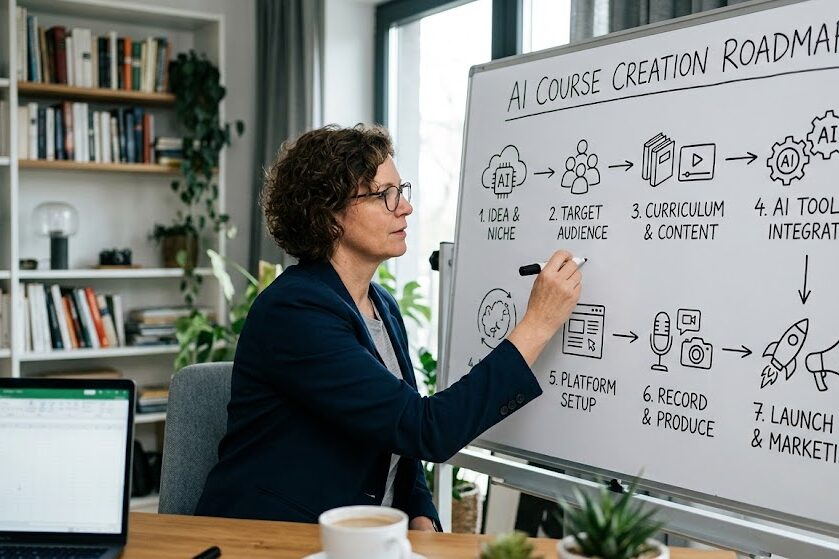
The Best Workflow for Online Course Creation with AI
A structured workflow ensures consistency while maximizing efficiency.
Recommended Creator Workflow
- Generate course ideas with AI
- Validate market demand
- Build curriculum
- Write lesson scripts
- Create visuals
- Produce videos
- Build assessments
- Launch and market
- Collect feedback
- Optimize continuously
Coach Workflow Example
Coaches can transform proven client frameworks into educational programs.
For example, a fitness coach might convert a 12-week coaching system into a scalable online course.
Corporate Training Workflow
Organizations can use AI to standardize employee training materials and update content quickly when procedures change.
Solo Entrepreneur Workflow
Solo founders can build complete educational products without hiring large teams.
This dramatically reduces startup costs and accelerates time-to-market.
How AI Helps Market and Sell Your Online Course
Creating a course is only half the challenge. Successful creators must also attract students.
AI can automate many marketing activities.
Lead Generation
AI can generate:
- Blog posts
- Lead magnets
- Landing pages
- Webinar scripts
Email Marketing
AI can write personalized nurture sequences that guide prospects toward enrollment.
Social Media Promotion
Course content can be repurposed into:
- LinkedIn posts
- Instagram content
- YouTube scripts
- Short-form videos
This dramatically increases content output.
SEO Optimization
AI can assist with keyword research, content optimization, and search visibility improvements.
Personal Branding
AI also helps creators maintain consistent messaging across multiple channels.
Best Platforms for Hosting AI-Created Courses
After creating your course, you’ll need a platform that supports delivery, engagement, and growth.
Popular options include:
- Teachable
- Thinkific
- Kajabi
- LearnWorlds
- Podia
- Moodle
Platform Selection Criteria
When evaluating platforms, consider:
| Feature | Why It Matters |
|---|---|
| Pricing | Affects profitability |
| Payment Processing | Simplifies transactions |
| Marketing Tools | Supports growth |
| Student Experience | Improves satisfaction |
| Community Features | Encourages engagement |
| Analytics | Enables optimization |
Growth-focused creators may prioritize marketing automation, while educators may place greater emphasis on learning tools.
The Future of AI-Powered Online Education
AI continues to reshape digital learning at a rapid pace.
Personalized Learning Paths
Future platforms will increasingly customize learning journeys based on individual student performance.
Real-Time Learning Analytics
Predictive analytics will help identify struggling students before they disengage.
Intelligent Course Updates
AI systems will continuously analyze learner behavior and recommend content improvements.
Adaptive Learning Experiences
Future courses may automatically adjust lesson difficulty, pacing, and content recommendations based on learner needs.
According to Gartner, AI-driven personalization remains one of the most significant trends shaping digital learning experiences — Source: Gartner, 2024.
What to Do After Publishing Your AI Course
Launching your course is only the beginning.
Long-term success comes from continuous improvement.
Collect and Analyze Feedback
Gather:
- Student reviews
- Completion rates
- Assessment results
- Support requests
Use this information to identify areas for improvement.
Expand Into Memberships
Membership programs can generate recurring revenue while strengthening student relationships.
Create Advanced Courses
Offer advanced programs that help existing students continue progressing.
Build a Complete Learning Ecosystem
Successful course creators often expand into:
- Communities
- Memberships
- Certifications
- Coaching programs
- Resource libraries
Tools and Practical Applications for AI Course Creators
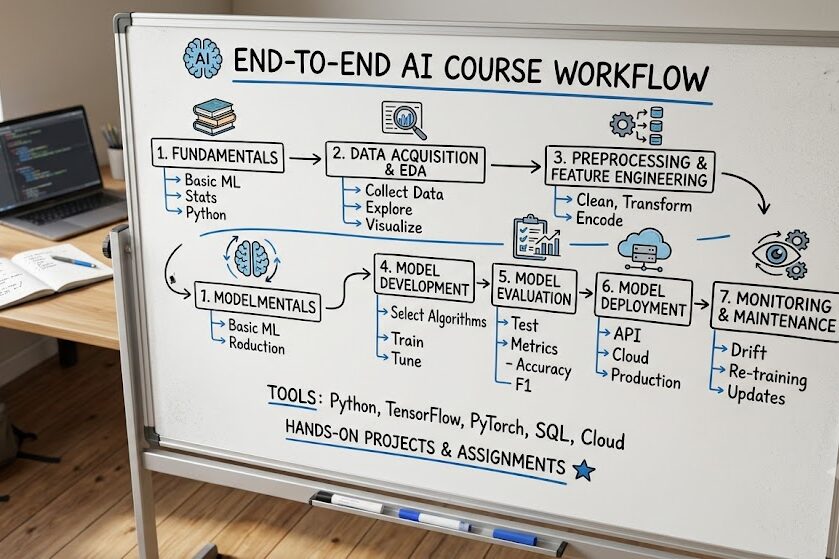
AI tools deliver the greatest value when integrated into a repeatable workflow.
Recommended Beginner Workflow
- Research with ChatGPT or Perplexity
- Build outlines with AI
- Create slides in Gamma
- Generate visuals in Canva AI
- Produce videos with Synthesia
- Create emails with Jasper
- Host on Teachable or Thinkific
Conclusion
Online Course Creation with AI is revolutionizing how educators, coaches, consultants, and entrepreneurs build and scale educational products. By automating research, curriculum planning, content production, marketing, and optimization, AI dramatically reduces the time, cost, and effort required to launch a successful course.
However, the most effective creators understand that AI is not a replacement for expertise. Human insight, instructional design, real-world experience, and strategic thinking remain essential for delivering exceptional learning outcomes.
The winning formula is simple: use AI to handle repetitive tasks while focusing your energy on creating unique value for students. By combining human expertise with AI-powered efficiency, you can launch faster, improve continuously, and build a sustainable online education business in a rapidly growing market.
FAQs
What is Online Course Creation with AI?
Online Course Creation with AI is the process of using artificial intelligence tools to research, plan, create, optimize, and market educational content more efficiently.
Can AI create an entire online course by itself?
AI can generate outlines, scripts, quizzes, presentations, and marketing materials, but human expertise is still required for fact-checking, instructional design, and personalization.
What are the best AI tools for course creation?
Popular tools include ChatGPT, Claude, Perplexity, Gamma, Canva AI, Synthesia, HeyGen, ElevenLabs, Jasper, and Zapier AI.
How much time can AI save when creating a course?
Depending on the project, AI can reduce course development time from several weeks or months to a matter of days or a few weeks.
Can AI create course videos and voiceovers?
Yes. AI video generators and voice synthesis platforms can transform scripts into professional educational videos with realistic narration.
What is the biggest risk of using AI for course creation?
The biggest risk is publishing generic or inaccurate content without proper review. Human oversight remains essential for quality and credibility.
Which platforms are best for hosting AI-created courses?
Popular hosting platforms include Teachable, Thinkific, Kajabi, LearnWorlds, Podia, and Moodle.
Is AI-powered course creation suitable for beginners?
Yes. Many AI tools are beginner-friendly and can significantly simplify research, content creation, design, and marketing tasks for first-time course creators.